In a Tauri v2 + React desktop app, right-clicking anywhere pops up the native Chromium context menu — Back, Forward, Reload, View Source, Inspect, and friends.
That shatters the native feel of the app, leaks implementation details (it’s a WebView under the hood), and conflicts with the app’s own custom context menus — transfer panel actions, terminal menus, and the like.
While building a screenshot tool, I ran into a series of nasty problems: pressing ESC to cancel a capture yanked the main window to the foreground, popup combo boxes from apps like PowerToys couldn’t be detected or captured, and the image shown on the capture overlay didn’t match the image actually captured. These issues span Windows window management, GDI screen capture, Tauri’s event system, and browser image rendering. This post records the full debugging and fixing process — hopefully it helps fellow developers hitting similar walls.
Issue 1: Main Window Jumps to the Foreground After ESC-Cancel
Symptom
Pressing ESC to cancel a screenshot unexpectedly brought the app’s main window to the foreground and gave it focus.
Root cause
The cancel logic explicitly called show() and set_focus() on the main window:
The intent was to restore the main window — but users expect a cancel to quietly return the app to the tray, not to steal focus.
Fix
Remove the show/focus calls from the cancel path; only destroy the capture overlay window:
1 2 3 4 5 6
fncancel_capture() { // only destroy the capture window, don't show/focus the main window ifletSome(window) = app.get_webview_window("capture") { let_ = window.destroy(); } }
Takeaways
Desktop utility apps should respect the user’s focus state — never steal focus on a cancel action
Tray-resident apps should stay silent after a cancel
Issue 2: PowerToys Combo Box Can’t Be Detected or Captured
Symptom
PowerToys’ “Image Resizer” window has a dropdown list box. Other screenshot tools (QQ Screenshot, ShareX) detect and capture it just fine — ours couldn’t see it at all.
Debugging
Step 1: Window enumeration diagnostics
First, verify whether window enumeration can even see the combo box. Write a diagnostic script that enumerates all visible windows with EnumWindows:
The combo box is a standalone window — not a child control of the main window, but an independent top-level window
Its title is empty — it was being filtered out by the existing title.is_empty() check
Its extended style contains WS_EX_TOOLWINDOW and WS_EX_NOACTIVATE — excluded by the style filter
Step 2: Drop the filters, add a fallback
1 2 3 4 5 6 7 8 9 10
// Before: filtering out empty-title / special-style windows if title.is_empty() { continue; } if ex_style & WS_EX_TOOLWINDOW != 0 { continue; }
// After: fall back to class name for empty titles, no style filtering letdisplay_title = if title.trim().is_empty() { class_name.clone() // use the window class as the title } else { title.clone() };
Step 3: Merge same-process windows
The combo box window and the main window belong to the same process but enumerate as two separate windows. Users expect clicking to highlight the whole region (main window + combo box), not each piece separately.
Implement same-process window merging:
1 2 3 4 5 6 7 8 9 10 11 12 13 14 15 16 17 18 19
// Use GetAncestor to find the root window; merge overlapping or // adjacent windows from the same process foriin0..raw_windows.len() { if used[i] { continue; } letroot_i = GetAncestor(hwnd_i, GA_ROOT); letmut merge_rect = Rect::from(hwnd_i);
forjin (i+1)..raw_windows.len() { if used[j] { continue; } if pid_j == pid_i && (root_j == root_i) { letrect_j = Rect::from(hwnd_j); if merge_rect.overlaps_or_near(&rect_j, threshold=50) { merge_rect = merge_rect.union(&rect_j); used[j] = true; } } } // build the window entry from the merged rect }
A screenshot tool must capture before any window state changes
The WS_EX_NOACTIVATE style lets windows show/hide without grabbing focus
Global hotkey handling should capture synchronously — avoid async delays that allow focus to shift
Issue 4: GDI Capture Misses Layered Windows
Symptom
Capturing with the xcap library dropped layered-window content such as the combo box — while ShareX captured it fine.
Root cause
xcap’s underlying screen-capture call doesn’t set the CAPTUREBLT flag. Windows’ BitBlt excludes layered windows by default; you must pass CAPTUREBLT to include them.
The 32-bit pixel data returned by GetDIBits has an undefined alpha channel (usually 0). Save it straight to a 32-bit BMP and render it in a browser, and every pixel turns transparent!
1 2 3 4 5
// Must force alpha to 255 (opaque) forchunkin buffer.chunks_exact_mut(4) { chunk.swap(0, 2); // BGRA → RGBA chunk[3] = 255; // force alpha = opaque }
Takeaways
Windows BitBlt needs the CAPTUREBLT flag to capture layered windows
GetDIBits alpha is untrustworthy — set it to 255 manually
Prefer PNG over BMP for saved screenshots to avoid the browser’s 32-bit BMP alpha rendering quirks
Issue 5: Overlay Shows a Different Image Than What Was Captured (the Nastiest One)
Symptom
The image saved to disk contained the combo box, but the image displayed on the capture overlay had a blank hole where the combo box should be. The highlight rectangle correctly covered the combo box region — the pixels were just missing.
Debugging
The most time-consuming issue, spanning several links of the frontend-backend data sync chain.
Link 1: Event timing
Initially the screenshot data traveled over Tauri events:
1 2 3 4 5 6 7
// Backend: fire the event app.emit("capture-ready", &result)?;
// Frontend: listen for it listen<CaptureResult>("capture-ready", (event) => { setImageSrc(convertFileSrc(event.payload.path)); });
Problem: the capture-ready event fired right after the capture window’s show() — but the webview might not have finished loading and the listener wasn’t registered yet, so the event was lost.
Link 2: Data consumed too early
Switched to letting the frontend pull the data via a Tauri command — but start_capture used take_pending_capture(), which consumed the pre-cached data:
1 2 3 4 5 6 7
// inside start_capture letresult = take_pending_capture(); // consumed the data!
// when the frontend later calls get_cached_capture pubfnget_cached_capture() ->Option<CaptureResult> { pending.take() // already consumed — returns None! }
The frontend got nothing, fell back to the possibly-missed event, and ended up loading the wrong image (probably a stale cached screenshot).
Link 3: The BMP alpha problem
Even with the correct file path in hand, 32-bit BMP alpha can render wrong regions in the browser.
Final fix
1. Backend: peek instead of take — keep the data available for the frontend
1 2 3 4 5 6 7 8
// in start_capture: peek, don't consume letresult = peek_pending_capture();
// frontend command: peek as well #[tauri::command] pubfnget_cached_capture() ->Option<CaptureResult> { PENDING_CAPTURE.lock().map(|p| p.clone()).unwrap_or(None) }
2. Frontend: polling + event listening as a double safety net
Tauri events are not guaranteed delivery: if the webview hasn’t finished loading, events get dropped. Critical data needs a command-based pull path too
Be careful with data consumption: take (consume) vs peek (inspect) have different semantics — use peek in multi-consumer scenarios
Polling + events as a double safety net: for critical data, the frontend should use both polling and event listeners so nothing gets lost
BMP is treacherous in browsers: 32-bit BMP alpha can be misinterpreted — use PNG
Overall Architecture After the Fixes
The capture flow now looks like this:
1 2 3 4 5 6 7 8 9 10 11 12 13 14 15 16 17 18
1. Hotkey fired (synchronous)
   ├── GDI capture (with CAPTUREBLT)
   ├── Enumerate windows (merge same-process windows)
   ├── Save as PNG
   └── Cache the result (without consuming)

2. start_capture (async)
   ├── Peek the cached result
   ├── Hide the main window
   ├── Create the capture overlay window
   ├── Emit the capture-ready event
   └── Frontend polls get_cached_capture for the data

3. Frontend overlay
   ├── Poll for the screenshot path and window list
   ├── Load the PNG image
   ├── Match the smallest containing window on mouse move
   └── Highlight the window region
Quick-Reference Cheat Sheet
Problem
Root cause
Fix
Main window pops up after ESC-cancel
Cancel logic explicitly shows + focuses it
Remove the show/focus calls
Combo box not detected
Empty titles and special styles filtered out
Fall back to class name, drop style filters
Combo box collapses on capture
Hiding windows shifts focus
Capture first, hide after; add WS_EX_NOACTIVATE
Layered windows missing
BitBlt without CAPTUREBLT
GDI capture with CAPTUREBLT
Overlay image ≠ captured image
Data consumed early + BMP alpha
Peek instead of take + polling + PNG
Closing Thoughts
A screenshot tool looks simple but touches multiple low-level mechanisms: the Windows window system, graphics capture APIs, and cross-process data sync. The deepest lessons from this build:
The Windows window system is far more complex than it looks: a humble combo box can involve multiple standalone windows, layered windows, and focus management
Verify data flow end to end: correct data in backend logs doesn’t mean the frontend receives it — verify every link
Never assume API behavior: GetDIBits alpha, BitBlt layered capture, browser BMP rendering — all need real-world verification
Have a fallback when events are unreliable: polling is inelegant, but far better than lost data
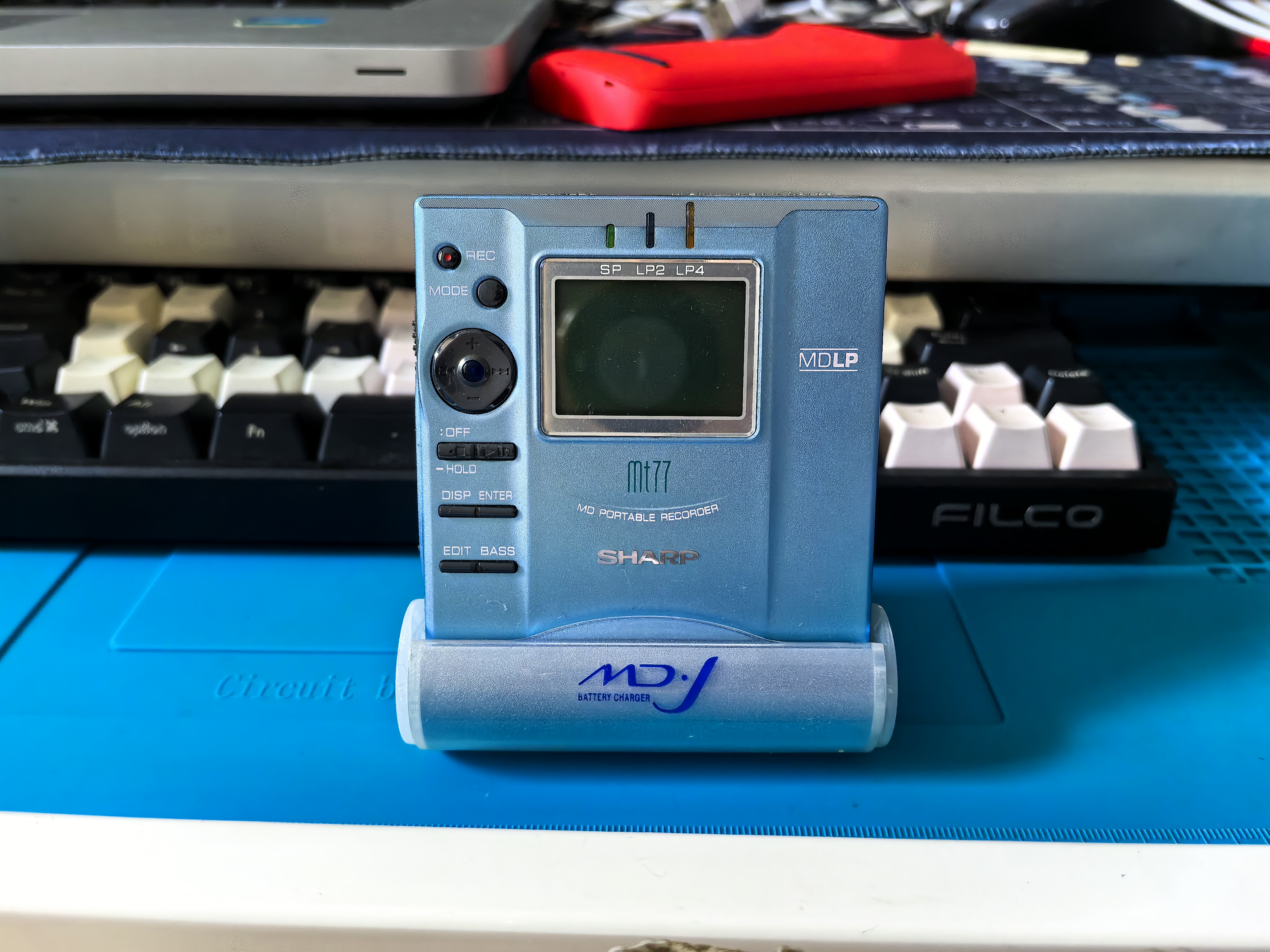
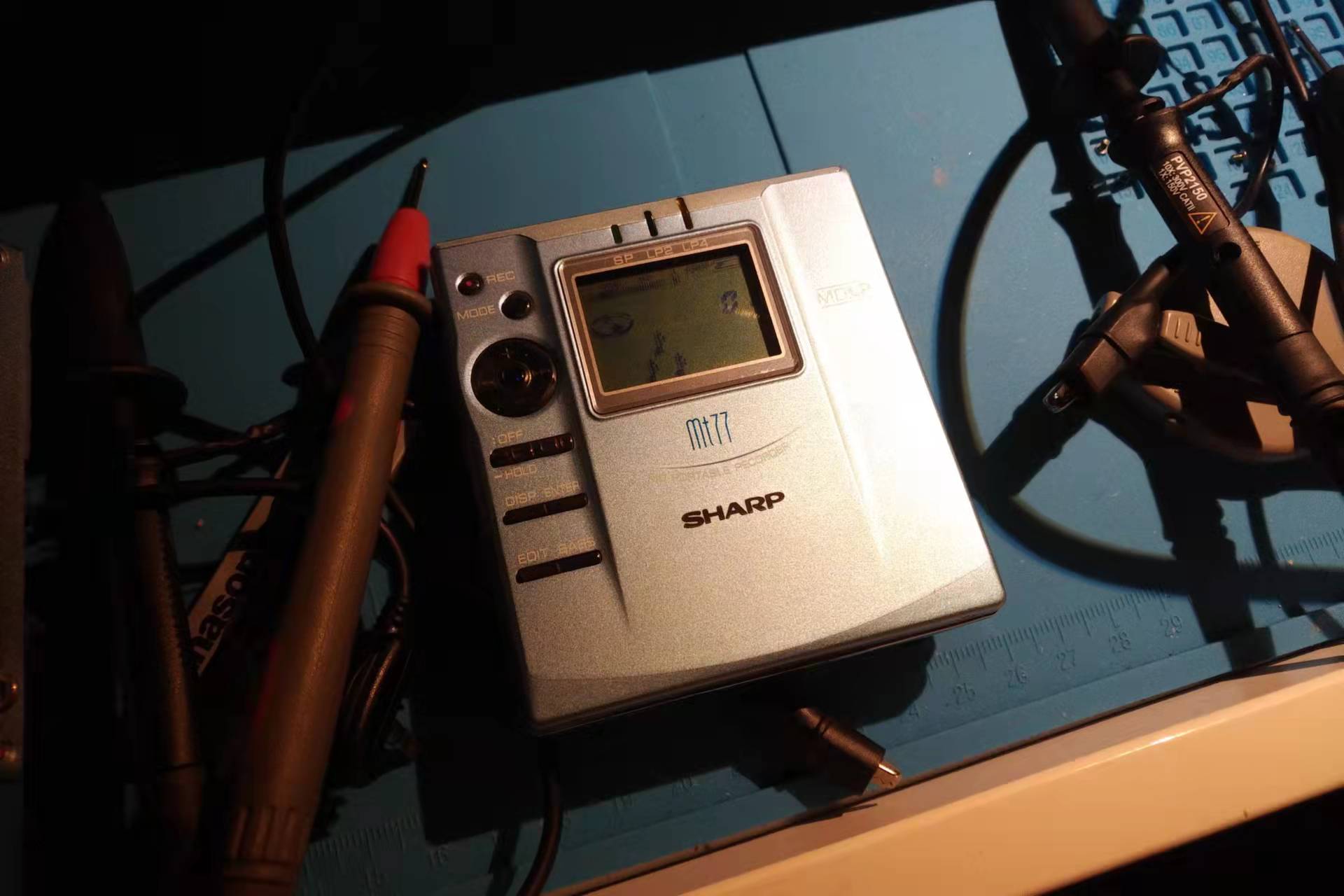
Someone recently messaged me that their Sharp MD player won’t power on. I’ve previously written two posts about dead Sharp MD units, so here’s a reorganized write-up to give anyone hitting the same problem a few ideas.
Sharp MD players have two notorious common faults: shattered gears and dead-no-power. They tend to split by model — the MT66 and MT77/877 rarely suffer shattered gears, but these two “sleep to death”: even a brand-new unit, left sitting unused for a long time, will refuse to power on when picked up again, which tanks its value. I’ve previously revived several units like this, including MT66/MT77 models — but if you ask me for the exact root cause, I honestly don’t know. Really! Every single one of them just… came back to life on its own while I was probing it on the bench.
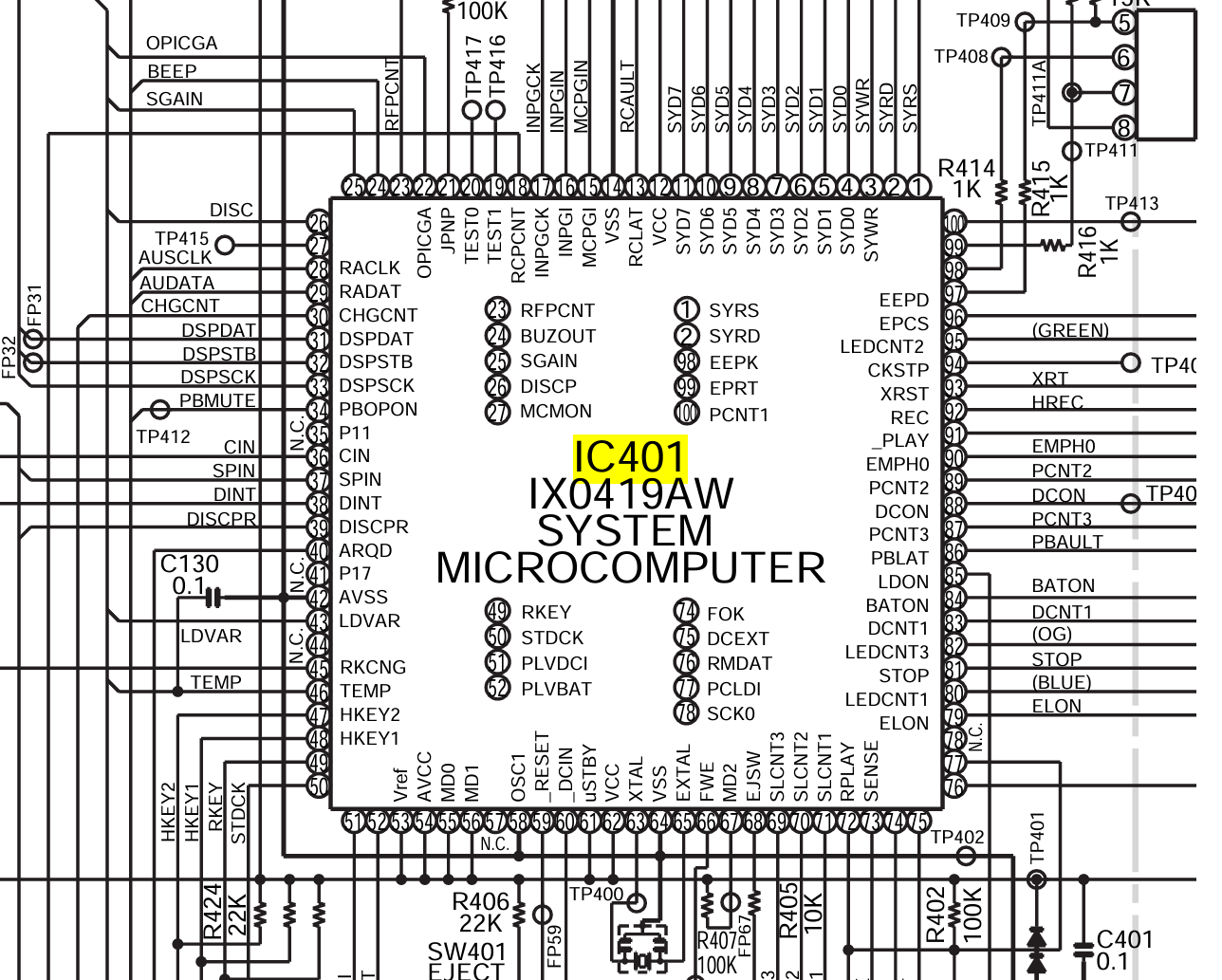
The first unit I ever revived: I was probing around IC401, casually poking a few voltages with the multimeter, and it just powered on — as if some capacitor was the culprit. One unit proves nothing, so I found another one with the same symptom. My guess was a stuck power IC state or an aged capacitor, and my earlier probing had effectively injected some impedance that pulled a level back into range or changed a load capacitance. So I pulled out the Service Manual, ready to check the RESET/VCC signals and capture the power-up sequence on the scope. Given how badly I slept through digital/analog electronics and signals & systems back in college — and how little attention I paid the oscilloscope in lab class — it’s no surprise the scope was probably misconfigured: nothing I measured looked right, nothing matched expectations. Then after another round of random poking, the unit came back to life. A later MT66 with the same symptom went down the exact same path.
Things worth trying
Set the bench supply to 1.3V. Don’t ask me why — the first unit mysteriously recovered while powered at exactly that voltage.
Find a ~100kΩ resistor and try discharging the RESET / VCC / XTAL / PLVBAT pins of IC401 to ground.
For those who know their stuff: help pin down the real cause
Grab the MT77 Service Manual, power it up (or rather, fail to), and record the static voltages on these pins with a multimeter, then follow up with a scope:
Using the CocoMarkdown project as a worked example, this post summarizes complete implementations for two drag-and-drop scenarios in Tauri (v2) apps, for other projects to reference.
Core principle: never use the HTML5 Drag and Drop API for in-app dragging, because Tauri’s WebView2 (Windows) intercepts native drag events — the cursor turns into a “not allowed” icon and no amount of preventDefault() fixes it.
2. Scenario 1: In-App Drag & Drop
2.1 Why not the HTML5 DnD API
On Windows WebView2, HTML5 Drag and Drop events get intercepted at the native layer:
Calling e.preventDefault() in dragover cannot stop the cursor from turning into the forbidden icon
dataTransfer.dropEffect settings have no effect
Custom MIME types don’t help either
Even intercepting the DragDrop event in Rust via on_window_event and calling prevent_default() doesn’t work (Tauri v2’s DragDropEvent has no prevent_default method)
Conclusion: the HTML5 DnD API does not work inside Tauri WebView2 — use Mouse events instead.
2.2 Mouse-Event Implementation
Overall approach
mousedown: record the drag source element and start coordinates
mousemove: once movement passes a threshold, activate the drag, show a ghost element following the cursor, highlight the target region
mouseup: complete the drop, run the business logic
Extras: ESC to cancel, prevent accidental click after a drag
// ── State ── let dragSrcPath = null; // drag source path let dragOverItem = null; // currently hovered target element let dragSrcElement = null; // drag source DOM element let isDragging = false; // drag in progress? let wasDragging = false; // a drag just finished (to swallow click) let dragStartX = 0; // drag start X let dragStartY = 0; // drag start Y let dragGhost = null; // ghost element following the cursor
// ── Reset drag state ── functionclearDragState() { if (dragSrcElement) dragSrcElement.classList.remove('dragging'); if (dragOverItem) dragOverItem.classList.remove('drag-over'); dragSrcPath = null; dragOverItem = null; dragSrcElement = null; isDragging = false; removeDragGhost(); document.body.classList.remove('explorer-dragging'); }
// ── mousedown: record the source ── container.addEventListener('mousedown', (e) => { const item = e.target.closest('.tree-item[data-path]'); if (!item) return; if (e.button !== 0) return; // left button only dragSrcPath = item.dataset.path; dragSrcElement = item; dragStartX = e.clientX; dragStartY = e.clientY; isDragging = false; wasDragging = false; });
// ── mousemove: drag in progress ── document.addEventListener('mousemove', (e) => { if (!dragSrcPath || !dragSrcElement) return;
// Movement threshold (prevents clicks from triggering drags) const dx = e.clientX - dragStartX; const dy = e.clientY - dragStartY; if (!isDragging) { if (Math.abs(dx) < 4 && Math.abs(dy) < 4) return; isDragging = true; dragSrcElement.classList.add('dragging'); document.body.classList.add('explorer-dragging'); const label = dragSrcElement.querySelector('.tree-label')?.textContent || ''; createDragGhost(label); }
// move the ghost moveDragGhost(e.clientX, e.clientY);
// hit-test the drop target (elementFromPoint sees through the ghost) const target = document.elementFromPoint(e.clientX, e.clientY) ?.closest('.tree-item[data-is-dir="true"]');
if (!srcPath || !destDir) return; if (srcPath === destDir) return;
// guard against dropping a folder into its own subdirectory if (destDir.startsWith(srcPath + '\\') || destDir.startsWith(srcPath + '/')) { showToast('Cannot move a folder into its own subfolder'); return; }
// perform the move awaithandleExplorerDrop(srcPath, destDir); });
// ── swallow the click that fires after a drag ── container.addEventListener('click', (e) => { if (wasDragging) { e.stopPropagation(); e.preventDefault(); wasDragging = false; } }, true);
Drag activates only after moving 4px+ from mousedown, so clicks never trigger drags
pointer-events: none
The ghost must set this, otherwise elementFromPoint hits the ghost instead of the target
wasDragging flag
A click still fires after mouseup — intercept it in the capture phase
Body-level cursor
Add a class to body during drags for cursor: grabbing, so the pointer is correct everywhere
Subdirectory guard
Prevent dropping a folder into its own subdirectory (infinite loop)
Name-collision check
Backend verifies no same-named file/folder exists at the destination
3. Scenario 2: External Files Dropped Into the App
3.1 Dual-strategy architecture
Dropping external files needs both strategies at once:
Strategy A (primary): Tauri native events — real file paths via tauri://drag-enter / tauri://drag-leave / tauri://drag-drop
Strategy B (supporting): HTML5 DnD events — UI visual feedback (highlight borders) backing up strategy A
Why both? Tauri’s native events only provide drag-enter / drag-leave / drag-drop — no dragover — but the UI highlight needs continuous updates during dragover.
3.2 Rust: forwarding native drag events
Register an on_window_event handler in the Tauri builder to forward native drag events to the frontend:
When developing a Tauri + Rust desktop app, teams often hit a bizarre situation: the app runs silky smooth under npm run tauri dev, but the packaged Release build (exe) mysteriously crashes when performing certain file I/O or async operations.
If your logs caught thread 'main' has overflowed its stack, this post may help you locate and fix the problem fast.
Managing files on a TV shouldn’t feel like a chore. CocoFileTV is a powerful file manager built exclusively for Android TV — fully navigable with a D-pad remote, and optimized for the 10-foot large-screen experience.
Browse local files, USB drives, cloud storage, NAS shares, and FTP servers — all from your couch.
Your home screen should help you focus — not distract you. Coco Launcher is a clean, lightweight Android launcher for users who want a simpler, faster, distraction-free home screen.
No clutter. No unnecessary features. Just the apps and information you need.
Lost your TV remote again? Typing a password with arrow keys letter by letter? Coco Bluetooth Remote turns your phone into a Bluetooth remote control, a full wireless keyboard, and a touchpad — using the standard Bluetooth HID protocol.
No app to install on your TV. No Wi-Fi needed. No cloud, no account. Just pair over Bluetooth and start controlling.
Every utility tool starts with a problem close to home. For CocoNote, it was a very personal one: helping my aging parents manage their small hometown grocery store.
Today, I’m excited to share the story behind CocoNote, how it works, and how it evolved into a modern, scan-to-open everyday note-taking application.