<?xml version="1.0" encoding="utf-8"?>
<feed xmlns="http://www.w3.org/2005/Atom">
  <author>
    <name>cocozq</name>
  </author>
  <generator uri="https://hexo.io/">Hexo</generator>
  <id>https://cocozq.site/</id>
  <link href="https://cocozq.site/" rel="alternate"/>
  <link href="https://cocozq.site/atom.xml" rel="self"/>
  <rights>All rights reserved 2026, cocozq</rights>
  <subtitle>Indie Developer</subtitle>
  <title>cocozq</title>
  <updated>2026-10-04T01:45:55.578Z</updated>
  <entry>
    <author>
      <name>cocozq</name>
    </author>
    <category term="dev-log" scheme="https://cocozq.site/categories/dev-log/"/>
    <category term="Tauri" scheme="https://cocozq.site/tags/Tauri/"/>
    <category term="React" scheme="https://cocozq.site/tags/React/"/>
    <category term="WebView" scheme="https://cocozq.site/tags/WebView/"/>
    <category term="Desktop" scheme="https://cocozq.site/tags/Desktop/"/>
    <category term="Frontend" scheme="https://cocozq.site/tags/Frontend/"/>
    <content>
      <![CDATA[<p>In a <strong>Tauri v2 + React</strong> desktop app, right-clicking anywhere pops up the <strong>native Chromium context menu</strong> — Back, Forward, Reload, View Source, Inspect, and friends.</p><p>That shatters the <strong>native feel</strong> of the app, leaks implementation details (it’s a WebView under the hood), and conflicts with the app’s own custom context menus — transfer panel actions, terminal menus, and the like.</p><span id="more"></span><h2 id="Root-Cause"><a href="#Root-Cause" class="headerlink" title="Root Cause"></a>Root Cause</h2><p>A Tauri frontend runs inside a <strong>WebView</strong> (WebKitGTK on macOS&#x2F;Linux, WebView2 &#x2F; Edge Chromium on Windows). A WebView is essentially an embedded browser, so its default behavior includes:</p><ol><li>Right-click fires the browser’s <code>contextmenu</code> event → native menu pops up</li><li>Unlike Electron, there is no global config option to turn this off</li><li>Every DOM element can become a right-click trigger point</li></ol><h3 id="Why-CSS-Can’t-Fix-It"><a href="#Why-CSS-Can’t-Fix-It" class="headerlink" title="Why CSS Can’t Fix It"></a>Why CSS Can’t Fix It</h3><figure class="highlight css"><table><tr><td class="gutter"><pre><span class="line">1</span><br><span class="line">2</span><br></pre></td><td class="code"><pre><span class="line"><span class="comment">/* ❌ CSS cannot stop the contextmenu event */</span></span><br><span class="line">* &#123; <span class="attribute">user-select</span>: none; &#125;</span><br></pre></td></tr></table></figure><p>Properties like <code>user-select</code> only affect text selection — they <strong>cannot prevent the <code>contextmenu</code> event from firing or the browser menu from appearing</strong>. This has to be solved with JavaScript event handling.</p><h2 id="The-Fix"><a href="#The-Fix" class="headerlink" title="The Fix"></a>The Fix</h2><h3 id="Core-idea-intercept-once-at-the-app-root"><a href="#Core-idea-intercept-once-at-the-app-root" class="headerlink" title="Core idea: intercept once at the app root"></a>Core idea: intercept once at the app root</h3><p>Attach an <code>onContextMenu</code> handler on the <strong>outermost root element</strong> of the React tree and call <code>e.preventDefault()</code> to suppress the browser default. Thanks to React’s <strong>event bubbling</strong>, no matter which child component gets right-clicked, the event bubbles up to the root and gets intercepted.</p><figure class="highlight tsx"><table><tr><td class="gutter"><pre><span class="line">1</span><br><span class="line">2</span><br><span class="line">3</span><br><span class="line">4</span><br><span class="line">5</span><br><span class="line">6</span><br><span class="line">7</span><br><span class="line">8</span><br><span class="line">9</span><br><span class="line">10</span><br><span class="line">11</span><br><span class="line">12</span><br></pre></td><td class="code"><pre><span class="line"><span class="comment">// App.tsx — application entry</span></span><br><span class="line"><span class="keyword">export</span> <span class="keyword">default</span> <span class="keyword">function</span> <span class="title function_">App</span>(<span class="params"></span>) &#123;</span><br><span class="line">  <span class="keyword">return</span> (</span><br><span class="line">    <span class="language-xml"><span class="tag">&lt;<span class="name">div</span> <span class="attr">className</span>=<span class="string">&quot;app-layout&quot;</span> <span class="attr">onContextMenu</span>=<span class="string">&#123;(e)</span> =&gt;</span> e.preventDefault()&#125;&gt;</span></span><br><span class="line"><span class="language-xml">      &#123;/* everything in the app */&#125;</span></span><br><span class="line"><span class="language-xml">      <span class="tag">&lt;<span class="name">Sidebar</span> /&gt;</span></span></span><br><span class="line"><span class="language-xml">      <span class="tag">&lt;<span class="name">MainContent</span> /&gt;</span></span></span><br><span class="line"><span class="language-xml">      <span class="tag">&lt;<span class="name">ToolPanel</span> /&gt;</span></span></span><br><span class="line"><span class="language-xml">      &#123;/* ... all dialogs, modals, panels ... */&#125;</span></span><br><span class="line"><span class="language-xml">    <span class="tag">&lt;/<span class="name">div</span>&gt;</span></span></span><br><span class="line">  );</span><br><span class="line">&#125;</span><br></pre></td></tr></table></figure><p><strong>One line of code covers the entire app.</strong></p><h3 id="Key-advantages"><a href="#Key-advantages" class="headerlink" title="Key advantages"></a>Key advantages</h3><table><thead><tr><th>Aspect</th><th>Detail</th></tr></thead><tbody><tr><td>Coverage</td><td>Every existing page&#x2F;component — and every future one</td></tr><tr><td>Child-friendly</td><td>Child components can still handle <code>contextmenu</code> themselves for custom menus</td></tr><tr><td>Low maintenance</td><td>No need to sprinkle handlers component by component</td></tr><tr><td>Zero perf cost</td><td>It’s just a trivial event interceptor</td></tr></tbody></table><h3 id="Handling-multi-window-apps"><a href="#Handling-multi-window-apps" class="headerlink" title="Handling multi-window apps"></a>Handling multi-window apps</h3><p>If the app has <strong>standalone windows</strong> (e.g. a detached SFTP file-manager window), each window has its own render tree and root element, so each needs its own handler:</p><figure class="highlight tsx"><table><tr><td class="gutter"><pre><span class="line">1</span><br><span class="line">2</span><br><span class="line">3</span><br><span class="line">4</span><br><span class="line">5</span><br><span class="line">6</span><br><span class="line">7</span><br><span class="line">8</span><br><span class="line">9</span><br><span class="line">10</span><br><span class="line">11</span><br><span class="line">12</span><br><span class="line">13</span><br><span class="line">14</span><br><span class="line">15</span><br></pre></td><td class="code"><pre><span class="line"><span class="comment">// App.tsx — main window</span></span><br><span class="line"><span class="keyword">return</span> (</span><br><span class="line">  <span class="language-xml"><span class="tag">&lt;<span class="name">div</span> <span class="attr">className</span>=<span class="string">&quot;app-layout&quot;</span> <span class="attr">onContextMenu</span>=<span class="string">&#123;(e)</span> =&gt;</span> e.preventDefault()&#125;&gt;</span></span><br><span class="line"><span class="language-xml">    &#123;/* main window content */&#125;</span></span><br><span class="line"><span class="language-xml">  <span class="tag">&lt;/<span class="name">div</span>&gt;</span></span></span><br><span class="line">);</span><br><span class="line"></span><br><span class="line"><span class="comment">// App.tsx — standalone SFTP window (another return branch)</span></span><br><span class="line"><span class="keyword">if</span> (isSftpWindow &amp;&amp; sftpWindowSessionId) &#123;</span><br><span class="line">  <span class="keyword">return</span> (</span><br><span class="line">    <span class="language-xml"><span class="tag">&lt;<span class="name">div</span> <span class="attr">className</span>=<span class="string">&quot;sftp-standalone-window&quot;</span> <span class="attr">onContextMenu</span>=<span class="string">&#123;(e)</span> =&gt;</span> e.preventDefault()&#125;&gt;</span></span><br><span class="line"><span class="language-xml">      <span class="tag">&lt;<span class="name">SftpBrowser</span> <span class="attr">sessionId</span>=<span class="string">&#123;sftpWindowSessionId&#125;</span> /&gt;</span></span></span><br><span class="line"><span class="language-xml">    <span class="tag">&lt;/<span class="name">div</span>&gt;</span></span></span><br><span class="line">  );</span><br><span class="line">&#125;</span><br></pre></td></tr></table></figure><h3 id="Coexisting-with-custom-context-menus"><a href="#Coexisting-with-custom-context-menus" class="headerlink" title="Coexisting with custom context menus"></a>Coexisting with custom context menus</h3><p>Regions that need their own right-click menu (file lists, table rows) can bind <code>onContextMenu</code> normally in the child component:</p><figure class="highlight tsx"><table><tr><td class="gutter"><pre><span class="line">1</span><br><span class="line">2</span><br><span class="line">3</span><br><span class="line">4</span><br><span class="line">5</span><br><span class="line">6</span><br><span class="line">7</span><br><span class="line">8</span><br><span class="line">9</span><br><span class="line">10</span><br><span class="line">11</span><br><span class="line">12</span><br><span class="line">13</span><br><span class="line">14</span><br><span class="line">15</span><br><span class="line">16</span><br><span class="line">17</span><br><span class="line">18</span><br><span class="line">19</span><br></pre></td><td class="code"><pre><span class="line"><span class="comment">// TransferPanel.tsx — custom context menu for the transfer list</span></span><br><span class="line">&lt;table&gt;</span><br><span class="line">  &#123;transfers.<span class="title function_">map</span>(<span class="function"><span class="params">transfer</span> =&gt;</span> (</span><br><span class="line">    <span class="language-xml"><span class="tag">&lt;<span class="name">tr</span></span></span></span><br><span class="line"><span class="tag"><span class="language-xml">      <span class="attr">key</span>=<span class="string">&#123;transfer.id&#125;</span></span></span></span><br><span class="line"><span class="tag"><span class="language-xml">      // <span class="attr">custom</span> <span class="attr">context</span> <span class="attr">menu</span> <span class="attr">handler</span></span></span></span><br><span class="line"><span class="tag"><span class="language-xml">      <span class="attr">onContextMenu</span>=<span class="string">&#123;(e)</span> =&gt;</span> &#123;</span></span><br><span class="line"><span class="language-xml">        e.preventDefault();        // suppress the browser menu</span></span><br><span class="line"><span class="language-xml">        e.stopPropagation();       // optional: stop bubbling to the root</span></span><br><span class="line"><span class="language-xml">        showCustomMenu(e, transfer); // show the custom menu</span></span><br><span class="line"><span class="language-xml">      &#125;&#125;</span></span><br><span class="line"><span class="language-xml">    &gt;</span></span><br><span class="line"><span class="language-xml">      ...</span></span><br><span class="line"><span class="language-xml">    <span class="tag">&lt;/<span class="name">tr</span>&gt;</span></span></span><br><span class="line">  ))&#125;</span><br><span class="line">&lt;/table&gt;</span><br><span class="line"></span><br><span class="line">&#123;<span class="comment">/* custom context menu component */</span>&#125;</span><br><span class="line">&lt;<span class="title class_">TransferContextMenu</span> visible=&#123;...&#125; position=&#123;...&#125; onClose=&#123;...&#125;&gt;</span><br></pre></td></tr></table></figure><p>Note: since the root already called <code>e.preventDefault()</code>, the one in the child is <strong>redundant but harmless</strong>. If you want only specific regions to suppress the browser menu (rather than globally), use <code>e.stopPropagation()</code> in the child to keep the event from bubbling further.</p><h2 id="Full-Implementation-Checklist"><a href="#Full-Implementation-Checklist" class="headerlink" title="Full Implementation Checklist"></a>Full Implementation Checklist</h2><h3 id="Step-1-Intercept-at-the-main-window-root"><a href="#Step-1-Intercept-at-the-main-window-root" class="headerlink" title="Step 1: Intercept at the main-window root"></a>Step 1: Intercept at the main-window root</h3><figure class="highlight tsx"><table><tr><td class="gutter"><pre><span class="line">1</span><br><span class="line">2</span><br><span class="line">3</span><br><span class="line">4</span><br><span class="line">5</span><br><span class="line">6</span><br><span class="line">7</span><br><span class="line">8</span><br><span class="line">9</span><br><span class="line">10</span><br><span class="line">11</span><br><span class="line">12</span><br><span class="line">13</span><br><span class="line">14</span><br><span class="line">15</span><br></pre></td><td class="code"><pre><span class="line"><span class="comment">// src/App.tsx</span></span><br><span class="line"><span class="keyword">return</span> (</span><br><span class="line">  <span class="language-xml"><span class="tag">&lt;<span class="name">SyncScrollProvider</span>&gt;</span></span></span><br><span class="line"><span class="language-xml">    <span class="tag">&lt;<span class="name">div</span> <span class="attr">className</span>=<span class="string">&quot;app-layout&quot;</span> <span class="attr">onContextMenu</span>=<span class="string">&#123;(e)</span> =&gt;</span> e.preventDefault()&#125;&gt;</span></span><br><span class="line"><span class="language-xml">      <span class="tag">&lt;<span class="name">NotificationToasts</span> /&gt;</span></span></span><br><span class="line"><span class="language-xml">      <span class="tag">&lt;<span class="name">TitleBar</span> /&gt;</span></span></span><br><span class="line"><span class="language-xml">      <span class="tag">&lt;<span class="name">div</span> <span class="attr">className</span>=<span class="string">&quot;app-body&quot;</span>&gt;</span></span></span><br><span class="line"><span class="language-xml">        <span class="tag">&lt;<span class="name">Sidebar</span> /&gt;</span></span></span><br><span class="line"><span class="language-xml">        <span class="tag">&lt;<span class="name">div</span> <span class="attr">className</span>=<span class="string">&quot;app-main&quot;</span>&gt;</span></span></span><br><span class="line"><span class="language-xml">          &#123;/* ... */&#125;</span></span><br><span class="line"><span class="language-xml">        <span class="tag">&lt;/<span class="name">div</span>&gt;</span></span></span><br><span class="line"><span class="language-xml">      <span class="tag">&lt;/<span class="name">div</span>&gt;</span></span></span><br><span class="line"><span class="language-xml">    <span class="tag">&lt;/<span class="name">div</span>&gt;</span></span></span><br><span class="line"><span class="language-xml">  <span class="tag">&lt;/<span class="name">SyncScrollProvider</span>&gt;</span></span></span><br><span class="line">);</span><br></pre></td></tr></table></figure><h3 id="Step-2-Intercept-at-every-standalone-window-root"><a href="#Step-2-Intercept-at-every-standalone-window-root" class="headerlink" title="Step 2: Intercept at every standalone window root"></a>Step 2: Intercept at every standalone window root</h3><figure class="highlight tsx"><table><tr><td class="gutter"><pre><span class="line">1</span><br><span class="line">2</span><br><span class="line">3</span><br><span class="line">4</span><br><span class="line">5</span><br><span class="line">6</span><br><span class="line">7</span><br><span class="line">8</span><br><span class="line">9</span><br><span class="line">10</span><br><span class="line">11</span><br><span class="line">12</span><br><span class="line">13</span><br><span class="line">14</span><br><span class="line">15</span><br><span class="line">16</span><br></pre></td><td class="code"><pre><span class="line"><span class="comment">// src/App.tsx — every standalone return branch needs it</span></span><br><span class="line"><span class="keyword">if</span> (isSftpWindow) &#123;</span><br><span class="line">  <span class="keyword">return</span> (</span><br><span class="line">    <span class="language-xml"><span class="tag">&lt;<span class="name">div</span> <span class="attr">className</span>=<span class="string">&quot;sftp-standalone-window&quot;</span> <span class="attr">onContextMenu</span>=<span class="string">&#123;(e)</span> =&gt;</span> e.preventDefault()&#125;&gt;</span></span><br><span class="line"><span class="language-xml">      <span class="tag">&lt;<span class="name">SftpBrowser</span> /&gt;</span></span></span><br><span class="line"><span class="language-xml">    <span class="tag">&lt;/<span class="name">div</span>&gt;</span></span></span><br><span class="line">  );</span><br><span class="line">&#125;</span><br><span class="line"></span><br><span class="line"><span class="keyword">if</span> (isOtherStandaloneWindow) &#123;</span><br><span class="line">  <span class="keyword">return</span> (</span><br><span class="line">    <span class="language-xml"><span class="tag">&lt;<span class="name">div</span> <span class="attr">className</span>=<span class="string">&quot;other-window-root&quot;</span> <span class="attr">onContextMenu</span>=<span class="string">&#123;(e)</span> =&gt;</span> e.preventDefault()&#125;&gt;</span></span><br><span class="line"><span class="language-xml">      &#123;/* ... */&#125;</span></span><br><span class="line"><span class="language-xml">    <span class="tag">&lt;/<span class="name">div</span>&gt;</span></span></span><br><span class="line">  );</span><br><span class="line">&#125;</span><br></pre></td></tr></table></figure><h3 id="Step-3-Verify-coverage"><a href="#Step-3-Verify-coverage" class="headerlink" title="Step 3: Verify coverage"></a>Step 3: Verify coverage</h3><p>Right-click-test each of these areas one by one:</p><ul><li><input disabled="" type="checkbox"> Home &#x2F; welcome panel</li><li><input disabled="" type="checkbox"> Host list sidebar</li><li><input disabled="" type="checkbox"> Terminal area</li><li><input disabled="" type="checkbox"> Settings toolbox (all sub-tabs)</li><li><input disabled="" type="checkbox"> SFTP file browser (embedded and standalone window modes)</li><li><input disabled="" type="checkbox"> File transfer panel</li><li><input disabled="" type="checkbox"> Add-host dialog</li><li><input disabled="" type="checkbox"> Quick-connect dialog</li><li><input disabled="" type="checkbox"> Snippets panel</li><li><input disabled="" type="checkbox"> Config file picker dropdown</li><li><input disabled="" type="checkbox"> About dialog</li><li><input disabled="" type="checkbox"> Every other popup &#x2F; modal</li></ul><h2 id="Common-Misconceptions"><a href="#Common-Misconceptions" class="headerlink" title="Common Misconceptions"></a>Common Misconceptions</h2><h3 id="Myth-1-Adding-it-to-one-component-is-enough"><a href="#Myth-1-Adding-it-to-one-component-is-enough" class="headerlink" title="Myth 1: Adding it to one component is enough"></a>Myth 1: Adding it to one component is enough</h3><p>Wrong — dead wrong. New pages and dialogs get added all the time and are easy to miss. <strong>Solve it at the architecture level</strong> with unified handling at the root element.</p><h3 id="Myth-2-CSS-can-solve-it"><a href="#Myth-2-CSS-can-solve-it" class="headerlink" title="Myth 2: CSS can solve it"></a>Myth 2: CSS can solve it</h3><figure class="highlight css"><table><tr><td class="gutter"><pre><span class="line">1</span><br><span class="line">2</span><br><span class="line">3</span><br><span class="line">4</span><br></pre></td><td class="code"><pre><span class="line"><span class="comment">/* ❌ This does nothing */</span></span><br><span class="line"><span class="selector-tag">body</span> &#123;</span><br><span class="line">  -webkit-context-<span class="selector-tag">menu</span>: none;</span><br><span class="line">&#125;</span><br></pre></td></tr></table></figure><p>The <code>-webkit-context-menu</code> property is deprecated and unsupported by modern WebViews. JavaScript event handling is required.</p><h3 id="Myth-3-It-breaks-copy-paste-menus-in-inputs"><a href="#Myth-3-It-breaks-copy-paste-menus-in-inputs" class="headerlink" title="Myth 3: It breaks copy&#x2F;paste menus in inputs"></a>Myth 3: It breaks copy&#x2F;paste menus in inputs</h3><p>No. <code>e.preventDefault()</code> only suppresses the <strong>native browser menu</strong> from popping up.</p><ul><li>Text editing in <code>&lt;input&gt;</code> &#x2F; <code>&lt;textarea&gt;</code> &#x2F; <code>[contenteditable]</code> is unaffected</li><li>If you want to keep the native copy&#x2F;paste&#x2F;spellcheck menu inside inputs, add a condition:</li></ul><figure class="highlight tsx"><table><tr><td class="gutter"><pre><span class="line">1</span><br><span class="line">2</span><br><span class="line">3</span><br><span class="line">4</span><br><span class="line">5</span><br><span class="line">6</span><br><span class="line">7</span><br><span class="line">8</span><br><span class="line">9</span><br><span class="line">10</span><br><span class="line">11</span><br><span class="line">12</span><br><span class="line">13</span><br><span class="line">14</span><br></pre></td><td class="code"><pre><span class="line">&lt;div</span><br><span class="line">  onContextMenu=&#123;<span class="function">(<span class="params">e</span>) =&gt;</span> &#123;</span><br><span class="line">    <span class="comment">// let inputs keep the native browser menu</span></span><br><span class="line">    <span class="keyword">const</span> target = e.<span class="property">target</span> <span class="keyword">as</span> <span class="title class_">HTMLElement</span>;</span><br><span class="line">    <span class="keyword">if</span> (</span><br><span class="line">      target.<span class="property">tagName</span> === <span class="string">&#x27;INPUT&#x27;</span> ||</span><br><span class="line">      target.<span class="property">tagName</span> === <span class="string">&#x27;TEXTAREA&#x27;</span> ||</span><br><span class="line">      target.<span class="property">isContentEditable</span></span><br><span class="line">    ) &#123;</span><br><span class="line">      <span class="keyword">return</span>; <span class="comment">// don&#x27;t suppress</span></span><br><span class="line">    &#125;</span><br><span class="line">    e.<span class="title function_">preventDefault</span>();</span><br><span class="line">  &#125;&#125;</span><br><span class="line">&gt;</span><br></pre></td></tr></table></figure><h3 id="Myth-4-Tauri-has-a-config-switch-for-this"><a href="#Myth-4-Tauri-has-a-config-switch-for-this" class="headerlink" title="Myth 4: Tauri has a config switch for this"></a>Myth 4: Tauri has a config switch for this</h3><p>As of Tauri v2, there is <strong>no built-in option</strong> to disable the WebView context menu. It’s WebView-level behavior and must be handled in the web frontend layer.</p><h2 id="Going-Further-Fine-Grained-Control"><a href="#Going-Further-Fine-Grained-Control" class="headerlink" title="Going Further: Fine-Grained Control"></a>Going Further: Fine-Grained Control</h2><p>If the app needs <strong>tiered policies</strong> (different rules per region), use a Context + HOC approach:</p><figure class="highlight tsx"><table><tr><td class="gutter"><pre><span class="line">1</span><br><span class="line">2</span><br><span class="line">3</span><br><span class="line">4</span><br><span class="line">5</span><br><span class="line">6</span><br><span class="line">7</span><br><span class="line">8</span><br><span class="line">9</span><br><span class="line">10</span><br><span class="line">11</span><br><span class="line">12</span><br><span class="line">13</span><br><span class="line">14</span><br><span class="line">15</span><br><span class="line">16</span><br><span class="line">17</span><br><span class="line">18</span><br><span class="line">19</span><br></pre></td><td class="code"><pre><span class="line"><span class="comment">// src/context/ContextMenuContext.tsx</span></span><br><span class="line"><span class="keyword">const</span> <span class="title class_">ContextMenuContext</span> = createContext&lt;&#123;</span><br><span class="line">  <span class="attr">disable</span>: <span class="built_in">boolean</span>;</span><br><span class="line">&#125;&gt;(&#123; <span class="attr">disable</span>: <span class="literal">true</span> &#125;);</span><br><span class="line"></span><br><span class="line"><span class="comment">// Browser menu disabled by default; sub-regions can opt back in</span></span><br><span class="line"><span class="keyword">export</span> <span class="keyword">function</span> <span class="title function_">ContextMenuProvider</span>(<span class="params">&#123; children &#125;: &#123; children: React.ReactNode &#125;</span>) &#123;</span><br><span class="line">  <span class="keyword">return</span> (</span><br><span class="line">    <span class="language-xml"><span class="tag">&lt;<span class="name">ContextMenuContext.Provider</span> <span class="attr">value</span>=<span class="string">&#123;&#123;</span> <span class="attr">disable:</span> <span class="attr">true</span> &#125;&#125;&gt;</span></span></span><br><span class="line"><span class="language-xml">      <span class="tag">&lt;<span class="name">div</span> <span class="attr">onContextMenu</span>=<span class="string">&#123;(e)</span> =&gt;</span> &#123;</span></span><br><span class="line"><span class="language-xml">        if (e.currentTarget.getAttribute(&#x27;data-native-menu&#x27;) !== &#x27;true&#x27;) &#123;</span></span><br><span class="line"><span class="language-xml">          e.preventDefault();</span></span><br><span class="line"><span class="language-xml">        &#125;</span></span><br><span class="line"><span class="language-xml">      &#125;&#125;&gt;</span></span><br><span class="line"><span class="language-xml">        &#123;children&#125;</span></span><br><span class="line"><span class="language-xml">      <span class="tag">&lt;/<span class="name">div</span>&gt;</span></span></span><br><span class="line"><span class="language-xml">    <span class="tag">&lt;/<span class="name">ContextMenuContext.Provider</span>&gt;</span></span></span><br><span class="line">  );</span><br><span class="line">&#125;</span><br></pre></td></tr></table></figure><p>For most Tauri apps, though, <strong>one <code>preventDefault()</code> at the root is plenty</strong> — no need to over-engineer it.</p><h2 id="Summary"><a href="#Summary" class="headerlink" title="Summary"></a>Summary</h2><table><thead><tr><th>Item</th><th>Detail</th></tr></thead><tbody><tr><td>Problem</td><td>Tauri&#x2F;WebView apps pop the native browser menu on right-click</td></tr><tr><td>Cause</td><td>Default WebView behavior, no global switch to turn it off</td></tr><tr><td>Fix</td><td>Root element <code>onContextMenu={(e) =&gt; e.preventDefault()}</code></td></tr><tr><td>Cost</td><td>1 line of code</td></tr><tr><td>Coverage</td><td>The whole app, including pages added in the future</td></tr><tr><td>Caveat</td><td>Multi-window apps need it on each window’s root element</td></tr></tbody></table><hr><p><em>Applies to Tauri v1&#x2F;v2 with React, Vue, Svelte, or any frontend framework.</em></p>]]>
    </content>
    <id>https://cocozq.site/2026/10/04/disable-browser-context-menu-in-tauri/</id>
    <link href="https://cocozq.site/2026/10/04/disable-browser-context-menu-in-tauri/"/>
    <published>2026-10-03T16:00:00.000Z</published>
    <summary>
      <![CDATA[<p>In a <strong>Tauri v2 + React</strong> desktop app, right-clicking anywhere pops up the <strong>native Chromium context menu</strong> — Back, Forward, Reload, View Source, Inspect, and friends.</p>
<p>That shatters the <strong>native feel</strong> of the app, leaks implementation details (it’s a WebView under the hood), and conflicts with the app’s own custom context menus — transfer panel actions, terminal menus, and the like.</p>]]>
    </summary>
    <title>Completely Disabling the Native Browser Context Menu in Tauri Apps</title>
    <updated>2026-10-04T01:45:55.578Z</updated>
  </entry>
  <entry>
    <author>
      <name>cocozq</name>
    </author>
    <category term="dev-log" scheme="https://cocozq.site/categories/dev-log/"/>
    <category term="Tauri" scheme="https://cocozq.site/tags/Tauri/"/>
    <category term="WebView" scheme="https://cocozq.site/tags/WebView/"/>
    <category term="Rust" scheme="https://cocozq.site/tags/Rust/"/>
    <category term="Windows" scheme="https://cocozq.site/tags/Windows/"/>
    <category term="Screenshot" scheme="https://cocozq.site/tags/Screenshot/"/>
    <category term="GDI" scheme="https://cocozq.site/tags/GDI/"/>
    <content>
      <![CDATA[<blockquote><p>While building a screenshot tool, I ran into a series of nasty problems: pressing ESC to cancel a capture yanked the main window to the foreground, popup combo boxes from apps like PowerToys couldn’t be detected or captured, and the image shown on the capture overlay didn’t match the image actually captured. These issues span Windows window management, GDI screen capture, Tauri’s event system, and browser image rendering. This post records the full debugging and fixing process — hopefully it helps fellow developers hitting similar walls.</p></blockquote><hr><h2 id="Issue-1-Main-Window-Jumps-to-the-Foreground-After-ESC-Cancel"><a href="#Issue-1-Main-Window-Jumps-to-the-Foreground-After-ESC-Cancel" class="headerlink" title="Issue 1: Main Window Jumps to the Foreground After ESC-Cancel"></a>Issue 1: Main Window Jumps to the Foreground After ESC-Cancel</h2><h3 id="Symptom"><a href="#Symptom" class="headerlink" title="Symptom"></a>Symptom</h3><p>Pressing ESC to cancel a screenshot unexpectedly brought the app’s main window to the foreground and gave it focus.</p><h3 id="Root-cause"><a href="#Root-cause" class="headerlink" title="Root cause"></a>Root cause</h3><p>The cancel logic explicitly called <code>show()</code> and <code>set_focus()</code> on the main window:</p><figure class="highlight rust"><table><tr><td class="gutter"><pre><span class="line">1</span><br><span class="line">2</span><br><span class="line">3</span><br></pre></td><td class="code"><pre><span class="line"><span class="comment">// inside cancel_capture</span></span><br><span class="line"><span class="keyword">let</span> <span class="variable">_</span> = main_window.<span class="title function_ invoke__">show</span>();</span><br><span class="line"><span class="keyword">let</span> <span class="variable">_</span> = main_window.<span class="title function_ invoke__">set_focus</span>();</span><br></pre></td></tr></table></figure><p>The intent was to restore the main window — but users expect a cancel to quietly return the app to the tray, not to steal focus.</p><h3 id="Fix"><a href="#Fix" class="headerlink" title="Fix"></a>Fix</h3><p>Remove the show&#x2F;focus calls from the cancel path; only destroy the capture overlay window:</p><figure class="highlight rust"><table><tr><td class="gutter"><pre><span class="line">1</span><br><span class="line">2</span><br><span class="line">3</span><br><span class="line">4</span><br><span class="line">5</span><br><span class="line">6</span><br></pre></td><td class="code"><pre><span class="line"><span class="keyword">fn</span> <span class="title function_">cancel_capture</span>() &#123;</span><br><span class="line">    <span class="comment">// only destroy the capture window, don&#x27;t show/focus the main window</span></span><br><span class="line">    <span class="keyword">if</span> <span class="keyword">let</span> <span class="variable">Some</span>(window) = app.<span class="title function_ invoke__">get_webview_window</span>(<span class="string">&quot;capture&quot;</span>) &#123;</span><br><span class="line">        <span class="keyword">let</span> <span class="variable">_</span> = window.<span class="title function_ invoke__">destroy</span>();</span><br><span class="line">    &#125;</span><br><span class="line">&#125;</span><br></pre></td></tr></table></figure><h3 id="Takeaways"><a href="#Takeaways" class="headerlink" title="Takeaways"></a>Takeaways</h3><ul><li>Desktop utility apps should respect the user’s focus state — never steal focus on a cancel action</li><li>Tray-resident apps should stay silent after a cancel</li></ul><hr><h2 id="Issue-2-PowerToys-Combo-Box-Can’t-Be-Detected-or-Captured"><a href="#Issue-2-PowerToys-Combo-Box-Can’t-Be-Detected-or-Captured" class="headerlink" title="Issue 2: PowerToys Combo Box Can’t Be Detected or Captured"></a>Issue 2: PowerToys Combo Box Can’t Be Detected or Captured</h2><h3 id="Symptom-1"><a href="#Symptom-1" class="headerlink" title="Symptom"></a>Symptom</h3><p>PowerToys’ “Image Resizer” window has a dropdown list box. Other screenshot tools (QQ Screenshot, ShareX) detect and capture it just fine — ours couldn’t see it at all.</p><h3 id="Debugging"><a href="#Debugging" class="headerlink" title="Debugging"></a>Debugging</h3><h4 id="Step-1-Window-enumeration-diagnostics"><a href="#Step-1-Window-enumeration-diagnostics" class="headerlink" title="Step 1: Window enumeration diagnostics"></a>Step 1: Window enumeration diagnostics</h4><p>First, verify whether window enumeration can even see the combo box. Write a diagnostic script that enumerates all visible windows with <code>EnumWindows</code>:</p><figure class="highlight plaintext"><table><tr><td class="gutter"><pre><span class="line">1</span><br><span class="line">2</span><br><span class="line">3</span><br></pre></td><td class="code"><pre><span class="line">Window title: &quot;&quot;  Class: &quot;ComboBox&quot;  Style: 0x96000000  ExStyle: 0x00000088</span><br><span class="line">  Position: (993, 422)  Size: 575x489</span><br><span class="line">  Owner PID: 12345</span><br></pre></td></tr></table></figure><p>Key findings:</p><ol><li><strong>The combo box is a standalone window</strong> — not a child control of the main window, but an independent top-level window</li><li><strong>Its title is empty</strong> — it was being filtered out by the existing <code>title.is_empty()</code> check</li><li><strong>Its extended style contains <code>WS_EX_TOOLWINDOW</code> and <code>WS_EX_NOACTIVATE</code></strong> — excluded by the style filter</li></ol><h4 id="Step-2-Drop-the-filters-add-a-fallback"><a href="#Step-2-Drop-the-filters-add-a-fallback" class="headerlink" title="Step 2: Drop the filters, add a fallback"></a>Step 2: Drop the filters, add a fallback</h4><figure class="highlight rust"><table><tr><td class="gutter"><pre><span class="line">1</span><br><span class="line">2</span><br><span class="line">3</span><br><span class="line">4</span><br><span class="line">5</span><br><span class="line">6</span><br><span class="line">7</span><br><span class="line">8</span><br><span class="line">9</span><br><span class="line">10</span><br></pre></td><td class="code"><pre><span class="line"><span class="comment">// Before: filtering out empty-title / special-style windows</span></span><br><span class="line"><span class="keyword">if</span> title.<span class="title function_ invoke__">is_empty</span>() &#123; <span class="keyword">continue</span>; &#125;</span><br><span class="line"><span class="keyword">if</span> ex_style &amp; WS_EX_TOOLWINDOW != <span class="number">0</span> &#123; <span class="keyword">continue</span>; &#125;</span><br><span class="line"></span><br><span class="line"><span class="comment">// After: fall back to class name for empty titles, no style filtering</span></span><br><span class="line"><span class="keyword">let</span> <span class="variable">display_title</span> = <span class="keyword">if</span> title.<span class="title function_ invoke__">trim</span>().<span class="title function_ invoke__">is_empty</span>() &#123;</span><br><span class="line">    class_name.<span class="title function_ invoke__">clone</span>()  <span class="comment">// use the window class as the title</span></span><br><span class="line">&#125; <span class="keyword">else</span> &#123;</span><br><span class="line">    title.<span class="title function_ invoke__">clone</span>()</span><br><span class="line">&#125;;</span><br></pre></td></tr></table></figure><h4 id="Step-3-Merge-same-process-windows"><a href="#Step-3-Merge-same-process-windows" class="headerlink" title="Step 3: Merge same-process windows"></a>Step 3: Merge same-process windows</h4><p>The combo box window and the main window belong to the same process but enumerate as two separate windows. Users expect clicking to highlight the whole region (main window + combo box), not each piece separately.</p><p>Implement same-process window merging:</p><figure class="highlight rust"><table><tr><td class="gutter"><pre><span class="line">1</span><br><span class="line">2</span><br><span class="line">3</span><br><span class="line">4</span><br><span class="line">5</span><br><span class="line">6</span><br><span class="line">7</span><br><span class="line">8</span><br><span class="line">9</span><br><span class="line">10</span><br><span class="line">11</span><br><span class="line">12</span><br><span class="line">13</span><br><span class="line">14</span><br><span class="line">15</span><br><span class="line">16</span><br><span class="line">17</span><br><span class="line">18</span><br><span class="line">19</span><br></pre></td><td class="code"><pre><span class="line"><span class="comment">// Use GetAncestor to find the root window; merge overlapping or</span></span><br><span class="line"><span class="comment">// adjacent windows from the same process</span></span><br><span class="line"><span class="keyword">for</span> <span class="variable">i</span> <span class="keyword">in</span> <span class="number">0</span>..raw_windows.<span class="title function_ invoke__">len</span>() &#123;</span><br><span class="line">    <span class="keyword">if</span> used[i] &#123; <span class="keyword">continue</span>; &#125;</span><br><span class="line">    <span class="keyword">let</span> <span class="variable">root_i</span> = <span class="title function_ invoke__">GetAncestor</span>(hwnd_i, GA_ROOT);</span><br><span class="line">    <span class="keyword">let</span> <span class="keyword">mut </span><span class="variable">merge_rect</span> = Rect::<span class="title function_ invoke__">from</span>(hwnd_i);</span><br><span class="line"></span><br><span class="line">    <span class="keyword">for</span> <span class="variable">j</span> <span class="keyword">in</span> (i+<span class="number">1</span>)..raw_windows.<span class="title function_ invoke__">len</span>() &#123;</span><br><span class="line">        <span class="keyword">if</span> used[j] &#123; <span class="keyword">continue</span>; &#125;</span><br><span class="line">        <span class="keyword">if</span> pid_j == pid_i &amp;&amp; (root_j == root_i) &#123;</span><br><span class="line">            <span class="keyword">let</span> <span class="variable">rect_j</span> = Rect::<span class="title function_ invoke__">from</span>(hwnd_j);</span><br><span class="line">            <span class="keyword">if</span> merge_rect.<span class="title function_ invoke__">overlaps_or_near</span>(&amp;rect_j, threshold=<span class="number">50</span>) &#123;</span><br><span class="line">                merge_rect = merge_rect.<span class="title function_ invoke__">union</span>(&amp;rect_j);</span><br><span class="line">                used[j] = <span class="literal">true</span>;</span><br><span class="line">            &#125;</span><br><span class="line">        &#125;</span><br><span class="line">    &#125;</span><br><span class="line">    <span class="comment">// build the window entry from the merged rect</span></span><br><span class="line">&#125;</span><br></pre></td></tr></table></figure><p>Merge result: main window (1014,562 535x437) + combo box (993,422 575x489) → merged (993,422 575x577)</p><h3 id="Takeaways-1"><a href="#Takeaways-1" class="headerlink" title="Takeaways"></a>Takeaways</h3><ul><li>On Windows, many popup controls (combo boxes, popup menus, tooltips) are standalone windows, not child controls of their parent</li><li>Don’t over-filter during window enumeration — empty titles and special styles must not be exclusion criteria</li><li>Consider merging multiple windows from the same process, or the UX suffers</li><li>Use <code>GetAncestor(hwnd, GA_ROOT)</code> to tell whether windows belong to the same top-level tree</li></ul><hr><h2 id="Issue-3-The-Combo-Box-Collapses-When-Capturing"><a href="#Issue-3-The-Combo-Box-Collapses-When-Capturing" class="headerlink" title="Issue 3: The Combo Box Collapses When Capturing"></a>Issue 3: The Combo Box Collapses When Capturing</h2><h3 id="Symptom-2"><a href="#Symptom-2" class="headerlink" title="Symptom"></a>Symptom</h3><p>With the combo box expanded, pressing the screenshot hotkey instantly collapsed it — the captured image never showed the dropdown contents.</p><h3 id="Root-cause-1"><a href="#Root-cause-1" class="headerlink" title="Root cause"></a>Root cause</h3><p>In the capture flow, hiding the main window changed focus, which made the combo box lose focus and close:</p><figure class="highlight plaintext"><table><tr><td class="gutter"><pre><span class="line">1</span><br></pre></td><td class="code"><pre><span class="line">Hotkey fired → hide main window (focus change) → combo box loses focus, closes → capture → combo box missing</span><br></pre></td></tr></table></figure><h3 id="Fix-reorder-the-operations"><a href="#Fix-reorder-the-operations" class="headerlink" title="Fix: reorder the operations"></a>Fix: reorder the operations</h3><p><strong>Capture first, hide windows after:</strong></p><figure class="highlight plaintext"><table><tr><td class="gutter"><pre><span class="line">1</span><br></pre></td><td class="code"><pre><span class="line">Hotkey fired → capture immediately (synchronous) → hide main window → show overlay</span><br></pre></td></tr></table></figure><p>Also add the <code>WS_EX_NOACTIVATE</code> style to the main window so showing&#x2F;hiding it never steals focus:</p><figure class="highlight rust"><table><tr><td class="gutter"><pre><span class="line">1</span><br><span class="line">2</span><br><span class="line">3</span><br><span class="line">4</span><br><span class="line">5</span><br><span class="line">6</span><br><span class="line">7</span><br><span class="line">8</span><br><span class="line">9</span><br><span class="line">10</span><br></pre></td><td class="code"><pre><span class="line"><span class="keyword">fn</span> <span class="title function_">hide_main_window</span>(app: &amp;AppHandle) &#123;</span><br><span class="line">    <span class="keyword">if</span> <span class="keyword">let</span> <span class="variable">Some</span>(window) = app.<span class="title function_ invoke__">get_webview_window</span>(<span class="string">&quot;main&quot;</span>) &#123;</span><br><span class="line">        <span class="keyword">let</span> <span class="variable">hwnd</span> = window.<span class="title function_ invoke__">hwnd</span>().<span class="title function_ invoke__">unwrap</span>().<span class="number">0</span> <span class="keyword">as</span> *<span class="keyword">mut</span> std::ffi::c_void;</span><br><span class="line">        <span class="keyword">unsafe</span> &#123;</span><br><span class="line">            <span class="keyword">let</span> <span class="variable">ex_style</span> = <span class="title function_ invoke__">GetWindowLongPtrW</span>(hwnd, GWL_EXSTYLE);</span><br><span class="line">            <span class="title function_ invoke__">SetWindowLongPtrW</span>(hwnd, GWL_EXSTYLE, ex_style | WS_EX_NOACTIVATE.<span class="number">0</span>);</span><br><span class="line">        &#125;</span><br><span class="line">        <span class="keyword">let</span> <span class="variable">_</span> = window.<span class="title function_ invoke__">hide</span>();</span><br><span class="line">    &#125;</span><br><span class="line">&#125;</span><br></pre></td></tr></table></figure><h3 id="Takeaways-2"><a href="#Takeaways-2" class="headerlink" title="Takeaways"></a>Takeaways</h3><ul><li>A screenshot tool must capture <em>before</em> any window state changes</li><li>The <code>WS_EX_NOACTIVATE</code> style lets windows show&#x2F;hide without grabbing focus</li><li>Global hotkey handling should capture synchronously — avoid async delays that allow focus to shift</li></ul><hr><h2 id="Issue-4-GDI-Capture-Misses-Layered-Windows"><a href="#Issue-4-GDI-Capture-Misses-Layered-Windows" class="headerlink" title="Issue 4: GDI Capture Misses Layered Windows"></a>Issue 4: GDI Capture Misses Layered Windows</h2><h3 id="Symptom-3"><a href="#Symptom-3" class="headerlink" title="Symptom"></a>Symptom</h3><p>Capturing with the xcap library dropped layered-window content such as the combo box — while ShareX captured it fine.</p><h3 id="Root-cause-2"><a href="#Root-cause-2" class="headerlink" title="Root cause"></a>Root cause</h3><p>xcap’s underlying screen-capture call doesn’t set the <code>CAPTUREBLT</code> flag. Windows’ <code>BitBlt</code> excludes layered windows by default; you must pass <code>CAPTUREBLT</code> to include them.</p><h3 id="Fix-implement-GDI-capture-with-CAPTUREBLT"><a href="#Fix-implement-GDI-capture-with-CAPTUREBLT" class="headerlink" title="Fix: implement GDI capture with CAPTUREBLT"></a>Fix: implement GDI capture with CAPTUREBLT</h3><figure class="highlight rust"><table><tr><td class="gutter"><pre><span class="line">1</span><br><span class="line">2</span><br><span class="line">3</span><br><span class="line">4</span><br><span class="line">5</span><br><span class="line">6</span><br><span class="line">7</span><br><span class="line">8</span><br><span class="line">9</span><br><span class="line">10</span><br><span class="line">11</span><br><span class="line">12</span><br><span class="line">13</span><br><span class="line">14</span><br><span class="line">15</span><br><span class="line">16</span><br><span class="line">17</span><br><span class="line">18</span><br><span class="line">19</span><br><span class="line">20</span><br><span class="line">21</span><br><span class="line">22</span><br></pre></td><td class="code"><pre><span class="line"><span class="keyword">pub</span> <span class="keyword">fn</span> <span class="title function_">gdi_capture_all_monitors</span>() <span class="punctuation">-&gt;</span> <span class="type">Result</span>&lt;RgbaImage, <span class="type">String</span>&gt; &#123;</span><br><span class="line">    <span class="keyword">unsafe</span> &#123;</span><br><span class="line">        <span class="keyword">let</span> <span class="variable">vx</span> = <span class="title function_ invoke__">GetSystemMetrics</span>(SM_XVIRTUALSCREEN);</span><br><span class="line">        <span class="keyword">let</span> <span class="variable">vy</span> = <span class="title function_ invoke__">GetSystemMetrics</span>(SM_YVIRTUALSCREEN);</span><br><span class="line">        <span class="keyword">let</span> <span class="variable">vw</span> = <span class="title function_ invoke__">GetSystemMetrics</span>(SM_CXVIRTUALSCREEN);</span><br><span class="line">        <span class="keyword">let</span> <span class="variable">vh</span> = <span class="title function_ invoke__">GetSystemMetrics</span>(SM_CYVIRTUALSCREEN);</span><br><span class="line"></span><br><span class="line">        <span class="keyword">let</span> <span class="variable">hdc_screen</span> = <span class="title function_ invoke__">GetWindowDC</span>(<span class="title function_ invoke__">GetDesktopWindow</span>());</span><br><span class="line">        <span class="keyword">let</span> <span class="variable">hdc_mem</span> = <span class="title function_ invoke__">CreateCompatibleDC</span>(hdc_screen);</span><br><span class="line">        <span class="keyword">let</span> <span class="variable">h_bitmap</span> = <span class="title function_ invoke__">CreateCompatibleBitmap</span>(hdc_screen, vw, vh);</span><br><span class="line">        <span class="title function_ invoke__">SelectObject</span>(hdc_mem, h_bitmap <span class="keyword">as</span> *<span class="keyword">mut</span> c_void);</span><br><span class="line"></span><br><span class="line">        <span class="comment">// Key: SRCCOPY | CAPTUREBLT ensures layered windows are captured</span></span><br><span class="line">        <span class="keyword">let</span> <span class="variable">result</span> = <span class="title function_ invoke__">BitBlt</span>(</span><br><span class="line">            hdc_mem, <span class="number">0</span>, <span class="number">0</span>, vw, vh,</span><br><span class="line">            hdc_screen, vx, vy,</span><br><span class="line">            SRCCOPY | CAPTUREBLT,  <span class="comment">// 0x00CC0020 | 0x40000000</span></span><br><span class="line">        );</span><br><span class="line"></span><br><span class="line">        <span class="comment">// ... GetDIBits to fetch pixel data ...</span></span><br><span class="line">    &#125;</span><br><span class="line">&#125;</span><br></pre></td></tr></table></figure><h3 id="The-alpha-channel-trap"><a href="#The-alpha-channel-trap" class="headerlink" title="The alpha channel trap"></a>The alpha channel trap</h3><p>The 32-bit pixel data returned by <code>GetDIBits</code> has an <strong>undefined</strong> alpha channel (usually 0). Save it straight to a 32-bit BMP and render it in a browser, and every pixel turns transparent!</p><figure class="highlight rust"><table><tr><td class="gutter"><pre><span class="line">1</span><br><span class="line">2</span><br><span class="line">3</span><br><span class="line">4</span><br><span class="line">5</span><br></pre></td><td class="code"><pre><span class="line"><span class="comment">// Must force alpha to 255 (opaque)</span></span><br><span class="line"><span class="keyword">for</span> <span class="variable">chunk</span> <span class="keyword">in</span> buffer.<span class="title function_ invoke__">chunks_exact_mut</span>(<span class="number">4</span>) &#123;</span><br><span class="line">    chunk.<span class="title function_ invoke__">swap</span>(<span class="number">0</span>, <span class="number">2</span>);  <span class="comment">// BGRA → RGBA</span></span><br><span class="line">    chunk[<span class="number">3</span>] = <span class="number">255</span>;     <span class="comment">// force alpha = opaque</span></span><br><span class="line">&#125;</span><br></pre></td></tr></table></figure><h3 id="Takeaways-3"><a href="#Takeaways-3" class="headerlink" title="Takeaways"></a>Takeaways</h3><ul><li>Windows <code>BitBlt</code> needs the <code>CAPTUREBLT</code> flag to capture layered windows</li><li><code>GetDIBits</code> alpha is untrustworthy — set it to 255 manually</li><li>Prefer PNG over BMP for saved screenshots to avoid the browser’s 32-bit BMP alpha rendering quirks</li></ul><hr><h2 id="Issue-5-Overlay-Shows-a-Different-Image-Than-What-Was-Captured-the-Nastiest-One"><a href="#Issue-5-Overlay-Shows-a-Different-Image-Than-What-Was-Captured-the-Nastiest-One" class="headerlink" title="Issue 5: Overlay Shows a Different Image Than What Was Captured (the Nastiest One)"></a>Issue 5: Overlay Shows a Different Image Than What Was Captured (the Nastiest One)</h2><h3 id="Symptom-4"><a href="#Symptom-4" class="headerlink" title="Symptom"></a>Symptom</h3><p>The image saved to disk contained the combo box, but the image displayed on the capture overlay had a blank hole where the combo box should be. The highlight rectangle correctly covered the combo box region — the pixels were just missing.</p><h3 id="Debugging-1"><a href="#Debugging-1" class="headerlink" title="Debugging"></a>Debugging</h3><p>The most time-consuming issue, spanning several links of the frontend-backend data sync chain.</p><h4 id="Link-1-Event-timing"><a href="#Link-1-Event-timing" class="headerlink" title="Link 1: Event timing"></a>Link 1: Event timing</h4><p>Initially the screenshot data traveled over Tauri events:</p><figure class="highlight rust"><table><tr><td class="gutter"><pre><span class="line">1</span><br><span class="line">2</span><br><span class="line">3</span><br><span class="line">4</span><br><span class="line">5</span><br><span class="line">6</span><br><span class="line">7</span><br></pre></td><td class="code"><pre><span class="line"><span class="comment">// Backend: fire the event</span></span><br><span class="line">app.<span class="title function_ invoke__">emit</span>(<span class="string">&quot;capture-ready&quot;</span>, &amp;result)?;</span><br><span class="line"></span><br><span class="line"><span class="comment">// Frontend: listen for it</span></span><br><span class="line">listen&lt;CaptureResult&gt;(<span class="string">&quot;capture-ready&quot;</span>, (event) =&gt; &#123;</span><br><span class="line">    <span class="title function_ invoke__">setImageSrc</span>(<span class="title function_ invoke__">convertFileSrc</span>(event.payload.path));</span><br><span class="line">&#125;);</span><br></pre></td></tr></table></figure><p>Problem: the <code>capture-ready</code> event fired right after the capture window’s <code>show()</code> — but the webview might not have finished loading and the listener wasn’t registered yet, so the <strong>event was lost</strong>.</p><h4 id="Link-2-Data-consumed-too-early"><a href="#Link-2-Data-consumed-too-early" class="headerlink" title="Link 2: Data consumed too early"></a>Link 2: Data consumed too early</h4><p>Switched to letting the frontend pull the data via a Tauri command — but <code>start_capture</code> used <code>take_pending_capture()</code>, which consumed the pre-cached data:</p><figure class="highlight rust"><table><tr><td class="gutter"><pre><span class="line">1</span><br><span class="line">2</span><br><span class="line">3</span><br><span class="line">4</span><br><span class="line">5</span><br><span class="line">6</span><br><span class="line">7</span><br></pre></td><td class="code"><pre><span class="line"><span class="comment">// inside start_capture</span></span><br><span class="line"><span class="keyword">let</span> <span class="variable">result</span> = <span class="title function_ invoke__">take_pending_capture</span>();  <span class="comment">// consumed the data!</span></span><br><span class="line"></span><br><span class="line"><span class="comment">// when the frontend later calls get_cached_capture</span></span><br><span class="line"><span class="keyword">pub</span> <span class="keyword">fn</span> <span class="title function_">get_cached_capture</span>() <span class="punctuation">-&gt;</span> <span class="type">Option</span>&lt;CaptureResult&gt; &#123;</span><br><span class="line">    pending.<span class="title function_ invoke__">take</span>()  <span class="comment">// already consumed — returns None!</span></span><br><span class="line">&#125;</span><br></pre></td></tr></table></figure><p>The frontend got nothing, fell back to the possibly-missed event, and ended up loading the wrong image (probably a stale cached screenshot).</p><h4 id="Link-3-The-BMP-alpha-problem"><a href="#Link-3-The-BMP-alpha-problem" class="headerlink" title="Link 3: The BMP alpha problem"></a>Link 3: The BMP alpha problem</h4><p>Even with the correct file path in hand, 32-bit BMP alpha can render wrong regions in the browser.</p><h3 id="Final-fix"><a href="#Final-fix" class="headerlink" title="Final fix"></a>Final fix</h3><p><strong>1. Backend: peek instead of take — keep the data available for the frontend</strong></p><figure class="highlight rust"><table><tr><td class="gutter"><pre><span class="line">1</span><br><span class="line">2</span><br><span class="line">3</span><br><span class="line">4</span><br><span class="line">5</span><br><span class="line">6</span><br><span class="line">7</span><br><span class="line">8</span><br></pre></td><td class="code"><pre><span class="line"><span class="comment">// in start_capture: peek, don&#x27;t consume</span></span><br><span class="line"><span class="keyword">let</span> <span class="variable">result</span> = <span class="title function_ invoke__">peek_pending_capture</span>();</span><br><span class="line"></span><br><span class="line"><span class="comment">// frontend command: peek as well</span></span><br><span class="line"><span class="meta">#[tauri::command]</span></span><br><span class="line"><span class="keyword">pub</span> <span class="keyword">fn</span> <span class="title function_">get_cached_capture</span>() <span class="punctuation">-&gt;</span> <span class="type">Option</span>&lt;CaptureResult&gt; &#123;</span><br><span class="line">    PENDING_CAPTURE.<span class="title function_ invoke__">lock</span>().<span class="title function_ invoke__">map</span>(|p| p.<span class="title function_ invoke__">clone</span>()).<span class="title function_ invoke__">unwrap_or</span>(<span class="literal">None</span>)</span><br><span class="line">&#125;</span><br></pre></td></tr></table></figure><p><strong>2. Frontend: polling + event listening as a double safety net</strong></p><figure class="highlight typescript"><table><tr><td class="gutter"><pre><span class="line">1</span><br><span class="line">2</span><br><span class="line">3</span><br><span class="line">4</span><br><span class="line">5</span><br><span class="line">6</span><br><span class="line">7</span><br><span class="line">8</span><br><span class="line">9</span><br><span class="line">10</span><br><span class="line">11</span><br><span class="line">12</span><br><span class="line">13</span><br><span class="line">14</span><br><span class="line">15</span><br><span class="line">16</span><br><span class="line">17</span><br><span class="line">18</span><br><span class="line">19</span><br><span class="line">20</span><br><span class="line">21</span><br><span class="line">22</span><br><span class="line">23</span><br><span class="line">24</span><br><span class="line">25</span><br><span class="line">26</span><br><span class="line">27</span><br></pre></td><td class="code"><pre><span class="line"><span class="title function_">useEffect</span>(<span class="function">() =&gt;</span> &#123;</span><br><span class="line">    <span class="keyword">let</span> gotData = <span class="literal">false</span>;</span><br><span class="line">    <span class="keyword">let</span> <span class="attr">pollInterval</span>: <span class="built_in">number</span> | <span class="literal">null</span> = <span class="literal">null</span>;</span><br><span class="line"></span><br><span class="line">    <span class="keyword">const</span> <span class="title function_">tryGetData</span> = (<span class="params"></span>) =&gt; &#123;</span><br><span class="line">        <span class="keyword">if</span> (gotData) <span class="keyword">return</span>;</span><br><span class="line">        invoke&lt;<span class="title class_">CaptureResult</span> | <span class="literal">null</span>&gt;(<span class="string">&quot;get_cached_capture&quot;</span>)</span><br><span class="line">            .<span class="title function_">then</span>(<span class="function">(<span class="params">result</span>) =&gt;</span> &#123;</span><br><span class="line">                <span class="keyword">if</span> (result) &#123;</span><br><span class="line">                    gotData = <span class="literal">true</span>;</span><br><span class="line">                    <span class="title function_">setCaptureResult</span>(result);</span><br><span class="line">                    <span class="title function_">setImageSrc</span>(<span class="title function_">convertFileSrc</span>(result.<span class="property">path</span>));</span><br><span class="line">                    <span class="keyword">if</span> (pollInterval) <span class="built_in">clearInterval</span>(pollInterval);</span><br><span class="line">                &#125;</span><br><span class="line">            &#125;);</span><br><span class="line">    &#125;;</span><br><span class="line"></span><br><span class="line">    <span class="comment">// try immediately + poll</span></span><br><span class="line">    <span class="title function_">tryGetData</span>();</span><br><span class="line">    pollInterval = <span class="built_in">setInterval</span>(tryGetData, <span class="number">50</span>);</span><br><span class="line">    <span class="built_in">setTimeout</span>(<span class="function">() =&gt;</span> &#123; <span class="keyword">if</span> (pollInterval) <span class="built_in">clearInterval</span>(pollInterval); &#125;, <span class="number">2000</span>);</span><br><span class="line"></span><br><span class="line">    <span class="comment">// also listen for the event as backup</span></span><br><span class="line">    listen&lt;<span class="title class_">CaptureResult</span>&gt;(<span class="string">&quot;capture-ready&quot;</span>, <span class="function">(<span class="params">event</span>) =&gt;</span> &#123;</span><br><span class="line">        <span class="keyword">if</span> (!gotData) &#123; <span class="comment">/* ... */</span> &#125;</span><br><span class="line">    &#125;);</span><br><span class="line">&#125;, []);</span><br></pre></td></tr></table></figure><p><strong>3. Save screenshots as PNG</strong></p><figure class="highlight rust"><table><tr><td class="gutter"><pre><span class="line">1</span><br><span class="line">2</span><br><span class="line">3</span><br></pre></td><td class="code"><pre><span class="line"><span class="comment">// Before: save_bmp_fast(&amp;full_image, &amp;path)?;</span></span><br><span class="line"><span class="comment">// After:</span></span><br><span class="line">full_image.<span class="title function_ invoke__">save</span>(&amp;path).<span class="title function_ invoke__">map_err</span>(|e| <span class="built_in">format!</span>(<span class="string">&quot;PNG save failed: &#123;&#125;&quot;</span>, e))?;</span><br></pre></td></tr></table></figure><h3 id="Takeaways-4"><a href="#Takeaways-4" class="headerlink" title="Takeaways"></a>Takeaways</h3><ul><li><strong>Tauri events are not guaranteed delivery</strong>: if the webview hasn’t finished loading, events get dropped. Critical data needs a command-based pull path too</li><li><strong>Be careful with data consumption</strong>: <code>take</code> (consume) vs <code>peek</code> (inspect) have different semantics — use peek in multi-consumer scenarios</li><li><strong>Polling + events as a double safety net</strong>: for critical data, the frontend should use both polling and event listeners so nothing gets lost</li><li><strong>BMP is treacherous in browsers</strong>: 32-bit BMP alpha can be misinterpreted — use PNG</li></ul><hr><h2 id="Overall-Architecture-After-the-Fixes"><a href="#Overall-Architecture-After-the-Fixes" class="headerlink" title="Overall Architecture After the Fixes"></a>Overall Architecture After the Fixes</h2><p>The capture flow now looks like this:</p><figure class="highlight plaintext"><table><tr><td class="gutter"><pre><span class="line">1</span><br><span class="line">2</span><br><span class="line">3</span><br><span class="line">4</span><br><span class="line">5</span><br><span class="line">6</span><br><span class="line">7</span><br><span class="line">8</span><br><span class="line">9</span><br><span class="line">10</span><br><span class="line">11</span><br><span class="line">12</span><br><span class="line">13</span><br><span class="line">14</span><br><span class="line">15</span><br><span class="line">16</span><br><span class="line">17</span><br><span class="line">18</span><br></pre></td><td class="code"><pre><span class="line">1. Hotkey fired (synchronous)</span><br><span class="line">   ├── GDI capture (with CAPTUREBLT)</span><br><span class="line">   ├── Enumerate windows (merge same-process windows)</span><br><span class="line">   ├── Save as PNG</span><br><span class="line">   └── Cache the result (without consuming)</span><br><span class="line"></span><br><span class="line">2. start_capture (async)</span><br><span class="line">   ├── Peek the cached result</span><br><span class="line">   ├── Hide the main window</span><br><span class="line">   ├── Create the capture overlay window</span><br><span class="line">   ├── Emit the capture-ready event</span><br><span class="line">   └── Frontend polls get_cached_capture for the data</span><br><span class="line"></span><br><span class="line">3. Frontend overlay</span><br><span class="line">   ├── Poll for the screenshot path and window list</span><br><span class="line">   ├── Load the PNG image</span><br><span class="line">   ├── Match the smallest containing window on mouse move</span><br><span class="line">   └── Highlight the window region</span><br></pre></td></tr></table></figure><hr><h2 id="Quick-Reference-Cheat-Sheet"><a href="#Quick-Reference-Cheat-Sheet" class="headerlink" title="Quick-Reference Cheat Sheet"></a>Quick-Reference Cheat Sheet</h2><table><thead><tr><th>Problem</th><th>Root cause</th><th>Fix</th></tr></thead><tbody><tr><td>Main window pops up after ESC-cancel</td><td>Cancel logic explicitly shows + focuses it</td><td>Remove the show&#x2F;focus calls</td></tr><tr><td>Combo box not detected</td><td>Empty titles and special styles filtered out</td><td>Fall back to class name, drop style filters</td></tr><tr><td>Combo box collapses on capture</td><td>Hiding windows shifts focus</td><td>Capture first, hide after; add WS_EX_NOACTIVATE</td></tr><tr><td>Layered windows missing</td><td>BitBlt without CAPTUREBLT</td><td>GDI capture with CAPTUREBLT</td></tr><tr><td>Overlay image ≠ captured image</td><td>Data consumed early + BMP alpha</td><td>Peek instead of take + polling + PNG</td></tr></tbody></table><hr><h2 id="Closing-Thoughts"><a href="#Closing-Thoughts" class="headerlink" title="Closing Thoughts"></a>Closing Thoughts</h2><p>A screenshot tool looks simple but touches multiple low-level mechanisms: the Windows window system, graphics capture APIs, and cross-process data sync. The deepest lessons from this build:</p><ol><li><strong>The Windows window system is far more complex than it looks</strong>: a humble combo box can involve multiple standalone windows, layered windows, and focus management</li><li><strong>Verify data flow end to end</strong>: correct data in backend logs doesn’t mean the frontend receives it — verify every link</li><li><strong>Never assume API behavior</strong>: <code>GetDIBits</code> alpha, <code>BitBlt</code> layered capture, browser BMP rendering — all need real-world verification</li><li><strong>Have a fallback when events are unreliable</strong>: polling is inelegant, but far better than lost data</li></ol>]]>
    </content>
    <id>https://cocozq.site/2026/10/04/screenshot-capture-debugging-guide/</id>
    <link href="https://cocozq.site/2026/10/04/screenshot-capture-debugging-guide/"/>
    <published>2026-10-03T16:00:00.000Z</published>
    <summary>
      <![CDATA[<blockquote>
<p>While building a screenshot tool, I ran into a series of nasty problems: pressing ESC to cancel a capture yanked the main]]>
    </summary>
    <title>Screenshot Tool Debugging Notes: Window Detection, Layered Capture, and Frontend Data Sync</title>
    <updated>2026-10-04T01:49:08.122Z</updated>
  </entry>
  <entry>
    <author>
      <name>cocozq</name>
    </author>
    <category term="repair-log" scheme="https://cocozq.site/categories/repair-log/"/>
    <category term="Sharp" scheme="https://cocozq.site/tags/Sharp/"/>
    <category term="MiniDisc" scheme="https://cocozq.site/tags/MiniDisc/"/>
    <category term="Hardware Repair" scheme="https://cocozq.site/tags/Hardware-Repair/"/>
    <category term="Electronics" scheme="https://cocozq.site/tags/Electronics/"/>
    <category term="Vintage Audio" scheme="https://cocozq.site/tags/Vintage-Audio/"/>
    <content>
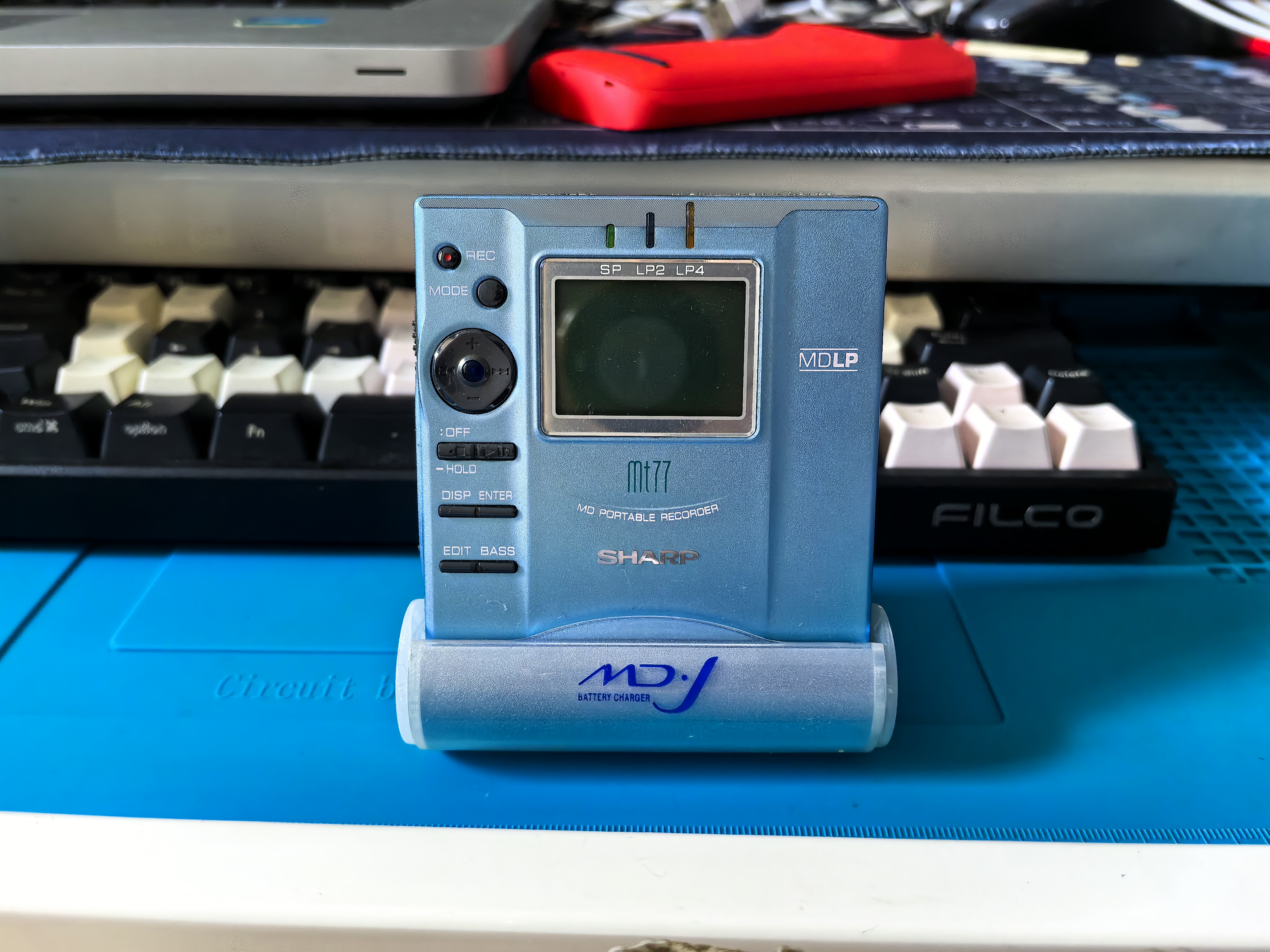
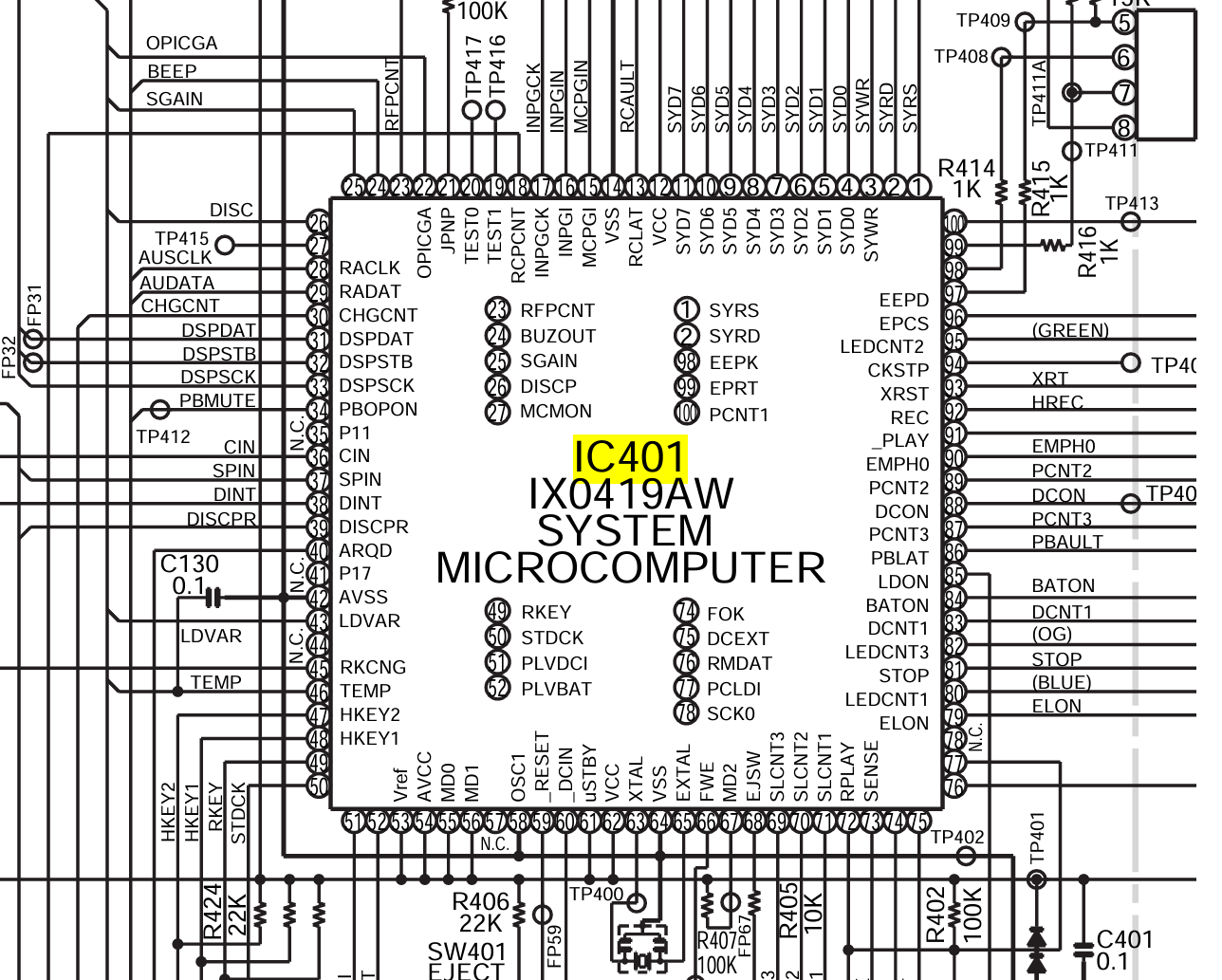
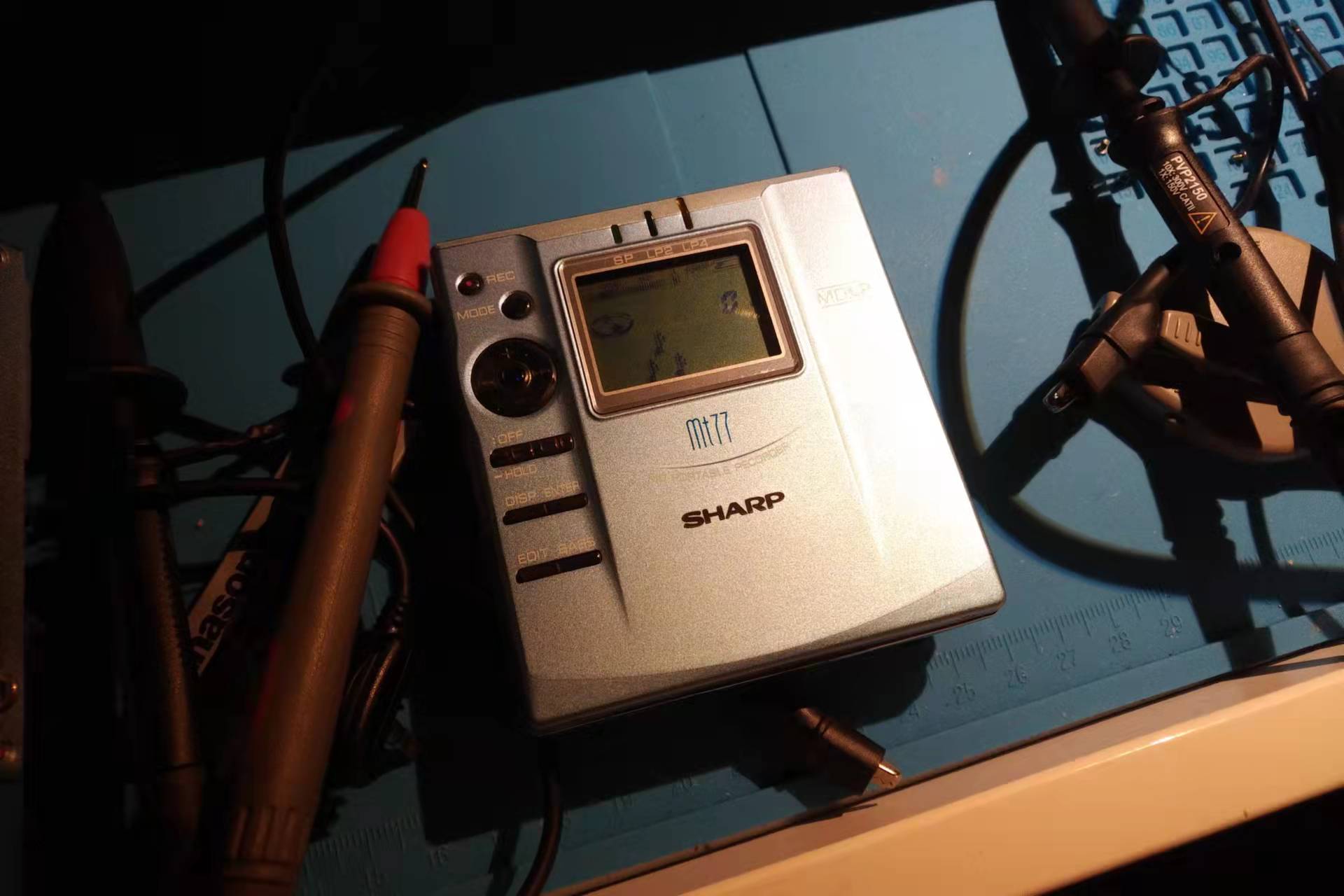
      <![CDATA[<blockquote><p>Someone recently messaged me that their Sharp MD player won’t power on. I’ve previously written two posts about dead Sharp MD units, so here’s a reorganized write-up to give anyone hitting the same problem a few ideas.</p></blockquote><p>Sharp MD players have two notorious common faults: shattered gears and dead-no-power. They tend to split by model — the MT66 and MT77&#x2F;877 rarely suffer shattered gears, but these two <strong>“sleep to death”</strong>: even a brand-new unit, left sitting unused for a long time, will refuse to power on when picked up again, which tanks its value. I’ve previously revived several units like this, including <code>MT66/MT77</code> models — but if you ask me for the exact root cause, I honestly don’t know. Really! Every single one of them just… came back to life on its own while I was probing it on the bench.</p><p><img src="/images/sharp-mt77-blue.jpg" alt="Sharp MT77 in blue"></p><p>The first unit I ever revived: I was probing around <code>IC401</code>, casually poking a few voltages with the multimeter, and it just powered on — as if some capacitor was the culprit. One unit proves nothing, so I found another one with the same symptom. My guess was a stuck power IC state or an aged capacitor, and my earlier probing had effectively injected some impedance that pulled a level back into range or changed a load capacitance. So I pulled out the Service Manual, ready to check the RESET&#x2F;VCC signals and capture the power-up sequence on the scope. Given how badly I slept through digital&#x2F;analog electronics and signals &amp; systems back in college — and how little attention I paid the oscilloscope in lab class — it’s no surprise the scope was probably misconfigured: nothing I measured looked right, nothing matched expectations. Then after another round of random poking, the unit came back to life. A later MT66 with the same symptom went down the exact same path.</p><h2 id="Things-worth-trying"><a href="#Things-worth-trying" class="headerlink" title="Things worth trying"></a>Things worth trying</h2><ol><li>Set the bench supply to <strong>1.3V</strong>. Don’t ask me why — the first unit mysteriously recovered while powered at exactly that voltage.</li><li>Find a ~100kΩ resistor and try discharging the RESET &#x2F; VCC &#x2F; XTAL &#x2F; PLVBAT pins of IC401 to ground.</li></ol><p><img src="/images/sharp-mt77-ic401.png" alt="IC401 probe points on the MT77"></p><h2 id="For-those-who-know-their-stuff-help-pin-down-the-real-cause"><a href="#For-those-who-know-their-stuff-help-pin-down-the-real-cause" class="headerlink" title="For those who know their stuff: help pin down the real cause"></a>For those who know their stuff: help pin down the real cause</h2><p>Grab the MT77 Service Manual, power it up (or rather, fail to), and record the static voltages on these pins with a multimeter, then follow up with a scope:</p><ul><li>RESET (pin 59) — is it stuck low?</li><li>VCC (pin 62) — is there a ramp-up at all?</li><li>XTAL (pin 63) — is the crystal oscillating?</li><li>PLVBAT (pin 52) — compare against a working unit</li></ul><p><img src="/images/sharp-mt77-fixed.jpg" alt="A revived MT77, powered on again"></p>]]>
    </content>
    <id>https://cocozq.site/2026/10/04/sharp-md-no-power-repair/</id>
    <link href="https://cocozq.site/2026/10/04/sharp-md-no-power-repair/"/>
    <published>2026-10-03T16:00:00.000Z</published>
    <summary>
      <![CDATA[<blockquote>
<p>Someone recently messaged me that their Sharp MD player won’t power on. I’ve previously written two posts about dead Sharp]]>
    </summary>
    <title>Sharp MD Players (MT66/MT77) That Won't Power On: Repair Notes (Mostly Blind Luck)</title>
    <updated>2026-10-04T01:59:37.927Z</updated>
  </entry>
  <entry>
    <author>
      <name>cocozq</name>
    </author>
    <category term="dev-log" scheme="https://cocozq.site/categories/dev-log/"/>
    <category term="Tauri" scheme="https://cocozq.site/tags/Tauri/"/>
    <category term="Frontend" scheme="https://cocozq.site/tags/Frontend/"/>
    <category term="Rust" scheme="https://cocozq.site/tags/Rust/"/>
    <category term="Drag and Drop" scheme="https://cocozq.site/tags/Drag-and-Drop/"/>
    <category term="WebView2" scheme="https://cocozq.site/tags/WebView2/"/>
    <category term="JavaScript" scheme="https://cocozq.site/tags/JavaScript/"/>
    <content>
      <![CDATA[<p>Using the CocoMarkdown project as a worked example, this post summarizes complete implementations for two drag-and-drop scenarios in Tauri (v2) apps, for other projects to reference.</p><hr><h2 id="Contents"><a href="#Contents" class="headerlink" title="Contents"></a>Contents</h2><ol><li><a href="#1-scenario-overview">Scenario Overview</a></li><li><a href="#2-scenario-1-in-app-drag-drop">Scenario 1: In-App Drag &amp; Drop</a></li><li><a href="#3-scenario-2-external-files-dropped-into-the-app">Scenario 2: External Files Dropped Into the App</a></li><li><a href="#4-common-pitfalls">Common Pitfalls</a></li><li><a href="#5-full-code-reference">Full Code Reference</a></li></ol><hr><h2 id="1-Scenario-Overview"><a href="#1-Scenario-Overview" class="headerlink" title="1. Scenario Overview"></a>1. Scenario Overview</h2><table><thead><tr><th>Scenario</th><th>Drag source</th><th>Drop target</th><th>Recommended approach</th></tr></thead><tbody><tr><td>In-app DnD</td><td>DOM element inside the app</td><td>DOM element inside the app</td><td><strong>Mouse events</strong> (mousedown&#x2F;mousemove&#x2F;mouseup)</td></tr><tr><td>External files</td><td>OS file manager</td><td>Region inside the app</td><td><strong>Tauri native events</strong> + HTML5 DnD assist</td></tr></tbody></table><p><strong>Core principle</strong>: never use the HTML5 Drag and Drop API for in-app dragging, because Tauri’s WebView2 (Windows) intercepts native drag events — the cursor turns into a “not allowed” icon and no amount of <code>preventDefault()</code> fixes it.</p><hr><h2 id="2-Scenario-1-In-App-Drag-Drop"><a href="#2-Scenario-1-In-App-Drag-Drop" class="headerlink" title="2. Scenario 1: In-App Drag &amp; Drop"></a>2. Scenario 1: In-App Drag &amp; Drop</h2><h3 id="2-1-Why-not-the-HTML5-DnD-API"><a href="#2-1-Why-not-the-HTML5-DnD-API" class="headerlink" title="2.1 Why not the HTML5 DnD API"></a>2.1 Why not the HTML5 DnD API</h3><p>On Windows WebView2, HTML5 Drag and Drop events get intercepted at the native layer:</p><ul><li>Calling <code>e.preventDefault()</code> in <code>dragover</code> cannot stop the cursor from turning into the forbidden icon</li><li><code>dataTransfer.dropEffect</code> settings have no effect</li><li>Custom MIME types don’t help either</li><li>Even intercepting the <code>DragDrop</code> event in Rust via <code>on_window_event</code> and calling <code>prevent_default()</code> doesn’t work (Tauri v2’s <code>DragDropEvent</code> has no <code>prevent_default</code> method)</li></ul><p><strong>Conclusion: the HTML5 DnD API does not work inside Tauri WebView2 — use Mouse events instead.</strong></p><h3 id="2-2-Mouse-Event-Implementation"><a href="#2-2-Mouse-Event-Implementation" class="headerlink" title="2.2 Mouse-Event Implementation"></a>2.2 Mouse-Event Implementation</h3><h4 id="Overall-approach"><a href="#Overall-approach" class="headerlink" title="Overall approach"></a>Overall approach</h4><ol><li><code>mousedown</code>: record the drag source element and start coordinates</li><li><code>mousemove</code>: once movement passes a threshold, activate the drag, show a ghost element following the cursor, highlight the target region</li><li><code>mouseup</code>: complete the drop, run the business logic</li><li>Extras: ESC to cancel, prevent accidental <code>click</code> after a drag</li></ol><h4 id="JavaScript-implementation"><a href="#JavaScript-implementation" class="headerlink" title="JavaScript implementation"></a>JavaScript implementation</h4><figure class="highlight javascript"><table><tr><td class="gutter"><pre><span class="line">1</span><br><span class="line">2</span><br><span class="line">3</span><br><span class="line">4</span><br><span class="line">5</span><br><span class="line">6</span><br><span class="line">7</span><br><span class="line">8</span><br><span class="line">9</span><br><span class="line">10</span><br><span class="line">11</span><br><span class="line">12</span><br><span class="line">13</span><br><span class="line">14</span><br><span class="line">15</span><br><span class="line">16</span><br><span class="line">17</span><br><span class="line">18</span><br><span class="line">19</span><br><span class="line">20</span><br><span class="line">21</span><br><span class="line">22</span><br><span class="line">23</span><br><span class="line">24</span><br><span class="line">25</span><br><span class="line">26</span><br><span class="line">27</span><br><span class="line">28</span><br><span class="line">29</span><br><span class="line">30</span><br><span class="line">31</span><br><span class="line">32</span><br><span class="line">33</span><br><span class="line">34</span><br><span class="line">35</span><br><span class="line">36</span><br><span class="line">37</span><br><span class="line">38</span><br><span class="line">39</span><br><span class="line">40</span><br><span class="line">41</span><br><span class="line">42</span><br><span class="line">43</span><br><span class="line">44</span><br><span class="line">45</span><br><span class="line">46</span><br><span class="line">47</span><br><span class="line">48</span><br><span class="line">49</span><br><span class="line">50</span><br><span class="line">51</span><br><span class="line">52</span><br><span class="line">53</span><br><span class="line">54</span><br><span class="line">55</span><br><span class="line">56</span><br><span class="line">57</span><br><span class="line">58</span><br><span class="line">59</span><br><span class="line">60</span><br><span class="line">61</span><br><span class="line">62</span><br><span class="line">63</span><br><span class="line">64</span><br><span class="line">65</span><br><span class="line">66</span><br><span class="line">67</span><br><span class="line">68</span><br><span class="line">69</span><br><span class="line">70</span><br><span class="line">71</span><br><span class="line">72</span><br><span class="line">73</span><br><span class="line">74</span><br><span class="line">75</span><br><span class="line">76</span><br><span class="line">77</span><br><span class="line">78</span><br><span class="line">79</span><br><span class="line">80</span><br><span class="line">81</span><br><span class="line">82</span><br><span class="line">83</span><br><span class="line">84</span><br><span class="line">85</span><br><span class="line">86</span><br><span class="line">87</span><br><span class="line">88</span><br><span class="line">89</span><br><span class="line">90</span><br><span class="line">91</span><br><span class="line">92</span><br><span class="line">93</span><br><span class="line">94</span><br><span class="line">95</span><br><span class="line">96</span><br><span class="line">97</span><br><span class="line">98</span><br><span class="line">99</span><br><span class="line">100</span><br><span class="line">101</span><br><span class="line">102</span><br><span class="line">103</span><br><span class="line">104</span><br><span class="line">105</span><br><span class="line">106</span><br><span class="line">107</span><br><span class="line">108</span><br><span class="line">109</span><br><span class="line">110</span><br><span class="line">111</span><br><span class="line">112</span><br><span class="line">113</span><br><span class="line">114</span><br><span class="line">115</span><br><span class="line">116</span><br><span class="line">117</span><br><span class="line">118</span><br><span class="line">119</span><br><span class="line">120</span><br><span class="line">121</span><br><span class="line">122</span><br><span class="line">123</span><br><span class="line">124</span><br><span class="line">125</span><br><span class="line">126</span><br><span class="line">127</span><br><span class="line">128</span><br><span class="line">129</span><br><span class="line">130</span><br><span class="line">131</span><br><span class="line">132</span><br><span class="line">133</span><br><span class="line">134</span><br><span class="line">135</span><br></pre></td><td class="code"><pre><span class="line"><span class="comment">// ── State ──</span></span><br><span class="line"><span class="keyword">let</span> dragSrcPath = <span class="literal">null</span>;       <span class="comment">// drag source path</span></span><br><span class="line"><span class="keyword">let</span> dragOverItem = <span class="literal">null</span>;      <span class="comment">// currently hovered target element</span></span><br><span class="line"><span class="keyword">let</span> dragSrcElement = <span class="literal">null</span>;    <span class="comment">// drag source DOM element</span></span><br><span class="line"><span class="keyword">let</span> isDragging = <span class="literal">false</span>;       <span class="comment">// drag in progress?</span></span><br><span class="line"><span class="keyword">let</span> wasDragging = <span class="literal">false</span>;      <span class="comment">// a drag just finished (to swallow click)</span></span><br><span class="line"><span class="keyword">let</span> dragStartX = <span class="number">0</span>;           <span class="comment">// drag start X</span></span><br><span class="line"><span class="keyword">let</span> dragStartY = <span class="number">0</span>;           <span class="comment">// drag start Y</span></span><br><span class="line"><span class="keyword">let</span> dragGhost = <span class="literal">null</span>;         <span class="comment">// ghost element following the cursor</span></span><br><span class="line"></span><br><span class="line"><span class="comment">// ── Ghost element management ──</span></span><br><span class="line"><span class="keyword">function</span> <span class="title function_">createDragGhost</span>(<span class="params">label</span>) &#123;</span><br><span class="line">  dragGhost = <span class="variable language_">document</span>.<span class="title function_">createElement</span>(<span class="string">&#x27;div&#x27;</span>);</span><br><span class="line">  dragGhost.<span class="property">className</span> = <span class="string">&#x27;tree-drag-ghost&#x27;</span>;</span><br><span class="line">  dragGhost.<span class="property">textContent</span> = label;</span><br><span class="line">  <span class="variable language_">document</span>.<span class="property">body</span>.<span class="title function_">appendChild</span>(dragGhost);</span><br><span class="line">&#125;</span><br><span class="line"></span><br><span class="line"><span class="keyword">function</span> <span class="title function_">moveDragGhost</span>(<span class="params">x, y</span>) &#123;</span><br><span class="line">  <span class="keyword">if</span> (!dragGhost) <span class="keyword">return</span>;</span><br><span class="line">  dragGhost.<span class="property">style</span>.<span class="property">left</span> = (x + <span class="number">12</span>) + <span class="string">&#x27;px&#x27;</span>;</span><br><span class="line">  dragGhost.<span class="property">style</span>.<span class="property">top</span> = (y + <span class="number">12</span>) + <span class="string">&#x27;px&#x27;</span>;</span><br><span class="line">&#125;</span><br><span class="line"></span><br><span class="line"><span class="keyword">function</span> <span class="title function_">removeDragGhost</span>(<span class="params"></span>) &#123;</span><br><span class="line">  <span class="keyword">if</span> (dragGhost) &#123; dragGhost.<span class="title function_">remove</span>(); dragGhost = <span class="literal">null</span>; &#125;</span><br><span class="line">&#125;</span><br><span class="line"></span><br><span class="line"><span class="comment">// ── Reset drag state ──</span></span><br><span class="line"><span class="keyword">function</span> <span class="title function_">clearDragState</span>(<span class="params"></span>) &#123;</span><br><span class="line">  <span class="keyword">if</span> (dragSrcElement) dragSrcElement.<span class="property">classList</span>.<span class="title function_">remove</span>(<span class="string">&#x27;dragging&#x27;</span>);</span><br><span class="line">  <span class="keyword">if</span> (dragOverItem) dragOverItem.<span class="property">classList</span>.<span class="title function_">remove</span>(<span class="string">&#x27;drag-over&#x27;</span>);</span><br><span class="line">  dragSrcPath = <span class="literal">null</span>;</span><br><span class="line">  dragOverItem = <span class="literal">null</span>;</span><br><span class="line">  dragSrcElement = <span class="literal">null</span>;</span><br><span class="line">  isDragging = <span class="literal">false</span>;</span><br><span class="line">  <span class="title function_">removeDragGhost</span>();</span><br><span class="line">  <span class="variable language_">document</span>.<span class="property">body</span>.<span class="property">classList</span>.<span class="title function_">remove</span>(<span class="string">&#x27;explorer-dragging&#x27;</span>);</span><br><span class="line">&#125;</span><br><span class="line"></span><br><span class="line"><span class="comment">// ── mousedown: record the source ──</span></span><br><span class="line">container.<span class="title function_">addEventListener</span>(<span class="string">&#x27;mousedown&#x27;</span>, <span class="function">(<span class="params">e</span>) =&gt;</span> &#123;</span><br><span class="line">  <span class="keyword">const</span> item = e.<span class="property">target</span>.<span class="title function_">closest</span>(<span class="string">&#x27;.tree-item[data-path]&#x27;</span>);</span><br><span class="line">  <span class="keyword">if</span> (!item) <span class="keyword">return</span>;</span><br><span class="line">  <span class="keyword">if</span> (e.<span class="property">button</span> !== <span class="number">0</span>) <span class="keyword">return</span>;  <span class="comment">// left button only</span></span><br><span class="line">  dragSrcPath = item.<span class="property">dataset</span>.<span class="property">path</span>;</span><br><span class="line">  dragSrcElement = item;</span><br><span class="line">  dragStartX = e.<span class="property">clientX</span>;</span><br><span class="line">  dragStartY = e.<span class="property">clientY</span>;</span><br><span class="line">  isDragging = <span class="literal">false</span>;</span><br><span class="line">  wasDragging = <span class="literal">false</span>;</span><br><span class="line">&#125;);</span><br><span class="line"></span><br><span class="line"><span class="comment">// ── mousemove: drag in progress ──</span></span><br><span class="line"><span class="variable language_">document</span>.<span class="title function_">addEventListener</span>(<span class="string">&#x27;mousemove&#x27;</span>, <span class="function">(<span class="params">e</span>) =&gt;</span> &#123;</span><br><span class="line">  <span class="keyword">if</span> (!dragSrcPath || !dragSrcElement) <span class="keyword">return</span>;</span><br><span class="line"></span><br><span class="line">  <span class="comment">// Movement threshold (prevents clicks from triggering drags)</span></span><br><span class="line">  <span class="keyword">const</span> dx = e.<span class="property">clientX</span> - dragStartX;</span><br><span class="line">  <span class="keyword">const</span> dy = e.<span class="property">clientY</span> - dragStartY;</span><br><span class="line">  <span class="keyword">if</span> (!isDragging) &#123;</span><br><span class="line">    <span class="keyword">if</span> (<span class="title class_">Math</span>.<span class="title function_">abs</span>(dx) &lt; <span class="number">4</span> &amp;&amp; <span class="title class_">Math</span>.<span class="title function_">abs</span>(dy) &lt; <span class="number">4</span>) <span class="keyword">return</span>;</span><br><span class="line">    isDragging = <span class="literal">true</span>;</span><br><span class="line">    dragSrcElement.<span class="property">classList</span>.<span class="title function_">add</span>(<span class="string">&#x27;dragging&#x27;</span>);</span><br><span class="line">    <span class="variable language_">document</span>.<span class="property">body</span>.<span class="property">classList</span>.<span class="title function_">add</span>(<span class="string">&#x27;explorer-dragging&#x27;</span>);</span><br><span class="line">    <span class="keyword">const</span> label = dragSrcElement.<span class="title function_">querySelector</span>(<span class="string">&#x27;.tree-label&#x27;</span>)?.<span class="property">textContent</span> || <span class="string">&#x27;&#x27;</span>;</span><br><span class="line">    <span class="title function_">createDragGhost</span>(label);</span><br><span class="line">  &#125;</span><br><span class="line"></span><br><span class="line">  <span class="comment">// move the ghost</span></span><br><span class="line">  <span class="title function_">moveDragGhost</span>(e.<span class="property">clientX</span>, e.<span class="property">clientY</span>);</span><br><span class="line"></span><br><span class="line">  <span class="comment">// hit-test the drop target (elementFromPoint sees through the ghost)</span></span><br><span class="line">  <span class="keyword">const</span> target = <span class="variable language_">document</span>.<span class="title function_">elementFromPoint</span>(e.<span class="property">clientX</span>, e.<span class="property">clientY</span>)</span><br><span class="line">    ?.<span class="title function_">closest</span>(<span class="string">&#x27;.tree-item[data-is-dir=&quot;true&quot;]&#x27;</span>);</span><br><span class="line"></span><br><span class="line">  <span class="keyword">if</span> (dragOverItem &amp;&amp; dragOverItem !== target) &#123;</span><br><span class="line">    dragOverItem.<span class="property">classList</span>.<span class="title function_">remove</span>(<span class="string">&#x27;drag-over&#x27;</span>);</span><br><span class="line">  &#125;</span><br><span class="line">  <span class="keyword">if</span> (target &amp;&amp; target.<span class="property">dataset</span>.<span class="property">path</span> !== dragSrcPath) &#123;</span><br><span class="line">    target.<span class="property">classList</span>.<span class="title function_">add</span>(<span class="string">&#x27;drag-over&#x27;</span>);</span><br><span class="line">    dragOverItem = target;</span><br><span class="line">  &#125; <span class="keyword">else</span> <span class="keyword">if</span> (dragOverItem) &#123;</span><br><span class="line">    dragOverItem.<span class="property">classList</span>.<span class="title function_">remove</span>(<span class="string">&#x27;drag-over&#x27;</span>);</span><br><span class="line">    dragOverItem = <span class="literal">null</span>;</span><br><span class="line">  &#125;</span><br><span class="line">&#125;);</span><br><span class="line"></span><br><span class="line"><span class="comment">// ── mouseup: complete the drop ──</span></span><br><span class="line"><span class="variable language_">document</span>.<span class="title function_">addEventListener</span>(<span class="string">&#x27;mouseup&#x27;</span>, <span class="title function_">async</span> (e) =&gt; &#123;</span><br><span class="line">  <span class="keyword">if</span> (!dragSrcPath || !dragSrcElement) &#123;</span><br><span class="line">    dragSrcPath = <span class="literal">null</span>;</span><br><span class="line">    dragSrcElement = <span class="literal">null</span>;</span><br><span class="line">    <span class="keyword">return</span>;</span><br><span class="line">  &#125;</span><br><span class="line">  <span class="keyword">if</span> (!isDragging) &#123;</span><br><span class="line">    dragSrcPath = <span class="literal">null</span>;</span><br><span class="line">    dragSrcElement = <span class="literal">null</span>;</span><br><span class="line">    <span class="keyword">return</span>;</span><br><span class="line">  &#125;</span><br><span class="line"></span><br><span class="line">  wasDragging = <span class="literal">true</span>;</span><br><span class="line">  <span class="keyword">const</span> destDir = dragOverItem?.<span class="property">dataset</span>.<span class="property">path</span>;</span><br><span class="line">  <span class="keyword">const</span> srcPath = dragSrcPath;</span><br><span class="line">  <span class="title function_">clearDragState</span>();</span><br><span class="line"></span><br><span class="line">  <span class="keyword">if</span> (!srcPath || !destDir) <span class="keyword">return</span>;</span><br><span class="line">  <span class="keyword">if</span> (srcPath === destDir) <span class="keyword">return</span>;</span><br><span class="line"></span><br><span class="line">  <span class="comment">// guard against dropping a folder into its own subdirectory</span></span><br><span class="line">  <span class="keyword">if</span> (destDir.<span class="title function_">startsWith</span>(srcPath + <span class="string">&#x27;\\&#x27;</span>) || destDir.<span class="title function_">startsWith</span>(srcPath + <span class="string">&#x27;/&#x27;</span>)) &#123;</span><br><span class="line">    <span class="title function_">showToast</span>(<span class="string">&#x27;Cannot move a folder into its own subfolder&#x27;</span>);</span><br><span class="line">    <span class="keyword">return</span>;</span><br><span class="line">  &#125;</span><br><span class="line"></span><br><span class="line">  <span class="comment">// perform the move</span></span><br><span class="line">  <span class="keyword">await</span> <span class="title function_">handleExplorerDrop</span>(srcPath, destDir);</span><br><span class="line">&#125;);</span><br><span class="line"></span><br><span class="line"><span class="comment">// ── swallow the click that fires after a drag ──</span></span><br><span class="line">container.<span class="title function_">addEventListener</span>(<span class="string">&#x27;click&#x27;</span>, <span class="function">(<span class="params">e</span>) =&gt;</span> &#123;</span><br><span class="line">  <span class="keyword">if</span> (wasDragging) &#123;</span><br><span class="line">    e.<span class="title function_">stopPropagation</span>();</span><br><span class="line">    e.<span class="title function_">preventDefault</span>();</span><br><span class="line">    wasDragging = <span class="literal">false</span>;</span><br><span class="line">  &#125;</span><br><span class="line">&#125;, <span class="literal">true</span>);</span><br><span class="line"></span><br><span class="line"><span class="comment">// ── ESC cancels the drag ──</span></span><br><span class="line"><span class="variable language_">document</span>.<span class="title function_">addEventListener</span>(<span class="string">&#x27;keydown&#x27;</span>, <span class="function">(<span class="params">e</span>) =&gt;</span> &#123;</span><br><span class="line">  <span class="keyword">if</span> (e.<span class="property">key</span> === <span class="string">&#x27;Escape&#x27;</span> &amp;&amp; isDragging) &#123;</span><br><span class="line">    <span class="title function_">clearDragState</span>();</span><br><span class="line">    wasDragging = <span class="literal">false</span>;</span><br><span class="line">  &#125;</span><br><span class="line">&#125;);</span><br></pre></td></tr></table></figure><h4 id="CSS"><a href="#CSS" class="headerlink" title="CSS"></a>CSS</h4><figure class="highlight css"><table><tr><td class="gutter"><pre><span class="line">1</span><br><span class="line">2</span><br><span class="line">3</span><br><span class="line">4</span><br><span class="line">5</span><br><span class="line">6</span><br><span class="line">7</span><br><span class="line">8</span><br><span class="line">9</span><br><span class="line">10</span><br><span class="line">11</span><br><span class="line">12</span><br><span class="line">13</span><br><span class="line">14</span><br><span class="line">15</span><br><span class="line">16</span><br><span class="line">17</span><br><span class="line">18</span><br><span class="line">19</span><br><span class="line">20</span><br><span class="line">21</span><br><span class="line">22</span><br><span class="line">23</span><br><span class="line">24</span><br><span class="line">25</span><br><span class="line">26</span><br><span class="line">27</span><br><span class="line">28</span><br><span class="line">29</span><br><span class="line">30</span><br><span class="line">31</span><br><span class="line">32</span><br></pre></td><td class="code"><pre><span class="line"><span class="comment">/* drag source: translucent */</span></span><br><span class="line"><span class="selector-class">.tree-item</span><span class="selector-class">.dragging</span> &#123;</span><br><span class="line">  <span class="attribute">opacity</span>: <span class="number">0.4</span>;</span><br><span class="line">&#125;</span><br><span class="line"></span><br><span class="line"><span class="comment">/* drop target: highlighted border */</span></span><br><span class="line"><span class="selector-class">.tree-item</span><span class="selector-class">.drag-over</span> &#123;</span><br><span class="line">  <span class="attribute">background</span>: <span class="built_in">rgba</span>(<span class="number">108</span>, <span class="number">99</span>, <span class="number">255</span>, <span class="number">0.2</span>);</span><br><span class="line">  <span class="attribute">outline</span>: <span class="number">1px</span> dashed <span class="built_in">var</span>(--accent);</span><br><span class="line">  <span class="attribute">outline-offset</span>: -<span class="number">1px</span>;</span><br><span class="line">&#125;</span><br><span class="line"></span><br><span class="line"><span class="comment">/* while dragging: cursor */</span></span><br><span class="line"><span class="selector-tag">body</span><span class="selector-class">.explorer-dragging</span>,</span><br><span class="line"><span class="selector-tag">body</span><span class="selector-class">.explorer-dragging</span> <span class="selector-class">.tree-item</span> &#123;</span><br><span class="line">  <span class="attribute">cursor</span>: grabbing <span class="meta">!important</span>;</span><br><span class="line">&#125;</span><br><span class="line"></span><br><span class="line"><span class="comment">/* ghost label following the cursor */</span></span><br><span class="line"><span class="selector-class">.tree-drag-ghost</span> &#123;</span><br><span class="line">  <span class="attribute">position</span>: fixed;</span><br><span class="line">  <span class="attribute">z-index</span>: <span class="number">9999</span>;</span><br><span class="line">  <span class="attribute">pointer-events</span>: none;       <span class="comment">/* key: lets elementFromPoint see through it */</span></span><br><span class="line">  <span class="attribute">background</span>: <span class="built_in">var</span>(--accent);</span><br><span class="line">  <span class="attribute">color</span>: <span class="number">#fff</span>;</span><br><span class="line">  <span class="attribute">padding</span>: <span class="number">4px</span> <span class="number">10px</span>;</span><br><span class="line">  <span class="attribute">border-radius</span>: <span class="number">4px</span>;</span><br><span class="line">  <span class="attribute">font-size</span>: <span class="number">12px</span>;</span><br><span class="line">  <span class="attribute">white-space</span>: nowrap;</span><br><span class="line">  <span class="attribute">box-shadow</span>: <span class="number">0</span> <span class="number">2px</span> <span class="number">8px</span> <span class="built_in">rgba</span>(<span class="number">0</span>, <span class="number">0</span>, <span class="number">0</span>, <span class="number">0.3</span>);</span><br><span class="line">  <span class="attribute">opacity</span>: <span class="number">0.9</span>;</span><br><span class="line">&#125;</span><br></pre></td></tr></table></figure><h4 id="Rust-backend-the-move-command"><a href="#Rust-backend-the-move-command" class="headerlink" title="Rust backend: the move command"></a>Rust backend: the move command</h4><figure class="highlight rust"><table><tr><td class="gutter"><pre><span class="line">1</span><br><span class="line">2</span><br><span class="line">3</span><br><span class="line">4</span><br><span class="line">5</span><br><span class="line">6</span><br><span class="line">7</span><br><span class="line">8</span><br><span class="line">9</span><br><span class="line">10</span><br><span class="line">11</span><br><span class="line">12</span><br><span class="line">13</span><br><span class="line">14</span><br><span class="line">15</span><br><span class="line">16</span><br><span class="line">17</span><br><span class="line">18</span><br><span class="line">19</span><br><span class="line">20</span><br><span class="line">21</span><br><span class="line">22</span><br><span class="line">23</span><br><span class="line">24</span><br><span class="line">25</span><br><span class="line">26</span><br></pre></td><td class="code"><pre><span class="line"><span class="meta">#[tauri::command]</span></span><br><span class="line"><span class="keyword">fn</span> <span class="title function_">move_item</span>(src_path: <span class="type">String</span>, dest_dir: <span class="type">String</span>) <span class="punctuation">-&gt;</span> <span class="type">Result</span>&lt;<span class="type">String</span>, <span class="type">String</span>&gt; &#123;</span><br><span class="line">    <span class="keyword">let</span> <span class="variable">src</span> = PathBuf::<span class="title function_ invoke__">from</span>(&amp;src_path);</span><br><span class="line">    <span class="keyword">let</span> <span class="variable">dest</span> = PathBuf::<span class="title function_ invoke__">from</span>(&amp;dest_dir);</span><br><span class="line"></span><br><span class="line">    <span class="keyword">if</span> !src.<span class="title function_ invoke__">exists</span>() &#123;</span><br><span class="line">        <span class="keyword">return</span> <span class="title function_ invoke__">Err</span>(<span class="string">&quot;Source does not exist&quot;</span>.<span class="title function_ invoke__">to_string</span>());</span><br><span class="line">    &#125;</span><br><span class="line">    <span class="keyword">if</span> !dest.<span class="title function_ invoke__">is_dir</span>() &#123;</span><br><span class="line">        <span class="keyword">return</span> <span class="title function_ invoke__">Err</span>(<span class="string">&quot;Destination is not a directory&quot;</span>.<span class="title function_ invoke__">to_string</span>());</span><br><span class="line">    &#125;</span><br><span class="line"></span><br><span class="line">    <span class="keyword">let</span> <span class="variable">file_name</span> = src.<span class="title function_ invoke__">file_name</span>()</span><br><span class="line">        .<span class="title function_ invoke__">map</span>(|n| n.<span class="title function_ invoke__">to_string_lossy</span>().<span class="title function_ invoke__">to_string</span>())</span><br><span class="line">        .<span class="title function_ invoke__">unwrap_or_default</span>();</span><br><span class="line">    <span class="keyword">let</span> <span class="variable">dest_full</span> = dest.<span class="title function_ invoke__">join</span>(&amp;file_name);</span><br><span class="line"></span><br><span class="line">    <span class="keyword">if</span> dest_full.<span class="title function_ invoke__">exists</span>() &#123;</span><br><span class="line">        <span class="keyword">return</span> <span class="title function_ invoke__">Err</span>(<span class="string">&quot;A file/folder with that name already exists at destination&quot;</span>.<span class="title function_ invoke__">to_string</span>());</span><br><span class="line">    &#125;</span><br><span class="line"></span><br><span class="line">    fs::<span class="title function_ invoke__">rename</span>(&amp;src, &amp;dest_full)</span><br><span class="line">        .<span class="title function_ invoke__">map_err</span>(|e| <span class="built_in">format!</span>(<span class="string">&quot;Move failed: &#123;&#125;&quot;</span>, e))?;</span><br><span class="line"></span><br><span class="line">    <span class="title function_ invoke__">Ok</span>(dest_full.<span class="title function_ invoke__">to_string_lossy</span>().<span class="title function_ invoke__">to_string</span>())</span><br><span class="line">&#125;</span><br></pre></td></tr></table></figure><h3 id="2-3-Key-Design-Points"><a href="#2-3-Key-Design-Points" class="headerlink" title="2.3 Key Design Points"></a>2.3 Key Design Points</h3><table><thead><tr><th>Point</th><th>Detail</th></tr></thead><tbody><tr><td>Movement threshold</td><td>Drag activates only after moving 4px+ from mousedown, so clicks never trigger drags</td></tr><tr><td><code>pointer-events: none</code></td><td>The ghost must set this, otherwise <code>elementFromPoint</code> hits the ghost instead of the target</td></tr><tr><td><code>wasDragging</code> flag</td><td>A <code>click</code> still fires after mouseup — intercept it in the capture phase</td></tr><tr><td>Body-level cursor</td><td>Add a class to body during drags for <code>cursor: grabbing</code>, so the pointer is correct everywhere</td></tr><tr><td>Subdirectory guard</td><td>Prevent dropping a folder into its own subdirectory (infinite loop)</td></tr><tr><td>Name-collision check</td><td>Backend verifies no same-named file&#x2F;folder exists at the destination</td></tr></tbody></table><hr><h2 id="3-Scenario-2-External-Files-Dropped-Into-the-App"><a href="#3-Scenario-2-External-Files-Dropped-Into-the-App" class="headerlink" title="3. Scenario 2: External Files Dropped Into the App"></a>3. Scenario 2: External Files Dropped Into the App</h2><h3 id="3-1-Dual-strategy-architecture"><a href="#3-1-Dual-strategy-architecture" class="headerlink" title="3.1 Dual-strategy architecture"></a>3.1 Dual-strategy architecture</h3><p>Dropping external files needs both strategies at once:</p><ul><li><strong>Strategy A (primary)</strong>: Tauri native events — real file paths via <code>tauri://drag-enter</code> &#x2F; <code>tauri://drag-leave</code> &#x2F; <code>tauri://drag-drop</code></li><li><strong>Strategy B (supporting)</strong>: HTML5 DnD events — UI visual feedback (highlight borders) backing up strategy A</li></ul><p>Why both? Tauri’s native events only provide <code>drag-enter</code> &#x2F; <code>drag-leave</code> &#x2F; <code>drag-drop</code> — no <code>dragover</code> — but the UI highlight needs continuous updates during <code>dragover</code>.</p><h3 id="3-2-Rust-forwarding-native-drag-events"><a href="#3-2-Rust-forwarding-native-drag-events" class="headerlink" title="3.2 Rust: forwarding native drag events"></a>3.2 Rust: forwarding native drag events</h3><p>Register an <code>on_window_event</code> handler in the Tauri builder to forward native drag events to the frontend:</p><figure class="highlight rust"><table><tr><td class="gutter"><pre><span class="line">1</span><br><span class="line">2</span><br><span class="line">3</span><br><span class="line">4</span><br><span class="line">5</span><br><span class="line">6</span><br><span class="line">7</span><br><span class="line">8</span><br></pre></td><td class="code"><pre><span class="line">tauri::Builder::<span class="title function_ invoke__">default</span>()</span><br><span class="line">    .<span class="title function_ invoke__">on_window_event</span>(|window, event| &#123;</span><br><span class="line">        <span class="keyword">if</span> <span class="keyword">let</span> <span class="variable">tauri</span>::WindowEvent::<span class="title function_ invoke__">DragDrop</span>(drop_event) = event &#123;</span><br><span class="line">            <span class="keyword">if</span> <span class="keyword">let</span> <span class="variable">tauri</span>::DragDropEvent::<span class="built_in">Drop</span> &#123; paths, position: _ &#125; = drop_event &#123;</span><br><span class="line">                <span class="keyword">let</span> <span class="variable">_</span> = window.<span class="title function_ invoke__">emit</span>(<span class="string">&quot;tauri://drag-drop&quot;</span>, paths);</span><br><span class="line">            &#125;</span><br><span class="line">        &#125;</span><br><span class="line">    &#125;)</span><br></pre></td></tr></table></figure><p><strong>Note</strong>: Tauri v2’s <code>DragDropEvent</code> has no <code>prevent_default()</code> method — don’t try to call it.</p><h3 id="3-3-Frontend-Tauri-events-HTML5-DnD-assist"><a href="#3-3-Frontend-Tauri-events-HTML5-DnD-assist" class="headerlink" title="3.3 Frontend: Tauri events + HTML5 DnD assist"></a>3.3 Frontend: Tauri events + HTML5 DnD assist</h3><figure class="highlight javascript"><table><tr><td class="gutter"><pre><span class="line">1</span><br><span class="line">2</span><br><span class="line">3</span><br><span class="line">4</span><br><span class="line">5</span><br><span class="line">6</span><br><span class="line">7</span><br><span class="line">8</span><br><span class="line">9</span><br><span class="line">10</span><br><span class="line">11</span><br><span class="line">12</span><br><span class="line">13</span><br><span class="line">14</span><br><span class="line">15</span><br><span class="line">16</span><br><span class="line">17</span><br><span class="line">18</span><br><span class="line">19</span><br><span class="line">20</span><br><span class="line">21</span><br><span class="line">22</span><br><span class="line">23</span><br><span class="line">24</span><br><span class="line">25</span><br><span class="line">26</span><br><span class="line">27</span><br><span class="line">28</span><br><span class="line">29</span><br><span class="line">30</span><br><span class="line">31</span><br><span class="line">32</span><br><span class="line">33</span><br><span class="line">34</span><br><span class="line">35</span><br><span class="line">36</span><br><span class="line">37</span><br><span class="line">38</span><br><span class="line">39</span><br><span class="line">40</span><br><span class="line">41</span><br><span class="line">42</span><br><span class="line">43</span><br><span class="line">44</span><br><span class="line">45</span><br><span class="line">46</span><br><span class="line">47</span><br><span class="line">48</span><br><span class="line">49</span><br><span class="line">50</span><br><span class="line">51</span><br><span class="line">52</span><br><span class="line">53</span><br><span class="line">54</span><br><span class="line">55</span><br><span class="line">56</span><br><span class="line">57</span><br><span class="line">58</span><br><span class="line">59</span><br><span class="line">60</span><br><span class="line">61</span><br><span class="line">62</span><br><span class="line">63</span><br><span class="line">64</span><br><span class="line">65</span><br><span class="line">66</span><br><span class="line">67</span><br><span class="line">68</span><br><span class="line">69</span><br><span class="line">70</span><br><span class="line">71</span><br><span class="line">72</span><br><span class="line">73</span><br><span class="line">74</span><br><span class="line">75</span><br><span class="line">76</span><br><span class="line">77</span><br><span class="line">78</span><br><span class="line">79</span><br><span class="line">80</span><br><span class="line">81</span><br><span class="line">82</span><br><span class="line">83</span><br></pre></td><td class="code"><pre><span class="line"><span class="keyword">function</span> <span class="title function_">setupExternalDragDrop</span>(<span class="params"></span>) &#123;</span><br><span class="line">  <span class="keyword">const</span> targetPanel = <span class="variable language_">document</span>.<span class="title function_">querySelector</span>(<span class="string">&#x27;.explorer-panel&#x27;</span>);</span><br><span class="line">  <span class="keyword">const</span> editorPanel = <span class="variable language_">document</span>.<span class="title function_">querySelector</span>(<span class="string">&#x27;.editor-panel&#x27;</span>);</span><br><span class="line"></span><br><span class="line">  <span class="comment">// ── Strategy A: Tauri native events ──</span></span><br><span class="line">  <span class="keyword">if</span> (<span class="variable language_">window</span>.<span class="property">__TAURI__</span>?.<span class="property">event</span>?.<span class="property">listen</span>) &#123;</span><br><span class="line">    <span class="variable language_">window</span>.<span class="property">__TAURI__</span>.<span class="property">event</span>.<span class="title function_">listen</span>(<span class="string">&#x27;tauri://drag-enter&#x27;</span>, <span class="function">() =&gt;</span> &#123;</span><br><span class="line">      targetPanel?.<span class="property">classList</span>.<span class="title function_">add</span>(<span class="string">&#x27;explorer-drag-over&#x27;</span>);</span><br><span class="line">    &#125;);</span><br><span class="line"></span><br><span class="line">    <span class="variable language_">window</span>.<span class="property">__TAURI__</span>.<span class="property">event</span>.<span class="title function_">listen</span>(<span class="string">&#x27;tauri://drag-leave&#x27;</span>, <span class="function">() =&gt;</span> &#123;</span><br><span class="line">      targetPanel?.<span class="property">classList</span>.<span class="title function_">remove</span>(<span class="string">&#x27;explorer-drag-over&#x27;</span>);</span><br><span class="line">    &#125;);</span><br><span class="line"></span><br><span class="line">    <span class="variable language_">window</span>.<span class="property">__TAURI__</span>.<span class="property">event</span>.<span class="title function_">listen</span>(<span class="string">&#x27;tauri://drag-drop&#x27;</span>, <span class="function">(<span class="params">event</span>) =&gt;</span> &#123;</span><br><span class="line">      targetPanel?.<span class="property">classList</span>.<span class="title function_">remove</span>(<span class="string">&#x27;explorer-drag-over&#x27;</span>);</span><br><span class="line">      <span class="keyword">const</span> paths = <span class="title class_">Array</span>.<span class="title function_">isArray</span>(event.<span class="property">payload</span>)</span><br><span class="line">        ? event.<span class="property">payload</span></span><br><span class="line">        : (event.<span class="property">payload</span>?.<span class="property">paths</span> || []);</span><br><span class="line">      <span class="keyword">if</span> (paths.<span class="property">length</span> &gt; <span class="number">0</span>) &#123;</span><br><span class="line">        <span class="title function_">handleDroppedFiles</span>(paths);</span><br><span class="line">      &#125;</span><br><span class="line">    &#125;);</span><br><span class="line">  &#125;</span><br><span class="line"></span><br><span class="line">  <span class="comment">// ── Strategy B: HTML5 DnD (visual feedback + fallback paths) ──</span></span><br><span class="line">  <span class="keyword">if</span> (targetPanel) &#123;</span><br><span class="line">    [<span class="string">&#x27;dragenter&#x27;</span>, <span class="string">&#x27;dragover&#x27;</span>].<span class="title function_">forEach</span>(<span class="function">(<span class="params">name</span>) =&gt;</span></span><br><span class="line">      targetPanel.<span class="title function_">addEventListener</span>(name, <span class="function">(<span class="params">e</span>) =&gt;</span> &#123;</span><br><span class="line">        e.<span class="title function_">preventDefault</span>();</span><br><span class="line">        e.<span class="title function_">stopPropagation</span>();</span><br><span class="line">        targetPanel.<span class="property">classList</span>.<span class="title function_">add</span>(<span class="string">&#x27;explorer-drag-over&#x27;</span>);</span><br><span class="line">      &#125;)</span><br><span class="line">    );</span><br><span class="line">    [<span class="string">&#x27;dragleave&#x27;</span>, <span class="string">&#x27;drop&#x27;</span>].<span class="title function_">forEach</span>(<span class="function">(<span class="params">name</span>) =&gt;</span></span><br><span class="line">      targetPanel.<span class="title function_">addEventListener</span>(name, <span class="function">(<span class="params">e</span>) =&gt;</span> &#123;</span><br><span class="line">        e.<span class="title function_">preventDefault</span>();</span><br><span class="line">        e.<span class="title function_">stopPropagation</span>();</span><br><span class="line">        targetPanel.<span class="property">classList</span>.<span class="title function_">remove</span>(<span class="string">&#x27;explorer-drag-over&#x27;</span>);</span><br><span class="line">      &#125;)</span><br><span class="line">    );</span><br><span class="line">    targetPanel.<span class="title function_">addEventListener</span>(<span class="string">&#x27;drop&#x27;</span>, <span class="title function_">async</span> (e) =&gt; &#123;</span><br><span class="line">      <span class="keyword">const</span> paths = [];</span><br><span class="line">      <span class="keyword">if</span> (e.<span class="property">dataTransfer</span>?.<span class="property">files</span>) &#123;</span><br><span class="line">        <span class="keyword">for</span> (<span class="keyword">const</span> f <span class="keyword">of</span> e.<span class="property">dataTransfer</span>.<span class="property">files</span>) &#123;</span><br><span class="line">          <span class="keyword">if</span> (f.<span class="property">path</span>) paths.<span class="title function_">push</span>(f.<span class="property">path</span>);</span><br><span class="line">        &#125;</span><br><span class="line">      &#125;</span><br><span class="line">      <span class="keyword">if</span> (paths.<span class="property">length</span> &gt; <span class="number">0</span>) &#123;</span><br><span class="line">        <span class="keyword">await</span> <span class="title function_">handleDroppedFiles</span>(paths);</span><br><span class="line">      &#125;</span><br><span class="line">    &#125;);</span><br><span class="line">  &#125;</span><br><span class="line"></span><br><span class="line">  <span class="comment">// ── Editor area: only .md files accepted ──</span></span><br><span class="line">  <span class="keyword">if</span> (editorPanel) &#123;</span><br><span class="line">    <span class="keyword">const</span> <span class="variable constant_">MD_RE</span> = <span class="regexp">/\.(md|markdown|mdown|mkd|mkdn|mdwn|mdtxt|text|mdtext|Rmd)$/i</span>;</span><br><span class="line">    [<span class="string">&#x27;dragenter&#x27;</span>, <span class="string">&#x27;dragover&#x27;</span>].<span class="title function_">forEach</span>(<span class="function">(<span class="params">ev</span>) =&gt;</span></span><br><span class="line">      editorPanel.<span class="title function_">addEventListener</span>(ev, <span class="function">(<span class="params">e</span>) =&gt;</span> &#123;</span><br><span class="line">        <span class="keyword">if</span> (!e.<span class="property">dataTransfer</span>.<span class="property">types</span>.<span class="title function_">includes</span>(<span class="string">&#x27;Files&#x27;</span>)) <span class="keyword">return</span>;</span><br><span class="line">        e.<span class="title function_">preventDefault</span>();</span><br><span class="line">        e.<span class="title function_">stopPropagation</span>();</span><br><span class="line">        editorPanel.<span class="property">classList</span>.<span class="title function_">add</span>(<span class="string">&#x27;editor-drag-over&#x27;</span>);</span><br><span class="line">      &#125;)</span><br><span class="line">    );</span><br><span class="line">    [<span class="string">&#x27;dragleave&#x27;</span>, <span class="string">&#x27;drop&#x27;</span>].<span class="title function_">forEach</span>(<span class="function">(<span class="params">ev</span>) =&gt;</span></span><br><span class="line">      editorPanel.<span class="title function_">addEventListener</span>(ev, <span class="function">(<span class="params">e</span>) =&gt;</span> &#123;</span><br><span class="line">        e.<span class="title function_">preventDefault</span>();</span><br><span class="line">        e.<span class="title function_">stopPropagation</span>();</span><br><span class="line">        editorPanel.<span class="property">classList</span>.<span class="title function_">remove</span>(<span class="string">&#x27;editor-drag-over&#x27;</span>);</span><br><span class="line">      &#125;)</span><br><span class="line">    );</span><br><span class="line">    editorPanel.<span class="title function_">addEventListener</span>(<span class="string">&#x27;drop&#x27;</span>, <span class="title function_">async</span> (e) =&gt; &#123;</span><br><span class="line">      <span class="keyword">if</span> (!e.<span class="property">dataTransfer</span>?.<span class="property">files</span> || e.<span class="property">dataTransfer</span>.<span class="property">files</span>.<span class="property">length</span> === <span class="number">0</span>) <span class="keyword">return</span>;</span><br><span class="line">      <span class="keyword">for</span> (<span class="keyword">const</span> f <span class="keyword">of</span> e.<span class="property">dataTransfer</span>.<span class="property">files</span>) &#123;</span><br><span class="line">        <span class="keyword">if</span> (<span class="variable constant_">MD_RE</span>.<span class="title function_">test</span>(f.<span class="property">name</span>) &amp;&amp; f.<span class="property">path</span>) &#123;</span><br><span class="line">          <span class="keyword">await</span> <span class="title function_">openFile</span>(f.<span class="property">path</span>);</span><br><span class="line">          <span class="keyword">break</span>;</span><br><span class="line">        &#125;</span><br><span class="line">      &#125;</span><br><span class="line">    &#125;);</span><br><span class="line">  &#125;</span><br><span class="line">&#125;</span><br></pre></td></tr></table></figure><h3 id="3-4-CSS-drop-zone-visual-feedback"><a href="#3-4-CSS-drop-zone-visual-feedback" class="headerlink" title="3.4 CSS: drop-zone visual feedback"></a>3.4 CSS: drop-zone visual feedback</h3><figure class="highlight css"><table><tr><td class="gutter"><pre><span class="line">1</span><br><span class="line">2</span><br><span class="line">3</span><br><span class="line">4</span><br><span class="line">5</span><br><span class="line">6</span><br><span class="line">7</span><br><span class="line">8</span><br><span class="line">9</span><br><span class="line">10</span><br><span class="line">11</span><br><span class="line">12</span><br><span class="line">13</span><br><span class="line">14</span><br><span class="line">15</span><br><span class="line">16</span><br><span class="line">17</span><br><span class="line">18</span><br><span class="line">19</span><br><span class="line">20</span><br><span class="line">21</span><br><span class="line">22</span><br><span class="line">23</span><br><span class="line">24</span><br><span class="line">25</span><br><span class="line">26</span><br><span class="line">27</span><br><span class="line">28</span><br><span class="line">29</span><br><span class="line">30</span><br><span class="line">31</span><br><span class="line">32</span><br><span class="line">33</span><br><span class="line">34</span><br></pre></td><td class="code"><pre><span class="line"><span class="comment">/* explorer drop highlight */</span></span><br><span class="line"><span class="selector-class">.panel-content</span><span class="selector-class">.explorer-drag-over</span> &#123;</span><br><span class="line">  <span class="attribute">position</span>: relative;</span><br><span class="line">&#125;</span><br><span class="line"></span><br><span class="line"><span class="selector-class">.panel-content</span><span class="selector-class">.explorer-drag-over</span><span class="selector-pseudo">::after</span> &#123;</span><br><span class="line">  <span class="attribute">content</span>: <span class="string">&#x27;&#x27;</span>;</span><br><span class="line">  <span class="attribute">position</span>: absolute;</span><br><span class="line">  <span class="attribute">inset</span>: <span class="number">0</span>;</span><br><span class="line">  <span class="attribute">z-index</span>: <span class="number">10</span>;</span><br><span class="line">  <span class="attribute">pointer-events</span>: none;</span><br><span class="line">  <span class="attribute">border</span>: <span class="number">2px</span> dashed <span class="built_in">var</span>(--accent);</span><br><span class="line">  <span class="attribute">border-radius</span>: <span class="built_in">var</span>(--radius-sm);</span><br><span class="line">  <span class="attribute">background</span>: <span class="built_in">rgba</span>(<span class="number">108</span>, <span class="number">99</span>, <span class="number">255</span>, <span class="number">0.06</span>);</span><br><span class="line">  <span class="attribute">animation</span>: dragPulse <span class="number">1.5s</span> ease-in-out infinite;</span><br><span class="line">&#125;</span><br><span class="line"></span><br><span class="line"><span class="comment">/* editor drop highlight */</span></span><br><span class="line"><span class="selector-class">.editor-panel</span><span class="selector-class">.editor-drag-over</span><span class="selector-pseudo">::after</span> &#123;</span><br><span class="line">  <span class="attribute">content</span>: <span class="string">&#x27;&#x27;</span>;</span><br><span class="line">  <span class="attribute">position</span>: absolute;</span><br><span class="line">  <span class="attribute">inset</span>: <span class="number">0</span>;</span><br><span class="line">  <span class="attribute">z-index</span>: <span class="number">10</span>;</span><br><span class="line">  <span class="attribute">pointer-events</span>: none;</span><br><span class="line">  <span class="attribute">border</span>: <span class="number">2px</span> dashed <span class="built_in">var</span>(--accent);</span><br><span class="line">  <span class="attribute">border-radius</span>: <span class="built_in">var</span>(--radius-sm);</span><br><span class="line">  <span class="attribute">background</span>: <span class="built_in">rgba</span>(<span class="number">108</span>, <span class="number">99</span>, <span class="number">255</span>, <span class="number">0.06</span>);</span><br><span class="line">  <span class="attribute">animation</span>: dragPulse <span class="number">1.5s</span> ease-in-out infinite;</span><br><span class="line">&#125;</span><br><span class="line"></span><br><span class="line"><span class="keyword">@keyframes</span> dragPulse &#123;</span><br><span class="line">  <span class="number">0%</span>, <span class="number">100%</span> &#123; <span class="attribute">opacity</span>: <span class="number">1</span>; &#125;</span><br><span class="line">  <span class="number">50%</span> &#123; <span class="attribute">opacity</span>: <span class="number">0.6</span>; &#125;</span><br><span class="line">&#125;</span><br></pre></td></tr></table></figure><h3 id="3-5-Tauri-capability-configuration"><a href="#3-5-Tauri-capability-configuration" class="headerlink" title="3.5 Tauri capability configuration"></a>3.5 Tauri capability configuration</h3><p>Make sure <code>capabilities</code> includes the event-listening permissions:</p><figure class="highlight json"><table><tr><td class="gutter"><pre><span class="line">1</span><br><span class="line">2</span><br><span class="line">3</span><br><span class="line">4</span><br><span class="line">5</span><br><span class="line">6</span><br></pre></td><td class="code"><pre><span class="line"><span class="punctuation">&#123;</span></span><br><span class="line">  <span class="attr">&quot;permissions&quot;</span><span class="punctuation">:</span> <span class="punctuation">[</span></span><br><span class="line">    <span class="string">&quot;core:event:default&quot;</span><span class="punctuation">,</span></span><br><span class="line">    <span class="string">&quot;core:event:allow-listen&quot;</span></span><br><span class="line">  <span class="punctuation">]</span></span><br><span class="line"><span class="punctuation">&#125;</span></span><br></pre></td></tr></table></figure><hr><h2 id="4-Common-Pitfalls"><a href="#4-Common-Pitfalls" class="headerlink" title="4. Common Pitfalls"></a>4. Common Pitfalls</h2><h3 id="4-1-WebView2-intercepts-HTML5-DnD-events"><a href="#4-1-WebView2-intercepts-HTML5-DnD-events" class="headerlink" title="4.1 WebView2 intercepts HTML5 DnD events"></a>4.1 WebView2 intercepts HTML5 DnD events</h3><table><thead><tr><th>Symptom</th><th>Cause</th><th>Fix</th></tr></thead><tbody><tr><td>Cursor turns into the forbidden icon</td><td>WebView2 intercepts drags at the native layer; <code>preventDefault()</code> is useless</td><td>Use Mouse events for in-app dragging</td></tr><tr><td><code>drop</code> never fires</td><td>WebView2 treats the drag as files being dropped into the app</td><td>Get paths from Tauri native events</td></tr><tr><td><code>dataTransfer.getData()</code> returns empty</td><td>WebView2 security restrictions</td><td>Get paths from the Tauri event <code>payload</code></td></tr></tbody></table><h3 id="4-2-elementFromPoint-hits-the-ghost-element"><a href="#4-2-elementFromPoint-hits-the-ghost-element" class="headerlink" title="4.2 elementFromPoint hits the ghost element"></a>4.2 <code>elementFromPoint</code> hits the ghost element</h3><p>While the ghost follows the cursor, <code>document.elementFromPoint(x, y)</code> returns the ghost itself instead of the target underneath.</p><p><strong>Fix</strong>: the ghost must set <code>pointer-events: none</code>.</p><h3 id="4-3-Stray-click-after-a-drag"><a href="#4-3-Stray-click-after-a-drag" class="headerlink" title="4.3 Stray click after a drag"></a>4.3 Stray click after a drag</h3><p>The browser still fires <code>click</code> after <code>mouseup</code>, accidentally opening the file&#x2F;folder you just dropped.</p><p><strong>Fix</strong>: use the <code>wasDragging</code> flag to intercept the click in the capture phase.</p><h3 id="4-4-File-path-may-be-undefined"><a href="#4-4-File-path-may-be-undefined" class="headerlink" title="4.4 File.path may be undefined"></a>4.4 <code>File.path</code> may be undefined</h3><p>In WebView2, the <code>.path</code> property of HTML5 DnD <code>File</code> objects may be <code>undefined</code> — no filesystem path available.</p><p><strong>Fix</strong>: prefer Tauri native events (strategy A) for paths; HTML5 DnD is only visual feedback plus a fallback.</p><h3 id="4-5-Tauri-v2’s-DragDropEvent-has-no-prevent-default"><a href="#4-5-Tauri-v2’s-DragDropEvent-has-no-prevent-default" class="headerlink" title="4.5 Tauri v2’s DragDropEvent has no prevent_default"></a>4.5 Tauri v2’s DragDropEvent has no prevent_default</h3><p>Tauri v1’s <code>DragDropEvent</code> had <code>prevent_default()</code>; it was removed in v2. Don’t call it inside <code>on_window_event</code>.</p><h3 id="4-6-External-drops-vs-in-app-drags-conflicting"><a href="#4-6-External-drops-vs-in-app-drags-conflicting" class="headerlink" title="4.6 External drops vs in-app drags conflicting"></a>4.6 External drops vs in-app drags conflicting</h3><p>Mouse-event in-app dragging and HTML5 DnD &#x2F; Tauri-native external drops don’t interfere, but note:</p><ul><li>Mouse <code>mousemove</code> does not fire during an HTML5 DnD operation (the browser suppresses mouse events mid-DnD)</li><li>So both mechanisms coexist safely</li></ul><hr><h2 id="5-Full-Code-Reference"><a href="#5-Full-Code-Reference" class="headerlink" title="5. Full Code Reference"></a>5. Full Code Reference</h2><p>Files involved in the CocoMarkdown project:</p><table><thead><tr><th>File</th><th>Contents</th></tr></thead><tbody><tr><td><code>src/app.js</code> (L1211-L1315)</td><td>In-app drag: Mouse-event implementation</td></tr><tr><td><code>src/app.js</code> (L2225-L2320)</td><td>External file drops: dual-strategy implementation</td></tr><tr><td><code>src/app.js</code> (L2435-L2474)</td><td>Post-drop file move handling</td></tr><tr><td><code>src/styles.css</code> (L694-L793)</td><td>Drag-related CSS</td></tr><tr><td><code>src-tauri/src/lib.rs</code> (L808-L837)</td><td>Rust <code>move_item</code> command</td></tr><tr><td><code>src-tauri/src/lib.rs</code> (L871-L878)</td><td>Rust <code>on_window_event</code> forwarding</td></tr><tr><td><code>src-tauri/capabilities/default.json</code></td><td>Event-listening permissions</td></tr></tbody></table><hr><h2 id="Summary"><a href="#Summary" class="headerlink" title="Summary"></a>Summary</h2><figure class="highlight plaintext"><table><tr><td class="gutter"><pre><span class="line">1</span><br><span class="line">2</span><br><span class="line">3</span><br><span class="line">4</span><br><span class="line">5</span><br><span class="line">6</span><br><span class="line">7</span><br><span class="line">8</span><br><span class="line">9</span><br><span class="line">10</span><br><span class="line">11</span><br><span class="line">12</span><br><span class="line">13</span><br><span class="line">14</span><br><span class="line">15</span><br><span class="line">16</span><br><span class="line">17</span><br><span class="line">18</span><br><span class="line">19</span><br></pre></td><td class="code"><pre><span class="line">┌─────────────────────────────────────────────────────┐</span><br><span class="line">│           Tauri Drag &amp; Drop Decision Tree            │</span><br><span class="line">├─────────────────────────────────────────────────────┤</span><br><span class="line">│                                                     │</span><br><span class="line">│  What is the drag source?                           │</span><br><span class="line">│  │                                                  │</span><br><span class="line">│  ├── DOM element inside the app                     │</span><br><span class="line">│  │   └── Use Mouse events (mousedown/move/up)        │</span><br><span class="line">│  │       - No HTML5 DnD (WebView2 intercepts it)     │</span><br><span class="line">│  │       - ghost element: pointer-events: none      │</span><br><span class="line">│  │       - wasDragging swallows stray clicks        │</span><br><span class="line">│  │                                                  │</span><br><span class="line">│  └── External OS file                               │</span><br><span class="line">│      └── Tauri native events + HTML5 DnD assist      │</span><br><span class="line">│          - Tauri events give real file paths         │</span><br><span class="line">│          - HTML5 DnD gives dragover feedback        │</span><br><span class="line">│          - on_window_event forwards drag-drop       │</span><br><span class="line">│                                                     │</span><br><span class="line">└─────────────────────────────────────────────────────┘</span><br></pre></td></tr></table></figure>]]>
    </content>
    <id>https://cocozq.site/2026/10/04/tauri-drag-drop-guide/</id>
    <link href="https://cocozq.site/2026/10/04/tauri-drag-drop-guide/"/>
    <published>2026-10-03T16:00:00.000Z</published>
    <summary>
      <![CDATA[<p>Using the CocoMarkdown project as a worked example, this post summarizes complete implementations for two drag-and-drop scenarios in]]>
    </summary>
    <title>Implementing Drag and Drop in Tauri Apps: A Complete Guide</title>
    <updated>2026-10-04T01:55:46.871Z</updated>
  </entry>
  <entry>
    <author>
      <name>cocozq</name>
    </author>
    <category term="dev-log" scheme="https://cocozq.site/categories/dev-log/"/>
    <category term="Tauri" scheme="https://cocozq.site/tags/Tauri/"/>
    <category term="Rust" scheme="https://cocozq.site/tags/Rust/"/>
    <category term="Windows" scheme="https://cocozq.site/tags/Windows/"/>
    <category term="Stack Overflow" scheme="https://cocozq.site/tags/Stack-Overflow/"/>
    <category term="Async" scheme="https://cocozq.site/tags/Async/"/>
    <category term="Release Build" scheme="https://cocozq.site/tags/Release-Build/"/>
    <content>
      <![CDATA[<p>When developing a Tauri + Rust desktop app, teams often hit a bizarre situation: the app runs silky smooth under <code>npm run tauri dev</code>, but the packaged Release build (<code>exe</code>) mysteriously crashes when performing certain file I&#x2F;O or async operations.</p><p>If your logs caught <code>thread &#39;main&#39; has overflowed its stack</code>, this post may help you locate and fix the problem fast.</p><span id="more"></span><h2 id="Symptoms"><a href="#Symptoms" class="headerlink" title="Symptoms"></a>Symptoms</h2><p>The app crashed suddenly during deep directory traversal (e.g. SFTP <code>read_dir</code>) or large file reads&#x2F;writes. The underlying Rust crash log looked like this:</p><figure class="highlight text"><table><tr><td class="gutter"><pre><span class="line">1</span><br><span class="line">2</span><br></pre></td><td class="code"><pre><span class="line">[SFTP] 🔵 sftp_read_dir CALLED: path=/home/wwwroot/website/wp-content</span><br><span class="line">thread &#x27;main&#x27; (114380) has overflowed its stack</span><br></pre></td></tr></table></figure><h2 id="Common-Investigation-Traps"><a href="#Common-Investigation-Traps" class="headerlink" title="Common Investigation Traps"></a>Common Investigation Traps</h2><p>On first pass, developers tend to fall into two traps:</p><ol><li>❌ <strong>Blaming LTO (Link Time Optimization)</strong><br><em>Theory</em>: Release mode enables LTO, functions get aggressively inlined, and deeply nested inlining blows up the call stack.<br><em>Truth</em>: check your <code>Cargo.toml</code> — unless you explicitly set <code>lto = true</code> under <code>[profile.release]</code>, Rust does not enable full LTO by default.</li><li>❌ <strong>Blaming infinite recursion from the frontend</strong><br><em>Theory</em>: the frontend TypeScript retries recursively when it hits “file already exists”.<br><em>Truth</em>: as long as the recursion has an exit (e.g. the second call passes an <code>overwrite</code> flag), even two or three levels of shallow recursion can never cause a system-level stack overflow.</li></ol><h2 id="The-Real-Root-Cause"><a href="#The-Real-Root-Cause" class="headerlink" title="The Real Root Cause"></a>The Real Root Cause</h2><p>This stack overflow was actually a chain reaction of <strong>three underlying mechanisms stacking up</strong>:</p><ol><li><strong>Windows’ tiny main-thread stack limit</strong>: unlike the <code>8MB</code> convention on Linux&#x2F;macOS, a PE executable on Windows gives the default main thread only <strong><code>1MB</code></strong> of stack.</li><li><strong>Wildly oversized stack allocations</strong>: to boost performance, file read&#x2F;write code may declare a huge array right on the stack. A single <code>let mut buffer = [0u8; 64 * 1024];</code> eats <code>64KB</code> of stack on the spot.</li><li><strong>Async Future state-machine bloat in Release</strong>: under Release optimization (<code>opt-level = 3</code>), the Rust compiler packs complex <code>async</code> call chains into one giant Future state machine, with all related locals stored inside that state-machine object.</li></ol><p>When Tauri’s main thread (which typically handles both the GUI and IPC command processing) reaches this code, <strong><code>1MB</code> of cramped space + a bloated Future state machine + a giant local buffer</strong> punches straight through the stack. Dev mode doesn’t crash only because, without deep optimization merging Futures together, locals get released quickly.</p><h2 id="The-Fix"><a href="#The-Fix" class="headerlink" title="The Fix"></a>The Fix</h2><p>To solve this thoroughly and elegantly, attack it from two sides.</p><h3 id="Fix-1-Enlarge-the-Windows-main-thread-stack-at-compile-time-the-cure"><a href="#Fix-1-Enlarge-the-Windows-main-thread-stack-at-compile-time-the-cure" class="headerlink" title="Fix 1: Enlarge the Windows main-thread stack at compile time (the cure)"></a>Fix 1: Enlarge the Windows main-thread stack at compile time (the cure)</h3><p>Since the default <code>1MB</code> isn’t enough, change the linker argument at build time to raise the stack ceiling to the standard <code>8MB</code>.</p><p>Find or create <code>build.rs</code> in your <code>src-tauri</code> directory and add:</p><figure class="highlight rust"><table><tr><td class="gutter"><pre><span class="line">1</span><br><span class="line">2</span><br><span class="line">3</span><br><span class="line">4</span><br><span class="line">5</span><br><span class="line">6</span><br><span class="line">7</span><br><span class="line">8</span><br><span class="line">9</span><br></pre></td><td class="code"><pre><span class="line"><span class="keyword">fn</span> <span class="title function_">main</span>() &#123;</span><br><span class="line">    <span class="comment">// 💡 On Windows, force the main-thread stack up to 8MB</span></span><br><span class="line">    <span class="comment">// so extremely complex async Futures or deep calls can&#x27;t</span></span><br><span class="line">    <span class="comment">// blow through the default 1MB limit</span></span><br><span class="line">    <span class="meta">#[cfg(target_os = <span class="string">&quot;windows&quot;</span>)]</span></span><br><span class="line">    <span class="built_in">println!</span>(<span class="string">&quot;cargo:rustc-link-arg=/STACK:8388608&quot;</span>);</span><br><span class="line"></span><br><span class="line">    tauri_build::<span class="title function_ invoke__">build</span>()</span><br><span class="line">&#125;</span><br></pre></td></tr></table></figure><p><em>💡 Tip: injecting the linker arg via <code>build.rs</code> is safer than editing <code>.cargo/config.toml</code> directly — it won’t clobber global rustflags and break Tauri’s build scripts.</em></p><h3 id="Fix-2-Move-giant-buffers-to-the-heap-the-optimization"><a href="#Fix-2-Move-giant-buffers-to-the-heap-the-optimization" class="headerlink" title="Fix 2: Move giant buffers to the heap (the optimization)"></a>Fix 2: Move giant buffers to the heap (the optimization)</h3><p>Never allocate super-sized arrays on the function stack. For any buffer above ~&#96;10KB<code>, decisively put it on the heap with a </code>Vec&#96;.</p><figure class="highlight rust"><table><tr><td class="gutter"><pre><span class="line">1</span><br><span class="line">2</span><br><span class="line">3</span><br><span class="line">4</span><br><span class="line">5</span><br></pre></td><td class="code"><pre><span class="line"><span class="comment">// ❌ Bad: allocated on the stack, devours stack space instantly</span></span><br><span class="line"><span class="keyword">let</span> <span class="keyword">mut </span><span class="variable">buffer</span> = [<span class="number">0u8</span>; <span class="number">64</span> * <span class="number">1024</span>];</span><br><span class="line"></span><br><span class="line"><span class="comment">// ✅ Good: allocated on the heap, takes all pressure off the stack</span></span><br><span class="line"><span class="keyword">let</span> <span class="keyword">mut </span><span class="variable">buffer</span> = <span class="built_in">vec!</span>[<span class="number">0u8</span>; <span class="number">64</span> * <span class="number">1024</span>];</span><br></pre></td></tr></table></figure><h2 id="Lessons-Learned"><a href="#Lessons-Learned" class="headerlink" title="Lessons Learned"></a>Lessons Learned</h2><ul><li><strong>Windows-only Release crashes</strong>: suspect the default <code>1MB</code> stack limit first.</li><li><strong>Beware oversized locals</strong>: especially inside <code>async</code> functions, where locals get swept into the compiler-generated Future state machine struct and can silently drain the stack.</li><li><strong>Put <code>build.rs</code> to work</strong>: it’s the cleanest place for per-platform linker customization — no global config pollution.</li></ul>]]>
    </content>
    <id>https://cocozq.site/2026/10/04/tauri-stack-overflow-fix/</id>
    <link href="https://cocozq.site/2026/10/04/tauri-stack-overflow-fix/"/>
    <published>2026-10-03T16:00:00.000Z</published>
    <summary>
      <![CDATA[<p>When developing a Tauri + Rust desktop app, teams often hit a bizarre situation: the app runs silky smooth under <code>npm run tauri dev</code>, but the packaged Release build (<code>exe</code>) mysteriously crashes when performing certain file I&#x2F;O or async operations.</p>
<p>If your logs caught <code>thread &#39;main&#39; has overflowed its stack</code>, this post may help you locate and fix the problem fast.</p>]]>
    </summary>
    <title>Tracking Down a Stack Overflow Crash in Tauri (Rust) Windows Release Builds</title>
    <updated>2026-10-04T01:54:20.153Z</updated>
  </entry>
  <entry>
    <author>
      <name>cocozq</name>
    </author>
    <category term="software-updates" scheme="https://cocozq.site/categories/software-updates/"/>
    <category term="CocoFileTV" scheme="https://cocozq.site/tags/CocoFileTV/"/>
    <category term="File Manager" scheme="https://cocozq.site/tags/File-Manager/"/>
    <category term="Android TV" scheme="https://cocozq.site/tags/Android-TV/"/>
    <category term="NAS" scheme="https://cocozq.site/tags/NAS/"/>
    <category term="Cloud Storage" scheme="https://cocozq.site/tags/Cloud-Storage/"/>
    <content>
      <![CDATA[<div style="display: flex; align-items: center; gap: 16px; margin: 16px 0 24px;">  <img src="/images/cocofiletv-icon.png" alt="CocoFileTV Icon" style="width: 72px; height: 72px; border-radius: 18px; box-shadow: 0 8px 24px rgba(16, 185, 129, 0.25); margin: 0;" />  <div>    <h3 style="margin: 0 0 4px; font-size: 1.3rem;">CocoFileTV - File Manager</h3>    <a href="https://play.google.com/store/apps/details?id=com.cocozq.filemanager.tv" target="_blank" rel="noopener" style="font-size: 0.85rem; color: #10b981; font-weight: 600; background: rgba(16, 185, 129, 0.1); padding: 3px 8px; border-radius: 6px; text-decoration: none;">Get it on Google Play</a>  </div></div><p>Managing files on a TV shouldn’t feel like a chore. <strong>CocoFileTV</strong> is a powerful file manager built exclusively for Android TV — fully navigable with a D-pad remote, and optimized for the 10-foot large-screen experience.</p><p>Browse local files, USB drives, cloud storage, NAS shares, and FTP servers — all from your couch.</p><span id="more"></span><div style="text-align: center; margin: 24px 0;">  <img src="/images/cocofiletv-poster.png" alt="CocoFileTV poster" style="border-radius: 14px; border: 1px solid rgba(16, 185, 129, 0.25); box-shadow: 0 10px 28px rgba(0,0,0,0.08); max-width: 100%;" /></div><h2 id="Screenshots"><a href="#Screenshots" class="headerlink" title="Screenshots"></a>Screenshots</h2><div style="display: grid; grid-template-columns: repeat(auto-fit, minmax(220px, 1fr)); gap: 16px; margin: 24px 0;">  <div style="text-align: center;">    <img src="/images/cocofiletv-home.png" alt="CocoFileTV home screen" style="border-radius: 12px; border: 1px solid rgba(16, 185, 129, 0.2); box-shadow: 0 6px 18px rgba(0,0,0,0.06); max-width: 100%;" />    <p style="font-size: 0.82rem; color: #64748b; margin-top: 6px;">TV-optimized home dashboard</p>  </div>  <div style="text-align: center;">    <img src="/images/cocofiletv-transfer.png" alt="Scan QR code to transfer files" style="border-radius: 12px; border: 1px solid rgba(16, 185, 129, 0.2); box-shadow: 0 6px 18px rgba(0,0,0,0.06); max-width: 100%;" />    <p style="font-size: 0.82rem; color: #64748b; margin-top: 6px;">Scan-to-transfer over LAN</p>  </div>  <div style="text-align: center;">    <img src="/images/cocofiletv-cloud.png" alt="Cloud storage drives" style="border-radius: 12px; border: 1px solid rgba(16, 185, 129, 0.2); box-shadow: 0 6px 18px rgba(0,0,0,0.06); max-width: 100%;" />    <p style="font-size: 0.82rem; color: #64748b; margin-top: 6px;">Cloud drives with QR login</p>  </div></div><hr><h2 id="Key-Highlights"><a href="#Key-Highlights" class="headerlink" title="Key Highlights"></a>Key Highlights</h2><h3 id="1-Scan-to-Transfer-Files"><a href="#1-Scan-to-Transfer-Files" class="headerlink" title="1. Scan to Transfer Files"></a>1. Scan to Transfer Files</h3><p>No USB stick needed, no complicated setup. Scan the QR code shown on your TV with your phone’s browser and send files straight to the TV over the local network. It elegantly solves the age-old “how do I get files onto my TV” problem.</p><h3 id="2-Cloud-Storage-QR-Login"><a href="#2-Cloud-Storage-QR-Login" class="headerlink" title="2. Cloud Storage QR Login"></a>2. Cloud Storage QR Login</h3><p>Connect Google Drive, OneDrive, Dropbox, and Box. Instead of typing passwords with a remote, just scan the QR code and enter a short code on your phone to log in — faster and far less painful.</p><hr><h2 id="Core-Features"><a href="#Core-Features" class="headerlink" title="Core Features"></a>Core Features</h2><ul><li><strong>File &amp; folder management</strong> — browse, copy, move, delete, rename, and create folders</li><li><strong>USB &amp; external storage</strong> — access thumb drives and external disks directly</li><li><strong>Cloud storage</strong> — manage files across Google Drive, OneDrive, Dropbox, and more</li><li><strong>NAS &amp; network explorer</strong> — browse network shares seamlessly on your TV</li><li><strong>FTP client</strong> — transfer files between the TV and other devices</li><li><strong>File preview</strong> — preview text, images, and videos, with large-file paging and encoding options</li><li><strong>Search &amp; sort</strong> — find files by name, type, or path; sort by name, size, or modified time</li><li><strong>Tags &amp; filters</strong> — organize files with tags for quick access</li><li><strong>Share &amp; web management</strong> — manage files and install APKs from a browser on the same network, no USB needed</li><li><strong>Remote-control friendly</strong> — every screen designed for D-pad navigation</li></ul><hr><h2 id="Perfect-For"><a href="#Perfect-For" class="headerlink" title="Perfect For"></a>Perfect For</h2><ul><li>Managing files on Android TV &#x2F; Google TV</li><li>Browsing USB drives on the big screen</li><li>Accessing cloud storage and NAS from the couch</li><li>Installing APKs without touching a USB stick</li></ul><hr><h2 id="Privacy-Stability-First"><a href="#Privacy-Stability-First" class="headerlink" title="Privacy &amp; Stability First"></a>Privacy &amp; Stability First</h2><p>CocoFileTV focuses on stability, performance, and privacy — local-first file operations with no unnecessary data leaving your devices, delivering a smooth and reliable file management experience for TV users.</p><hr><h2 id="Get-the-App"><a href="#Get-the-App" class="headerlink" title="Get the App"></a>Get the App</h2><div style="margin: 8px 0 20px;">  <a href="https://play.google.com/store/apps/details?id=com.cocozq.filemanager.tv" class="btn-fresh-primary" target="_blank" rel="noopener"><i class="fab fa-google-play"></i> Get it on Google Play</a></div>]]>
    </content>
    <id>https://cocozq.site/2026/10/02/introducing-cocofiletv/</id>
    <link href="https://cocozq.site/2026/10/02/introducing-cocofiletv/"/>
    <published>2026-10-01T16:00:00.000Z</published>
    <summary>
      <![CDATA[<div style="display: flex; align-items: center; gap: 16px; margin: 16px 0 24px;">
  <img src="/images/cocofiletv-icon.png" alt="CocoFileTV Icon" style="width: 72px; height: 72px; border-radius: 18px; box-shadow: 0 8px 24px rgba(16, 185, 129, 0.25); margin: 0;" />
  <div>
    <h3 style="margin: 0 0 4px; font-size: 1.3rem;">CocoFileTV - File Manager</h3>
    <a href="https://play.google.com/store/apps/details?id=com.cocozq.filemanager.tv" target="_blank" rel="noopener" style="font-size: 0.85rem; color: #10b981; font-weight: 600; background: rgba(16, 185, 129, 0.1); padding: 3px 8px; border-radius: 6px; text-decoration: none;">Get it on Google Play</a>
  </div>
</div>

<p>Managing files on a TV shouldn’t feel like a chore. <strong>CocoFileTV</strong> is a powerful file manager built exclusively for Android TV — fully navigable with a D-pad remote, and optimized for the 10-foot large-screen experience.</p>
<p>Browse local files, USB drives, cloud storage, NAS shares, and FTP servers — all from your couch.</p>]]>
    </summary>
    <title>Introducing CocoFileTV: A Powerful File Manager for Android TV</title>
    <updated>2026-10-02T07:40:29.295Z</updated>
  </entry>
  <entry>
    <author>
      <name>cocozq</name>
    </author>
    <category term="software-updates" scheme="https://cocozq.site/categories/software-updates/"/>
    <category term="Productivity" scheme="https://cocozq.site/tags/Productivity/"/>
    <category term="Mobile" scheme="https://cocozq.site/tags/Mobile/"/>
    <category term="CocoLauncher" scheme="https://cocozq.site/tags/CocoLauncher/"/>
    <category term="Android Launcher" scheme="https://cocozq.site/tags/Android-Launcher/"/>
    <category term="Minimalist" scheme="https://cocozq.site/tags/Minimalist/"/>
    <content>
      <![CDATA[<div style="display: flex; align-items: center; gap: 16px; margin: 16px 0 24px;">  <img src="/images/cocolauncher-icon.png" alt="Coco Launcher Icon" style="width: 72px; height: 72px; border-radius: 18px; box-shadow: 0 8px 24px rgba(16, 185, 129, 0.25); margin: 0;" />  <div>    <h3 style="margin: 0 0 4px; font-size: 1.3rem;">Coco Launcher - Minimalist</h3>    <a href="https://play.google.com/store/apps/details?id=com.cocozq.launcher.mobile" target="_blank" rel="noopener" style="font-size: 0.85rem; color: #10b981; font-weight: 600; background: rgba(16, 185, 129, 0.1); padding: 3px 8px; border-radius: 6px; text-decoration: none;">Get it on Google Play</a>  </div></div><p>Your home screen should help you focus — not distract you. <strong>Coco Launcher</strong> is a clean, lightweight Android launcher for users who want a simpler, faster, distraction-free home screen.</p><p>No clutter. No unnecessary features. Just the apps and information you need.</p><span id="more"></span><div style="text-align: center; margin: 24px 0;">  <img src="/images/cocolauncher-poster.png" alt="Coco Launcher poster" style="border-radius: 14px; border: 1px solid rgba(16, 185, 129, 0.25); box-shadow: 0 10px 28px rgba(0,0,0,0.08); max-width: 100%;" /></div><h2 id="Screenshots"><a href="#Screenshots" class="headerlink" title="Screenshots"></a>Screenshots</h2><div style="display: grid; grid-template-columns: repeat(auto-fit, minmax(200px, 1fr)); gap: 16px; margin: 24px 0;">  <div style="text-align: center;">    <img src="/images/cocolauncher-screen1.png" alt="Frequent and recent apps with custom dock" style="border-radius: 12px; border: 1px solid rgba(16, 185, 129, 0.2); box-shadow: 0 6px 18px rgba(0,0,0,0.06); max-width: 100%;" />    <p style="font-size: 0.82rem; color: #64748b; margin-top: 6px;">Smart lists: Frequent & Recent Apps</p>  </div>  <div style="text-align: center;">    <img src="/images/cocolauncher-screen2.png" alt="Theme and layout settings" style="border-radius: 12px; border: 1px solid rgba(16, 185, 129, 0.2); box-shadow: 0 6px 18px rgba(0,0,0,0.06); max-width: 100%;" />    <p style="font-size: 0.82rem; color: #64748b; margin-top: 6px;">Deep customization: themes & grid</p>  </div>  <div style="text-align: center;">    <img src="/images/cocolauncher-screen3.png" alt="Information cards and widgets" style="border-radius: 12px; border: 1px solid rgba(16, 185, 129, 0.2); box-shadow: 0 6px 18px rgba(0,0,0,0.06); max-width: 100%;" />    <p style="font-size: 0.82rem; color: #64748b; margin-top: 6px;">Information cards & widgets</p>  </div></div><hr><h2 id="Why-Coco-Launcher"><a href="#Why-Coco-Launcher" class="headerlink" title="Why Coco Launcher?"></a>Why Coco Launcher?</h2><h3 id="Minimalist-Home-Screen"><a href="#Minimalist-Home-Screen" class="headerlink" title="Minimalist Home Screen"></a>Minimalist Home Screen</h3><p>A focused layout keeps your home screen clean. Frequently used and recent apps are organized automatically, so what you need is always one tap away.</p><h3 id="Smart-App-Search"><a href="#Smart-App-Search" class="headerlink" title="Smart App Search"></a>Smart App Search</h3><p>Find any app instantly by name, first letter, or Pinyin — perfect for Chinese app names and blazing-fast app launching.</p><h3 id="Smart-App-Lists"><a href="#Smart-App-Lists" class="headerlink" title="Smart App Lists"></a>Smart App Lists</h3><p>Frequently used and recently opened apps update automatically, keeping important apps always within reach without manual sorting.</p><h3 id="Custom-Dock-Bar"><a href="#Custom-Dock-Bar" class="headerlink" title="Custom Dock Bar"></a>Custom Dock Bar</h3><p>Pin your favorite apps to the dock for quick one-tap access.</p><h3 id="Information-Cards"><a href="#Information-Cards" class="headerlink" title="Information Cards"></a>Information Cards</h3><p>Swipe from the edge to glance at useful info: battery, RAM, storage, CPU, Bluetooth devices, time, and countdowns.</p><h3 id="Beautiful-Themes"><a href="#Beautiful-Themes" class="headerlink" title="Beautiful Themes"></a>Beautiful Themes</h3><p>Multiple themes plus dark mode to make the launcher truly yours.</p><h3 id="Physical-Keyboard-Support"><a href="#Physical-Keyboard-Support" class="headerlink" title="Physical Keyboard Support"></a>Physical Keyboard Support</h3><p>Launch apps instantly with hardware key shortcuts — a perfect companion for phones with physical keyboards, alongside my other keyboard-first apps.</p><h3 id="Modern-Android-Experience"><a href="#Modern-Android-Experience" class="headerlink" title="Modern Android Experience"></a>Modern Android Experience</h3><p>Gesture and 3-button navigation support with a clean edge-to-edge interface.</p><hr><h2 id="Perfect-For"><a href="#Perfect-For" class="headerlink" title="Perfect For"></a>Perfect For</h2><ul><li>Users who want a simple Android home screen</li><li>Fans of lightweight launchers</li><li>People who prefer distraction-free design</li><li>Users with physical keyboard devices</li><li>Chinese users who need Pinyin app search</li></ul><hr><h2 id="Built-for-Simplicity-Speed-Stability"><a href="#Built-for-Simplicity-Speed-Stability" class="headerlink" title="Built for Simplicity, Speed &amp; Stability"></a>Built for Simplicity, Speed &amp; Stability</h2><p>Coco Launcher focuses on simplicity, speed, and stability — a clean home screen experience made for everyday use, with no bloat and no noise.</p><hr><h2 id="Get-the-App"><a href="#Get-the-App" class="headerlink" title="Get the App"></a>Get the App</h2><div style="margin: 8px 0 20px;">  <a href="https://play.google.com/store/apps/details?id=com.cocozq.launcher.mobile" class="btn-fresh-primary" target="_blank" rel="noopener"><i class="fab fa-google-play"></i> Get it on Google Play</a></div>]]>
    </content>
    <id>https://cocozq.site/2026/10/02/introducing-coco-launcher-m/</id>
    <link href="https://cocozq.site/2026/10/02/introducing-coco-launcher-m/"/>
    <published>2026-10-01T16:00:00.000Z</published>
    <summary>
      <![CDATA[<div style="display: flex; align-items: center; gap: 16px; margin: 16px 0 24px;">
  <img src="/images/cocolauncher-icon.png" alt="Coco Launcher Icon" style="width: 72px; height: 72px; border-radius: 18px; box-shadow: 0 8px 24px rgba(16, 185, 129, 0.25); margin: 0;" />
  <div>
    <h3 style="margin: 0 0 4px; font-size: 1.3rem;">Coco Launcher - Minimalist</h3>
    <a href="https://play.google.com/store/apps/details?id=com.cocozq.launcher.mobile" target="_blank" rel="noopener" style="font-size: 0.85rem; color: #10b981; font-weight: 600; background: rgba(16, 185, 129, 0.1); padding: 3px 8px; border-radius: 6px; text-decoration: none;">Get it on Google Play</a>
  </div>
</div>

<p>Your home screen should help you focus — not distract you. <strong>Coco Launcher</strong> is a clean, lightweight Android launcher for users who want a simpler, faster, distraction-free home screen.</p>
<p>No clutter. No unnecessary features. Just the apps and information you need.</p>]]>
    </summary>
    <title>Introducing Coco Launcher: A Clean, Minimalist Android Home Screen</title>
    <updated>2026-10-02T08:13:55.439Z</updated>
  </entry>
  <entry>
    <author>
      <name>cocozq</name>
    </author>
    <category term="software-updates" scheme="https://cocozq.site/categories/software-updates/"/>
    <category term="CocoRemote" scheme="https://cocozq.site/tags/CocoRemote/"/>
    <category term="Bluetooth HID" scheme="https://cocozq.site/tags/Bluetooth-HID/"/>
    <category term="TV Remote" scheme="https://cocozq.site/tags/TV-Remote/"/>
    <category term="Wireless Keyboard" scheme="https://cocozq.site/tags/Wireless-Keyboard/"/>
    <category term="Android" scheme="https://cocozq.site/tags/Android/"/>
    <content>
      <![CDATA[<div style="display: flex; align-items: center; gap: 16px; margin: 16px 0 24px;">  <img src="/images/cocoremote-icon.png" alt="Coco Bluetooth Remote Icon" style="width: 72px; height: 72px; border-radius: 18px; box-shadow: 0 8px 24px rgba(16, 185, 129, 0.25); margin: 0;" />  <div>    <h3 style="margin: 0 0 4px; font-size: 1.3rem;">Coco Bluetooth Remote</h3>    <a href="https://play.google.com/store/apps/details?id=com.cocozq.remote" target="_blank" rel="noopener" style="font-size: 0.85rem; color: #10b981; font-weight: 600; background: rgba(16, 185, 129, 0.1); padding: 3px 8px; border-radius: 6px; text-decoration: none;">Get it on Google Play</a>  </div></div><p>Lost your TV remote again? Typing a password with arrow keys letter by letter? <strong>Coco Bluetooth Remote</strong> turns your phone into a Bluetooth remote control, a full wireless keyboard, and a touchpad — using the standard Bluetooth HID protocol.</p><p>No app to install on your TV. No Wi-Fi needed. No cloud, no account. Just pair over Bluetooth and start controlling.</p><span id="more"></span><h2 id="Screenshots"><a href="#Screenshots" class="headerlink" title="Screenshots"></a>Screenshots</h2><div style="display: grid; grid-template-columns: repeat(auto-fit, minmax(200px, 1fr)); gap: 16px; margin: 24px 0;">  <div style="text-align: center;">    <img src="/images/cocoremote-remote-en.jpg" alt="TV remote control interface" style="border-radius: 12px; border: 1px solid rgba(16, 185, 129, 0.2); box-shadow: 0 6px 18px rgba(0,0,0,0.06); max-width: 100%;" />    <p style="font-size: 0.82rem; color: #64748b; margin-top: 6px;">Familiar TV remote layout</p>  </div>  <div style="text-align: center;">    <img src="/images/cocoremote-keyboard-en.jpg" alt="Full wireless keyboard interface" style="border-radius: 12px; border: 1px solid rgba(16, 185, 129, 0.2); box-shadow: 0 6px 18px rgba(0,0,0,0.06); max-width: 100%;" />    <p style="font-size: 0.82rem; color: #64748b; margin-top: 6px;">Full keyboard with modifiers & F-keys</p>  </div>  <div style="text-align: center;">    <img src="/images/cocoremote-pairing-en.jpg" alt="Bluetooth pairing screen" style="border-radius: 12px; border: 1px solid rgba(16, 185, 129, 0.2); box-shadow: 0 6px 18px rgba(0,0,0,0.06); max-width: 100%;" />    <p style="font-size: 0.82rem; color: #64748b; margin-top: 6px;">Pair in seconds, auto-reconnect</p>  </div></div><hr><h2 id="Why-Choose-It"><a href="#Why-Choose-It" class="headerlink" title="Why Choose It?"></a>Why Choose It?</h2><ul><li><strong>No TV-side app</strong> — works with any device that supports standard Bluetooth HID</li><li><strong>No Wi-Fi or internet required</strong> — pure local Bluetooth connection</li><li><strong>Fast, stable, low-latency</strong> — secure local communication, no cloud dependency</li></ul><hr><h2 id="Core-Features"><a href="#Core-Features" class="headerlink" title="Core Features"></a>Core Features</h2><h3 id="1-Smart-TV-Remote-Control"><a href="#1-Smart-TV-Remote-Control" class="headerlink" title="1. Smart TV Remote Control"></a>1. Smart TV Remote Control</h3><p>A familiar remote experience with D-pad navigation, OK&#x2F;Enter, Back, Home, Menu, Power (on supported devices), volume, mute, number keys, and channel switching — plus full media controls (play&#x2F;pause, stop, previous&#x2F;next track).</p><h3 id="2-Full-Wireless-Keyboard"><a href="#2-Full-Wireless-Keyboard" class="headerlink" title="2. Full Wireless Keyboard"></a>2. Full Wireless Keyboard</h3><p>Typing on a TV with a D-pad is painful. Coco Bluetooth Remote gives you a complete keyboard: letters, numbers, symbols, Ctrl&#x2F;Alt&#x2F;Shift&#x2F;Win modifiers, F1–F12, arrows, Esc&#x2F;Tab&#x2F;Backspace&#x2F;Delete, Home&#x2F;End&#x2F;Insert, Page Up&#x2F;Down, and Print Screen. Perfect for searching movies, entering passwords, or driving a PC from the couch.</p><h3 id="3-Wireless-Touchpad"><a href="#3-Wireless-Touchpad" class="headerlink" title="3. Wireless Touchpad"></a>3. Wireless Touchpad</h3><p>Turn your phone screen into a responsive touchpad with cursor movement, single&#x2F;double tap, long-press drag, and adjustable sensitivity. Great for web browsing, presentations, and desktop control.</p><h3 id="4-NEW-in-v1-0-6-Gamepad-Mode"><a href="#4-NEW-in-v1-0-6-Gamepad-Mode" class="headerlink" title="4. NEW in v1.0.6: Gamepad Mode"></a>4. NEW in v1.0.6: Gamepad Mode</h3><p>The latest update adds a gamepad remote control mode with joystick, D-pad, ABXY buttons, and triggers. It also fixes the HID keycode mapping for the number key “0” for better remote compatibility.</p><h3 id="5-Multiple-Compatibility-Modes"><a href="#5-Multiple-Compatibility-Modes" class="headerlink" title="5. Multiple Compatibility Modes"></a>5. Multiple Compatibility Modes</h3><p>Different brands handle system keys differently, so the app ships multiple key-sending modes you can switch per device. Compatible with Android TV, Google TV, smart TVs, TV boxes, projectors, Windows, macOS, and Linux — with compatibility improving every release.</p><hr><h2 id="Thoughtful-Details"><a href="#Thoughtful-Details" class="headerlink" title="Thoughtful Details"></a>Thoughtful Details</h2><ul><li>Beautiful light &amp; dark themes, one-hand-friendly layout</li><li>Auto-reconnect to the last paired device</li><li>Adjustable touchpad sensitivity and optional haptic feedback</li><li>Multi-language support</li></ul><hr><h2 id="Privacy-First"><a href="#Privacy-First" class="headerlink" title="Privacy First"></a>Privacy First</h2><p>All communication happens over local Bluetooth only:</p><ul><li>No internet connection required</li><li>No cloud servers, no accounts</li><li>No data collection, no keystroke uploads</li></ul><hr><h2 id="How-to-Use"><a href="#How-to-Use" class="headerlink" title="How to Use"></a>How to Use</h2><ol><li>Enable Bluetooth on your phone.</li><li>Open Coco Bluetooth Remote.</li><li>On your TV, TV box, or computer, search for Bluetooth devices.</li><li>Pair with <strong>Android Remote Keyboard</strong>.</li><li>Start controlling instantly.</li></ol><hr><h2 id="Get-the-App"><a href="#Get-the-App" class="headerlink" title="Get the App"></a>Get the App</h2><div style="margin: 8px 0 20px;">  <a href="https://play.google.com/store/apps/details?id=com.cocozq.remote" class="btn-fresh-primary" target="_blank" rel="noopener"><i class="fab fa-google-play"></i> Get it on Google Play</a></div>]]>
    </content>
    <id>https://cocozq.site/2026/10/01/introducing-coco-bluetooth-remote/</id>
    <link href="https://cocozq.site/2026/10/01/introducing-coco-bluetooth-remote/"/>
    <published>2026-09-30T16:00:00.000Z</published>
    <summary>
      <![CDATA[<div style="display: flex; align-items: center; gap: 16px; margin: 16px 0 24px;">
  <img src="/images/cocoremote-icon.png" alt="Coco Bluetooth Remote Icon" style="width: 72px; height: 72px; border-radius: 18px; box-shadow: 0 8px 24px rgba(16, 185, 129, 0.25); margin: 0;" />
  <div>
    <h3 style="margin: 0 0 4px; font-size: 1.3rem;">Coco Bluetooth Remote</h3>
    <a href="https://play.google.com/store/apps/details?id=com.cocozq.remote" target="_blank" rel="noopener" style="font-size: 0.85rem; color: #10b981; font-weight: 600; background: rgba(16, 185, 129, 0.1); padding: 3px 8px; border-radius: 6px; text-decoration: none;">Get it on Google Play</a>
  </div>
</div>

<p>Lost your TV remote again? Typing a password with arrow keys letter by letter? <strong>Coco Bluetooth Remote</strong> turns your phone into a Bluetooth remote control, a full wireless keyboard, and a touchpad — using the standard Bluetooth HID protocol.</p>
<p>No app to install on your TV. No Wi-Fi needed. No cloud, no account. Just pair over Bluetooth and start controlling.</p>]]>
    </summary>
    <title>
      <![CDATA[Introducing Coco Bluetooth Remote: Turn Your Phone into a TV Remote, Wireless Keyboard & Touchpad]]>
    </title>
    <updated>2026-10-02T00:49:40.854Z</updated>
  </entry>
  <entry>
    <author>
      <name>cocozq</name>
    </author>
    <category term="software-updates" scheme="https://cocozq.site/categories/software-updates/"/>
    <category term="Android" scheme="https://cocozq.site/tags/Android/"/>
    <category term="CocoIME" scheme="https://cocozq.site/tags/CocoIME/"/>
    <category term="注音輸入法" scheme="https://cocozq.site/tags/%E6%B3%A8%E9%9F%B3%E8%BC%B8%E5%85%A5%E6%B3%95/"/>
    <category term="BlackBerry" scheme="https://cocozq.site/tags/BlackBerry/"/>
    <category term="Unihertz" scheme="https://cocozq.site/tags/Unihertz/"/>
    <category term="實體鍵盤" scheme="https://cocozq.site/tags/%E5%AF%A6%E9%AB%94%E9%8D%B5%E7%9B%A4/"/>
    <content>
      <![CDATA[<div style="display: flex; align-items: center; gap: 16px; margin: 16px 0 24px;">  <img src="/images/cocoime-icon.png" alt="可可注音輸入法圖示" style="width: 72px; height: 72px; border-radius: 18px; box-shadow: 0 8px 24px rgba(16, 185, 129, 0.25); margin: 0;" />  <div>    <h3 style="margin: 0 0 4px; font-size: 1.3rem;">可可注音輸入法</h3>    <span style="font-size: 0.85rem; color: #10b981; font-weight: 600; background: rgba(16, 185, 129, 0.1); padding: 3px 8px; border-radius: 6px;">實體鍵盤專用 • BlackBerry 台灣注音鍵位 • 五鍵選字</span>    <div style="margin-top: 10px;">      <a href="https://play.google.com/store/apps/details?id=com.cocozq.inputmethod.zhuyin" target="_blank" rel="noopener" style="font-size: 0.85rem; color: #10b981; font-weight: 600; background: rgba(16, 185, 129, 0.1); padding: 3px 8px; border-radius: 6px; text-decoration: none;">前往 Google Play 下載</a>    </div>  </div></div><p><strong>可可注音輸入法</strong>是一款專為實體全鍵盤手機打造的注音輸入法（ㄅㄆㄇㄈ），將 37 個注音符號與聲調符號完整映射到 QWERTY 鍵盤上，沿用 BlackBerry 台灣版注音鍵位習慣，並保留廣受好評的五鍵選字體系，讓您在實體鍵盤上重現流暢極速的台灣注音輸入體驗。</p><span id="more"></span><hr><h2 id="⌨️-實體全鍵盤注音佈局（BlackBerry-經典鍵位映射）"><a href="#⌨️-實體全鍵盤注音佈局（BlackBerry-經典鍵位映射）" class="headerlink" title="⌨️ 實體全鍵盤注音佈局（BlackBerry 經典鍵位映射）"></a>⌨️ 實體全鍵盤注音佈局（BlackBerry 經典鍵位映射）</h2><p>以下為 37 個注音符號與聲調在實體 QWERTY 鍵盤上的完整分佈圖，雙符號鍵支援連按切換（Multi-Tap）：</p><div style="text-align: center; margin: 24px 0;">  <img src="/images/cocoime-layout.png" alt="可可注音輸入法實體鍵盤佈局圖" style="border-radius: 14px; border: 1px solid rgba(16, 185, 129, 0.25); box-shadow: 0 10px 28px rgba(0,0,0,0.08); max-width: 100%;" />  <p style="font-size: 0.85rem; color: #64748b; margin-top: 8px;">經典 BlackBerry 台灣版鍵位映射與連按雙符號切換說明</p></div><hr><h2 id="📱-實機畫面與介面展示"><a href="#📱-實機畫面與介面展示" class="headerlink" title="📱 實機畫面與介面展示"></a>📱 實機畫面與介面展示</h2><div style="display: grid; grid-template-columns: repeat(auto-fit, minmax(200px, 1fr)); gap: 16px; margin: 24px 0;">  <div style="text-align: center;">    <img src="/images/cocoime-screenshot1.png" alt="實體鍵盤注音介面" style="border-radius: 12px; border: 1px solid rgba(16, 185, 129, 0.2); box-shadow: 0 6px 18px rgba(0,0,0,0.06); max-width: 100%;" />    <p style="font-size: 0.82rem; color: #64748b; margin-top: 6px;">五鍵選字與實體鍵盤映射</p>  </div>  <div style="text-align: center;">    <img src="/images/cocoime-screenshot2.png" alt="繁簡切換與工具列" style="border-radius: 12px; border: 1px solid rgba(16, 185, 129, 0.2); box-shadow: 0 6px 18px rgba(0,0,0,0.06); max-width: 100%;" />    <p style="font-size: 0.82rem; color: #64748b; margin-top: 6px;">即時繁簡切換與快捷工具列</p>  </div>  <div style="text-align: center;">    <img src="/images/cocoime-screenshot3.png" alt="細緻設定與機型配對" style="border-radius: 12px; border: 1px solid rgba(16, 185, 129, 0.2); box-shadow: 0 6px 18px rgba(0,0,0,0.06); max-width: 100%;" />    <p style="font-size: 0.82rem; color: #64748b; margin-top: 6px;">連按切換時間與自訂外觀</p>  </div></div><hr><h2 id="⚡-核心亮點"><a href="#⚡-核心亮點" class="headerlink" title="⚡ 核心亮點"></a>⚡ 核心亮點</h2><h3 id="1-⌨️-實體鍵盤注音（完美傳承經典）"><a href="#1-⌨️-實體鍵盤注音（完美傳承經典）" class="headerlink" title="1. ⌨️ 實體鍵盤注音（完美傳承經典）"></a>1. ⌨️ 實體鍵盤注音（完美傳承經典）</h3><ul><li><strong>37 個注音符號 + 聲調完整映射</strong>：依循 BlackBerry 台灣版經典注音鍵位。</li><li><strong>雙符號鍵連按切換（Multi-Tap）</strong>：同一按鍵連按循環切換雙注音符號（如 <code>W</code>→<code>ㄉ</code>，連按兩下 <code>WW</code>→<code>ㄊ</code>），切換超時時間支援自訂（300~1500ms），行為與原生黑莓完全一致。</li></ul><h3 id="2-👍-五鍵選字（拇指不離主鍵盤）"><a href="#2-👍-五鍵選字（拇指不離主鍵盤）" class="headerlink" title="2. 👍 五鍵選字（拇指不離主鍵盤）"></a>2. 👍 五鍵選字（拇指不離主鍵盤）</h3><ul><li><strong>候選欄常駐 5 個候選字</strong>：<code>0</code> 鍵選擇首選字，方向鍵選第 2~5 候選字。</li><li><strong>完全免用數字鍵</strong>：真正實現盲打選字，輸入效率倍增。</li><li><strong>聲調可省略</strong>：空格直接輸出首選字，支援簡拼輸入（例如輸入 <code>ㄑㄎ</code> 直接出現「情況」）。</li></ul><h3 id="3-🔄-一鍵繁簡切換"><a href="#3-🔄-一鍵繁簡切換" class="headerlink" title="3. 🔄 一鍵繁簡切換"></a>3. 🔄 一鍵繁簡切換</h3><ul><li>工具列設有繁簡按鈕快速切換候選字輸出，亦可使用快捷鍵 <code>Sym + Del</code> 隨時切換，繁體中文即時生效。</li></ul><hr><h2 id="🛠️-豐富功能支援"><a href="#🛠️-豐富功能支援" class="headerlink" title="🛠️ 豐富功能支援"></a>🛠️ 豐富功能支援</h2><ul><li><strong>軟鍵盤模式</strong>：鍵帽同時顯示字母與注音符號，觸控螢幕手機亦能享受一致的輸入邏輯。</li><li><strong>同步顯示漢語拼音</strong>：注音框可同步提示對應拼音，幫助快速熟悉實體鍵位。</li><li><strong>手勢操作</strong>：支援上下滑動選字、左右滑動翻頁，靈敏度與有效觸控區域均可自由調整。</li><li><strong>便捷工具整合</strong>：內建剪貼簿歷史管理、輸入框算式即時計算、藍牙遙控鍵盤功能。</li><li><strong>詞庫備份與匯入</strong>：支援使用者個人詞庫備份&#x2F;還原、自訂詞庫匯入與通訊錄姓名整合。</li></ul><hr><h2 id="📱-支援機型"><a href="#📱-支援機型" class="headerlink" title="📱 支援機型"></a>📱 支援機型</h2><p>自動偵測並針對以下實體全鍵盤裝置深度調校：</p><ul><li><strong>BlackBerry 系列</strong>：KEYone &#x2F; KEY2 &#x2F; KEY2 LE &#x2F; Priv</li><li><strong>Unihertz Titan 系列</strong>：Titan &#x2F; Titan Pocket &#x2F; Titan Slim &#x2F; Titan2 Elite</li><li><strong>其他全鍵盤設備</strong>：Zinwa Q25 &#x2F; Q27、IKKO Mind One 及一般外接藍牙實體鍵盤</li></ul><hr><h2 id="下載與體驗"><a href="#下載與體驗" class="headerlink" title="下載與體驗"></a>下載與體驗</h2><div style="margin: 8px 0 20px;">  <a href="https://play.google.com/store/apps/details?id=com.cocozq.inputmethod.zhuyin" class="btn-fresh-primary" target="_blank" rel="noopener"><i class="fab fa-google-play"></i> 前往 Google Play 下載</a></div><p>可可注音輸入法專注於穩定性、原生極速效能與純淨隱私，為喜愛實體鍵盤的玩家提供無可替代的台灣注音輸入體驗。</p>]]>
    </content>
    <id>https://cocozq.site/2026/09/27/introducing-cocoime-zy/</id>
    <link href="https://cocozq.site/2026/09/27/introducing-cocoime-zy/"/>
    <published>2026-09-26T16:00:00.000Z</published>
    <summary>
      <![CDATA[<div style="display: flex; align-items: center; gap: 16px; margin: 16px 0 24px;">
  <img src="/images/cocoime-icon.png" alt="可可注音輸入法圖示" style="width: 72px; height: 72px; border-radius: 18px; box-shadow: 0 8px 24px rgba(16, 185, 129, 0.25); margin: 0;" />
  <div>
    <h3 style="margin: 0 0 4px; font-size: 1.3rem;">可可注音輸入法</h3>
    <span style="font-size: 0.85rem; color: #10b981; font-weight: 600; background: rgba(16, 185, 129, 0.1); padding: 3px 8px; border-radius: 6px;">實體鍵盤專用 • BlackBerry 台灣注音鍵位 • 五鍵選字</span>
    <div style="margin-top: 10px;">
      <a href="https://play.google.com/store/apps/details?id=com.cocozq.inputmethod.zhuyin" target="_blank" rel="noopener" style="font-size: 0.85rem; color: #10b981; font-weight: 600; background: rgba(16, 185, 129, 0.1); padding: 3px 8px; border-radius: 6px; text-decoration: none;">前往 Google Play 下載</a>
    </div>
  </div>
</div>

<p><strong>可可注音輸入法</strong>是一款專為實體全鍵盤手機打造的注音輸入法（ㄅㄆㄇㄈ），將 37 個注音符號與聲調符號完整映射到 QWERTY 鍵盤上，沿用 BlackBerry 台灣版注音鍵位習慣，並保留廣受好評的五鍵選字體系，讓您在實體鍵盤上重現流暢極速的台灣注音輸入體驗。</p>]]>
    </summary>
    <title>可可注音輸入法：專為實體全鍵盤手機打造的經典注音輸入體驗</title>
    <updated>2026-10-02T00:49:40.842Z</updated>
  </entry>
  <entry>
    <author>
      <name>cocozq</name>
    </author>
    <category term="software-updates" scheme="https://cocozq.site/categories/software-updates/"/>
    <category term="CocoNote" scheme="https://cocozq.site/tags/CocoNote/"/>
    <category term="Flutter" scheme="https://cocozq.site/tags/Flutter/"/>
    <category term="Indie Software" scheme="https://cocozq.site/tags/Indie-Software/"/>
    <category term="Productivity" scheme="https://cocozq.site/tags/Productivity/"/>
    <category term="Mobile" scheme="https://cocozq.site/tags/Mobile/"/>
    <content>
      <![CDATA[<div style="display: flex; align-items: center; gap: 16px; margin: 16px 0 24px;">  <img src="/images/coconote-icon.png" alt="CocoNote Icon" style="width: 72px; height: 72px; border-radius: 18px; box-shadow: 0 8px 24px rgba(16, 185, 129, 0.25); margin: 0;" />  <div>    <h3 style="margin: 0 0 4px; font-size: 1.3rem;">CocoNote</h3>    <a href="https://play.google.com/store/apps/details?id=com.cocozq.note" target="_blank" rel="noopener" style="font-size: 0.85rem; color: #10b981; font-weight: 600; background: rgba(16, 185, 129, 0.1); padding: 3px 8px; border-radius: 6px; text-decoration: none;">Get it on Google Play</a>  </div></div><p>Every utility tool starts with a problem close to home. For <strong>CocoNote</strong>, it was a very personal one: helping my aging parents manage their small hometown grocery store.</p><p>Today, I’m excited to share the story behind CocoNote, how it works, and how it evolved into a modern, scan-to-open everyday note-taking application.</p><span id="more"></span><h2 id="The-Origin-Story"><a href="#The-Origin-Story" class="headerlink" title="The Origin Story"></a>The Origin Story</h2><p>My parents run a small convenience store in my hometown. Over the years, with hundreds of items coming in and out, remembering the price and stock details of every single product became increasingly difficult for them.</p><p>I wanted to give them a tool that was effortless to use: <strong>point the camera at any barcode, scan it, and immediately see the product’s price, specs, and stock notes.</strong></p><p>No complex spreadsheets, no bloated POS systems with monthly subscriptions—just a clean, responsive mobile app that solves the exact problem in front of them.</p><p>As I built and refined it, I began using it for my own daily routines—tracking medication schedules, managing hardware device serial numbers, indexing household storage boxes, and logging everyday expenses. That’s how CocoNote grew into the product it is today.</p><hr><h2 id="Key-Highlights-App-Screenshots"><a href="#Key-Highlights-App-Screenshots" class="headerlink" title="Key Highlights &amp; App Screenshots"></a>Key Highlights &amp; App Screenshots</h2><div style="display: grid; grid-template-columns: repeat(auto-fit, minmax(220px, 1fr)); gap: 16px; margin: 24px 0;">  <div style="text-align: center;">    <img src="/images/coconote-home.jpg" alt="CocoNote Main Dashboard" style="border-radius: 12px; border: 1px solid rgba(16, 185, 129, 0.2); box-shadow: 0 6px 18px rgba(0,0,0,0.06); max-width: 100%;" />    <p style="font-size: 0.82rem; color: #64748b; margin-top: 6px;">Clean Note Stream & Quick Actions</p>  </div>  <div style="text-align: center;">    <img src="/images/coconote-preview.jpg" alt="CocoNote Markdown Preview" style="border-radius: 12px; border: 1px solid rgba(16, 185, 129, 0.2); box-shadow: 0 6px 18px rgba(0,0,0,0.06); max-width: 100%;" />    <p style="font-size: 0.82rem; color: #64748b; margin-top: 6px;">Rich Markdown Rendering</p>  </div>  <div style="text-align: center;">    <img src="/images/coconote-cloud.jpg" alt="CocoNote Cloud & Backup" style="border-radius: 12px; border: 1px solid rgba(16, 185, 129, 0.2); box-shadow: 0 6px 18px rgba(0,0,0,0.06); max-width: 100%;" />    <p style="font-size: 0.82rem; color: #64748b; margin-top: 6px;">Encrypted Sync & Cloud Backup</p>  </div></div><hr><h2 id="Core-Features"><a href="#Core-Features" class="headerlink" title="Core Features"></a>Core Features</h2><h3 id="1-Scan-to-Open-Notes-Barcode-QR-Code-Binding"><a href="#1-Scan-to-Open-Notes-Barcode-QR-Code-Binding" class="headerlink" title="1. Scan-to-Open Notes (Barcode &amp; QR Code Binding)"></a>1. Scan-to-Open Notes (Barcode &amp; QR Code Binding)</h3><p>The core highlight of CocoNote. Bind any QR code or standard barcode to a specific note. Whether you are scanning a product in a store, a server rack label, or a storage box in your garage, one scan brings up the exact note and details instantly.</p><h3 id="2-Encrypted-Note-Sharing"><a href="#2-Encrypted-Note-Sharing" class="headerlink" title="2. Encrypted Note Sharing"></a>2. Encrypted Note Sharing</h3><p>Privacy matters. CocoNote lets you generate encrypted shareable content, ensuring that private information, credentials, or sensitive notes can be securely sent and unlocked only by intended recipients.</p><h3 id="3-Native-Markdown-Support-Tag-System"><a href="#3-Native-Markdown-Support-Tag-System" class="headerlink" title="3. Native Markdown Support &amp; Tag System"></a>3. Native Markdown Support &amp; Tag System</h3><p>Write formatted notes cleanly using full Markdown syntax (headers, checklists, code blocks, tables). Organize and cross-reference information quickly using a flexible tag management system.</p><h3 id="4-Smart-Reminders-Fast-Capture"><a href="#4-Smart-Reminders-Fast-Capture" class="headerlink" title="4. Smart Reminders &amp; Fast Capture"></a>4. Smart Reminders &amp; Fast Capture</h3><ul><li>Set time-based alerts and notifications for critical tasks or medication instructions.</li><li>Fast capture support for text, images, and audio attachments on the go.</li></ul><h3 id="5-Seamless-Multi-Device-Sync-Local-First-Resilience"><a href="#5-Seamless-Multi-Device-Sync-Local-First-Resilience" class="headerlink" title="5. Seamless Multi-Device Sync &amp; Local-First Resilience"></a>5. Seamless Multi-Device Sync &amp; Local-First Resilience</h3><p>Designed with a local-first mindset—your data is always accessible offline on your device, with optional cloud sync to keep notes in harmony across all your devices.</p><hr><h2 id="Built-with-Craft-Care"><a href="#Built-with-Craft-Care" class="headerlink" title="Built with Craft &amp; Care"></a>Built with Craft &amp; Care</h2><p>CocoNote is built using <strong>Flutter</strong>, engineered for high performance, smooth 60fps animations, and a polished user experience on both Android and iOS.</p><h3 id="What’s-Coming-Next"><a href="#What’s-Coming-Next" class="headerlink" title="What’s Coming Next"></a>What’s Coming Next</h3><ul><li>Enhanced batch barcode import &amp; export (CSV &#x2F; JSON)</li><li>Advanced OCR scanning for receipt text extraction</li><li>Desktop companion client built with Flutter Desktop &#x2F; Tauri</li></ul><hr><h2 id="Get-CocoNote"><a href="#Get-CocoNote" class="headerlink" title="Get CocoNote"></a>Get CocoNote</h2><div style="margin: 8px 0 20px;">  <a href="https://play.google.com/store/apps/details?id=com.cocozq.note" class="btn-fresh-primary" target="_blank" rel="noopener"><i class="fab fa-google-play"></i> Get it on Google Play</a></div><p>CocoNote is rolling out across app stores. Stay tuned for upcoming release notes and deep-dive technical articles on how its offline sync engine and camera scanning pipeline were architected.</p>]]>
    </content>
    <id>https://cocozq.site/2026/09/27/introducing-coconote/</id>
    <link href="https://cocozq.site/2026/09/27/introducing-coconote/"/>
    <published>2026-09-26T16:00:00.000Z</published>
    <summary>
      <![CDATA[<div style="display: flex; align-items: center; gap: 16px; margin: 16px 0 24px;">
  <img src="/images/coconote-icon.png" alt="CocoNote Icon" style="width: 72px; height: 72px; border-radius: 18px; box-shadow: 0 8px 24px rgba(16, 185, 129, 0.25); margin: 0;" />
  <div>
    <h3 style="margin: 0 0 4px; font-size: 1.3rem;">CocoNote</h3>
    <a href="https://play.google.com/store/apps/details?id=com.cocozq.note" target="_blank" rel="noopener" style="font-size: 0.85rem; color: #10b981; font-weight: 600; background: rgba(16, 185, 129, 0.1); padding: 3px 8px; border-radius: 6px; text-decoration: none;">Get it on Google Play</a>
  </div>
</div>

<p>Every utility tool starts with a problem close to home. For <strong>CocoNote</strong>, it was a very personal one: helping my aging parents manage their small hometown grocery store.</p>
<p>Today, I’m excited to share the story behind CocoNote, how it works, and how it evolved into a modern, scan-to-open everyday note-taking application.</p>]]>
    </summary>
    <title>Introducing CocoNote: A Local-First, Scan-to-Open Smart Note App</title>
    <updated>2026-10-02T00:49:40.841Z</updated>
  </entry>
</feed>